68kMLA Classic Interface
This is a version of the 68kMLA forums for viewing on your favorite old mac. Visitors on modern platforms may prefer the main site.
| Click here to select a new forum. | |
| PowerBook 540c black coffee edition | |
Posted by: MacUp72 on 2023-12-05 02:11:45Does your 32MB RAM card have 60 or 70ns chips?I dont think that would make a big difference, as long as it isnt slower than 70ns..I had my 540c board populated with chips of this funky looking ram stick..I chose this because it had slim type chips. they are now mixed, 2100 AT-6 and 2100 ALLT-7. 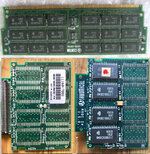 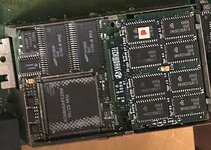 here 32mB reference boards 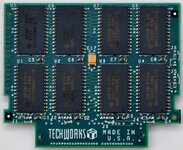 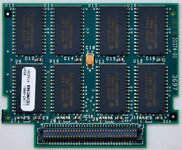 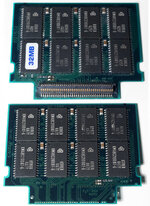 | |
| Posted by: jmacz on 2024-08-25 16:48:45 Note I think I found a larger crystal for those looking later. This is a 20MHz part with the proper dimensions of 14mm x 8.65mm. | |
Posted by: croissantking on 2024-08-26 03:39:16Note I think I found a larger crystal for those looking later. This is a 20MHz part with the proper dimensions of 14mm x 8.65mm.Can confirm this crystal works great. 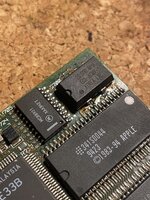 I have a new theory as to why I can’t get a stable 40MHz overclock with a 32MB RAM card installed: some Pratt IC chips can’t handle it. This is the memory controller which is equivalent to the PBX IC on the 5300 and 1400 series. I believe it’s the large chip on the underside of the 500 series CPU card. 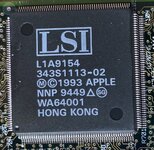 Why do I say this? Because I have tried 40MHz overclock on two different processor cards. With 32MB RAM installed, one of them works but is unstable, and the other always death chimes. For the card which death chimes, I replaced the 33MHz LC040 chip with a Freescale 25MHz 040 chip (which is modern enough that it should work at 40MHz) and the behaviour - bong then death chime with 32MB installed - is exactly the same. I would still like to try a 60ns RAM card, even though this is unlikely to be the issue (because a couple of fellow forum members have 70ns modules and a successful overclock). I have the donor chips ready and am waiting for a card with empty pads to come up for sale. | |
Posted by: demik on 2024-08-26 04:25:51Can confirm this crystal works great. Can confirm this one works fine as well. There is a 18MHz-ish EOL Epson around as well, which will make your CPU go to 36 MHz if 40 MHz isn't stable | |
| Posted by: croissantking on 2025-05-16 18:23:10 So I finally built a 32MB RAM card with 60ns chips, and I can conclusively say that my unstable 40MHz operation was due to running with 70ns RAM. Using a processor card overclocked to 40MHz, I did several tests with a 70ns card and my new 60ns card. The 70ns either causes the machine to death chime, or is unstable if it does boot. With the 60ns card everything is fine. | |
Posted by: jmacz on 2025-05-16 18:55:21So I finally built a 32MB RAM card with 60ns chips, and I can conclusively say that my unstable 40MHz operation was due to running with 70ns RAM. Using a processor card overclocked to 40MHz, I did several tests with a 70ns card and my new 60ns card. The 70ns either causes the machine to death chime, or is unstable if it does boot. With the 60ns card everything is fine. Awesome!! | |
Posted by: croissantking on 2025-05-17 10:34:16So I finally built a 32MB RAM card with 60ns chips, and I can conclusively say that my unstable 40MHz operation was due to running with 70ns RAM. Using a processor card overclocked to 40MHz, I did several tests with a 70ns card and my new 60ns card. The 70ns either causes the machine to death chime, or is unstable if it does boot. With the 60ns card everything is fine. Okay, this is weird. With one CPU card, the observations above stand. But with another, it still death chimes with the 60ns 32MB card. So I think the conclusion now is, RAM speed matters, but it’s not the only factor in running at 40MHz. Some CPU cards struggle more than others. | |
| Posted by: Byrd on 2025-05-24 03:23:16 Had a dabble with a 540c (33Mhz LC040), CPU card has 4MB 70ns RAM rating while the Apple branded 32MB RAM card says 60ns. No dice @ 40Mhz - could get to desktop most of the time (and seemed stable but didn't stress it much), but found it patchy to chime at the start. Some blank error dialogs and death chime once. Back to 33Mhz for me. | |
| Posted by: croissantking on 2025-05-24 04:55:22 New theory I have is that the onboard RAM needs swapping out to 60ns as well | |
| Posted by: Byrd on 2025-05-24 23:17:44 Definitely would get it over the line. With mine I couldn't make it chime out of ~ 5 attempts, then it would and boot happily to desktop (and wouldn't crash), but then more quirks came into play so sent it back to stock. | |
| Posted by: croissantking on 2025-06-28 18:05:45 Have done some more testing at 40MHz. Card #1 has an E42K 68040/33, PCB 820-0457A. It has had its onboard RAM chips upgraded to 60ns parts. It's rock solid with my 60ns 32MB RAM card but not either of my 70ns cards. The onboard RAM upgrade got me over the line on this one. Card #2 has an L88M 68040/33, PCB 820-0559-A. I've just completed a 60ns upgrade to the onboard RAM. However, it still death chimes even with my 60ns 32MB RAM card installed, the same one that works in card #1. I think that overclocking to 40MHz tightens up the RAM timing too much for some Pratt IC memory controllers and they freak out. You may get lucky with a CPU card, and upgrading RAM to 60ns helps, but success is not a given. If it was possible to add a wait state, then that would be ideal. | |
| < 4 |