68kMLA Classic Interface
This is a version of the 68kMLA forums for viewing on your favorite old mac. Visitors on modern platforms may prefer the main site.
| Click here to select a new forum. | |
| Two SEs & Accessories - $300 | |
Posted by: volvo242gt on 2023-05-03 11:27:48Gosh, I had no idea it would be this much work! Not complaining, at least one machine seems to boot OK. Still unsure if any of the floppy drives work, but hopefully I can get in with the BlueSCSI.I should have at least one extra bootable copy of System 6.0.8 that you can have, if you want to head out to Duvall this weekend sometime. | |
Posted by: jdcurry on 2023-05-03 12:23:15You should check for a "SCSI Rider" to put your BlueSCSI in vertically and you can even use a micro-sd extender to get the SD card without opening the Mac (I did it in mine, it's so easy).Okay I will take a look. Thanks for the advice. | |
| Posted by: jdcurry on 2023-05-04 21:47:38 Took some time today and scrubbed the SE logic board with the screen issue with IPA and the proper brushes. Even though it's a much cleaner board, still no dice on resolving the issue. I'm thinking it's either something with the analog board or that board attached to the yoke... (can't think of the name... video board?) I also can't see any apparent damage caused by leaky caps and the batteries I snipped out of both of them weren't leaky as well. If I were to replace or repair something on it, would the analog board be the best first choice? | |
Posted by: Phipli on 2023-05-05 02:36:27I'm thinking it's either something with the analog board or that board attached to the yoke... (can't think of the name... video board?)No, the "neck board" on the back of the CRT wouldn't cause this. I don't think it is the analogue board either, but I don't have experience with this type of fault, my SE has just happily worked for the last 30 years 🤣 I'm only commenting to stop you prematurely removing parts you don't need to. 🙂 | |
| Posted by: ironborn65 on 2023-05-05 03:30:18 don't retrobright the cat! | |
| Posted by: Phipli on 2023-05-05 03:45:05 I'd suggest removing the RAM from the machine and carefully cleaning the SIMM contacts with contact cleaner. If you don't have any, a little vinegar on a brillo pad, then rinse with IPA perhaps. If it still doesn't work, swap the SIMMs from the other machine (clean their contacts too, and don't mix up which set is which - if possible, label them). | |
| Posted by: Phipli on 2023-05-05 05:42:40 Oh, before that even, swap the logic boards over - does the fault follow the board, or stay with the chassis? I'm being daft not suggesting that first. Not on the ball today, sorry! | |
Posted by: jdcurry on 2023-05-05 12:07:48No, the "neck board" on the back of the CRT wouldn't cause this.I broke one of these about three years ago. I’m not doing it again! I pulled on the yoke, cracked the tube and I heard the hissing sound of air rushing in… at that point my soul exited my body. | |
Posted by: jdcurry on 2023-05-05 12:09:13Oh, before that even, swap the logic boards over - does the fault follow the board, or stay with the chassis?I’ll give that a try next. | |
Posted by: jdcurry on 2023-05-05 12:35:00I’ll give that a try next.Okay, swapping logic boards seems to have gotten rid of the issue. I’m presented with the disk icon instead of the black and white bars. 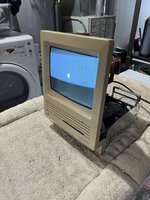 | |
| Posted by: jdcurry on 2023-05-05 12:58:19 So maybe it’s an issue with the RAM. I noticed a resistor missing. Which I think is correct when upgrading to 4MB? 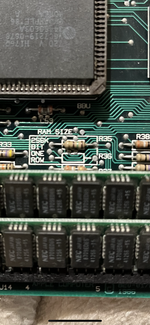 | |
Posted by: Phipli on 2023-05-05 13:11:33Okay, swapping logic boards seems to have gotten rid of the issue. I’m presented with the disk icon instead of the black and white bars.You're going to have to be more clear than that. I'm assuming you mean swapping the other logic board into the computer that didn't boot, allows it to boot. The purpose of that was that we now know that the issue is most likely the logic board, or something fitted to the logic board. Your next step is to confirm that the logic board that you took out of the bad machine also doesn't work in the machine that did boot. | |
Posted by: jdcurry on 2023-05-05 13:17:29You're going to have to be more clear than that. I'm assuming you mean swapping the other logic board into the computer that didn't boot, allows it to boot. The purpose of that was that we now know that the issue is most likely the logic board, or something fitted to the logic board.I'm sorry for the confusion. I have swapped logic boards between the two SEs and now the bars issue has transferred from one machine to the other, so I believe the issue is something with the logic board. | |
| Posted by: bibilit on 2023-05-05 13:21:24 Have you tried swapping the Rom ? The SE is by far the most reliable unit, but you can have a faulty Rom. | |
Posted by: Phipli on 2023-05-05 13:23:04So maybe it’s an issue with the RAM. I noticed a resistor missing. Which I think is correct when upgrading to 4MB? View attachment 56145The computer has 1MB of RAM installed, as 4x 256k SIMMs. The resistors are exactly as they should be. Remove the RAM, and carefully clean it as per my post earlier. Don't swap the RAM between the two boards because they might not have the same amount. | |
Posted by: Phipli on 2023-05-05 13:23:49Have you tried swapping the Rom ? The SE is by far the most reliable unit, but you can have a faulty Rom.Hold off on this until after a couple of other things. ROMs don't play up as often as RAM. | |
Posted by: jdcurry on 2023-05-05 13:33:08The computer has 1MB of RAM installed, as 4x 256k SIMMs. The resistors are exactly as they should be.Okay I will clean the ram with IPA next. I noticed they are labeled “NEC Japan 8709ED65 41256-15” if that’s helpful at all. If the “256” part is true then each stick would be 2MB; is is possible the previous owner incorrectly upgraded the unit with too much ram as these units don’t support 8MB of ram? (He did mention that the ram had been upgraded at some point). If I am incorrect then it’s just a part number and nothing more. | |
Posted by: Phipli on 2023-05-05 13:34:19Okay I will clean the ram with IPA next.Best reread my previous post, you want to clean the contacts with something that will remove oxides. The IPA was to rinse. | |
Posted by: jdcurry on 2023-05-05 13:36:03Best reread my previous post, you want to clean the contacts with something that will remove oxides. The IPA was to rinse.Okay let me see if I have contact cleaner. I think I have vinegar in the closet. | |
Posted by: Phipli on 2023-05-05 13:36:22If the “256” part is true then each stick would be 2MB256k Bits, not bytes. Each chip is 32kByte, not 256kByte. He did mention that the ram had been upgraded at some pointWith respect to this machine, he misremembered 🙂 | |
| < 4 > |