68kMLA Classic Interface
This is a version of the 68kMLA forums for viewing on your favorite old mac. Visitors on modern platforms may prefer the main site.
| Click here to select a new forum. | |
| OrangePC Card on IIfx | |
| Posted by: Concorde1993 on 2025-07-20 07:14:12 I wonder if the video driver you are using for your card will finally fix my graphics problem with Hoyle Classic. Mine only seems to like VGA 3.0 | |
| Posted by: Concorde1993 on 2025-08-12 13:35:33 I was reading over the owner's manual for the Orange 386 (I know I have a 486 card but I was never able to find the correct manual for it). I would imagine that the information is similar. Anyway, the manual states that the emulated Drive C for the OrangePC Hard Disk can only have a maximum of 100MB space. It's repeated again in another section of the manual: 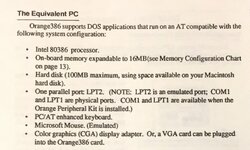 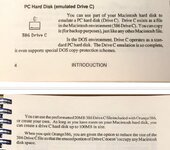 Why limit the partition to 100MB? I'm nearly maxed out with 50MB (or have I exceeded the design limitations of my OrangePC card?). I was hoping to create a new partition on a new HD with at least 250MB. Again, this is from the 386 manual; not sure if this applies to my 486 card. Also, does anyone know why the interface card for Apple's 5.25" PC drive is incompatible with the OrangePC card? I have some programs and documents that were stored on 5.25" format. Doubt I'll ever find the breakout cable for this card (unless of course someone wants to develop one). 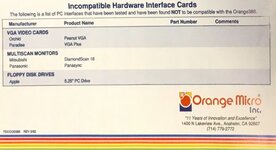 | |
| Posted by: Unknown_K on 2025-08-12 14:04:59 For the 300/400/500 series cards 2048MB emulated drive sizes are good (DOS limitation of 2GB). | |
| Posted by: Concorde1993 on 2025-08-12 18:45:53 So the manual is bull? Wonder where they got the 100MB max partition from. | |
Posted by: Juror22 on 2025-08-12 19:37:55So the manual is bull? Wonder where they got the 100MB max partition from.I suspect it was a reasonable number, since in1992 (the date of the manual?) the 240MB drive was towards the upper end of what people would have had.  From the May 1992 MacUser. Kind of like when they would quote a maximum RAM size based on the memory sticks available at that point in time. | |
| Posted by: Joe The Dragon on 2025-08-13 18:14:25 does that HDD emulation work with https://en.wikipedia.org/wiki/Microsoft_32-bit_disk_access ? | |
| Posted by: Byrd on 2025-08-14 00:07:13 I doubt it, but I'll try on mine one day - onboard subsystem would be ISA based not anything like VLB. | |
| Posted by: finkmac on 2025-08-15 12:26:04 . | |
| Posted by: croissantking on 2025-08-15 12:55:33 . | |
Posted by: Concorde1993 on 2025-08-15 13:31:43 | |
| Posted by: Irinikus on 2025-08-15 15:05:09 Yesterday I replied to this post in error, thinking that I was replying to a post by @Byrd on the thread regarding dual CPU’s in a Beige G3 and was unable to delete the post and the least I could leave was a full stop! I reported the post and asked for it to be removed, but clearly that hasn’t happened) | |
| Posted by: Concorde1993 on 2025-08-25 01:03:21 Got this lovely error message trying to boot into DOS: 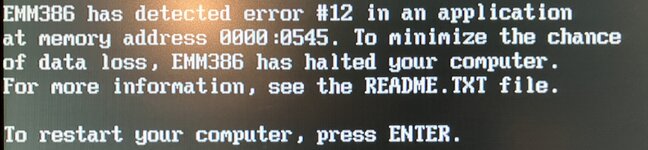 Of course, pressing Enter did nothing, and I simply quit and rebooted the OrangePC program. On occasion, I would get this error. It’s been happening for a couple of months:  Are the RAM chips failing on the OrangePC card (even though it passes memory)? Software? Or is DOS just being DOS? | |
Posted by: Byrd on 2025-08-25 02:32:56Are the RAM chips failing on the OrangePC card (even though it passes memory)? Software? Or is DOS just being DOS? Sadly the errors point to a memory issue, the onboard RAM test at POST is usually pretty rudimentary. A 486 I had built up recently would do same - good on POST but HIMEM.SYS would fail. A utility such as MEMtest86 would allow you to stress the memory subsystem further: 
MemTest86 - Official Site of the x86 Memory Testing ToolMemTest86 is the original self booting memory testing software for x86 and ARM computers. Supporting both BIOS and UEFI, with options to boot from USB.
www.memtest86.com
Surely the Orange 486 board has user replaceable memory - I would remove card clean NUBUS connector, RAM socket, reseat RAM or replace the module(s). | |
Posted by: Concorde1993 on 2025-08-25 03:31:44Surely the Orange 486 board has user replaceable memoryIt does (fortunately). Let's hope the retention tabs aren't brittle. I wonder what the max RAM is on the 486? I have about 10MB currently on the card. | |
| Posted by: Byrd on 2025-08-25 03:43:00 It'd be 32 - 64MB depending on onboard cache size of your card - does it have 8 slots or 4? | |
| Posted by: Concorde1993 on 2025-08-25 09:24:18 4 Slots 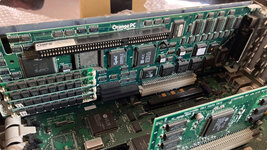 | |
| Posted by: dr.zeissler on 2025-08-25 09:35:21 OrangeCard in IIcx. slowwwwww on Dos, but surprisingly fast in win3x. 20:00 Orange-PC Card | |
Posted by: Byrd on 2025-08-28 02:44:554 Slots No onboard RAM if the error keeps coming 4 x 4MB would be nice. Love how yours has an ISA slot! OrangeCard in IIcx. slowwwwww on Dos, but surprisingly fast in win3x. Thanks for video. Yep mine same low-res DOS full screen is terrible but Windows better than you'd think. Still planning on trying the card in various Macs, video subsystems to see if can improve the overall video speed. | |
Posted by: Concorde1993 on 2025-08-28 05:54:444 x 4MB would be nice.So you’re recommending I should go to 16MB total? Any particular brand of RAM sticks to lookout for? Love how yours has an ISA slot!It’s currently being used to connect my SB-2770 Sound Blaster card to the OrangePC. | |
Posted by: Byrd on 2025-08-29 18:40:16So you’re recommending I should go to 16MB total? Any particular brand of RAM sticks to lookout for? ... yes (doesn't it already have 16MB but gone bad?)? It would be the sweet spot as 4 x 16MB (64MB) might not be fully cacheable on this 386/early 486 design. 30pin 4 x 4MB kits would be readily available in your region, maybe even new | |
| < 4 > |