68kMLA Classic Interface
This is a version of the 68kMLA forums for viewing on your favorite old mac. Visitors on modern platforms may prefer the main site.
| Click here to select a new forum. | |
| Outbound laptop internal docking cable | |
| Posted by: cheesestraws on 2022-07-13 14:34:16 I don't believe so, if it's like the internal floppy drive (Which also uses a Citizen U0DA). That is its own thing with its own firmware. | |
| Posted by: unity on 2022-07-13 18:12:48 Ok, so firmware for the drive is indeed on the mainboard. Darn it. | |
| Posted by: trag on 2022-07-14 20:05:54 Both the internal floppy drive and the external floppy drive have an interface board between them and the main board. The internal and external boards have very similar component sets, except the internal board seems to lack the GAL. It is conceivable that Outbound used the floppy interface as their expansion bus. I wouldn't want to guess how likely or unlike that is.... Actually, it seems kind of unlikely, because the internal hard drive is bare to the motherboard. Connected with just a dumb cable. 1) Are the internal drive interface and the external expansion bus the same set of signals? Probably not. It looks like the internal interface must be 16 bits wide with 44 pins? Don't have one in front of me, but here's a pinout for the Conner CP2064: https://stason.org/TULARC/pc/hard-drives-hdd/conner/CP-2064-64MB-2-5-SSL-IDE-AT.html External interface is almost certainly 8 bits wide, because SCSI chip in SCSI adapter and 85C30 chip in Floppy adapter are set up to receive 8 bit data. I don't think there are bus latches/switches bringing in 16 bits and slinging them twice as fast, but 8 bits at a time to those chips. It's also possible that the internal interface changes depending on what is detected there... 2) Are either of them the same or similar to the Apple floppy interface. Was that on a 19 pin connector? | |
| Posted by: ScutBoy on 2023-07-30 12:15:45 Bringing this thread back - the whole internal Outbound connection card/cable/etc. for the Mac Plus showed up on eBay. $1700... 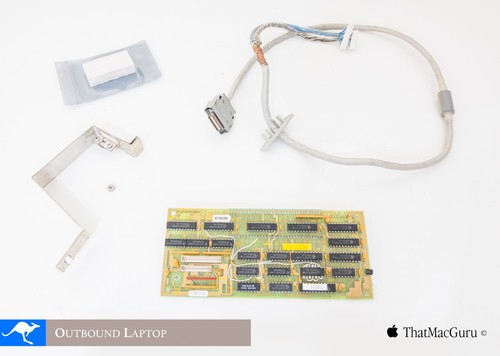
RARE! Outbound Laptop Notebook interface card for Macintosh Plus Wallaby Systems | eBayFind many great new & used options and get the best deals for RARE! Outbound Laptop Notebook interface card for Macintosh Plus Wallaby Systems at the best online prices at eBay! Free shipping for many products!
www.ebay.com
| |
| Posted by: CTB on 2023-08-01 00:33:18 Very cool but pricey. My Wallaby has an SE rom so I am.pretty sure this won't work for me anyway. | |
| Posted by: cheesestraws on 2023-08-01 01:45:38 Grief, and I thought my docking card was expensive (though I still haven't worked out the pinout...) | |
| Posted by: wymtb on 2023-09-01 13:03:56 As also the floppy was discussed inside this thread. It is possible to use gotek drive (at least as internal drive) and boot the Outbound laptop. Slow but it works. Have not checked if it might be possible to optimize something. With the right cable also a standard floppy is working. As far as I remember I used a drive modified to be working inside an Amiga. 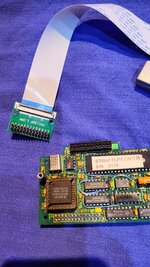 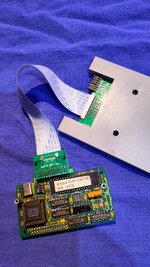 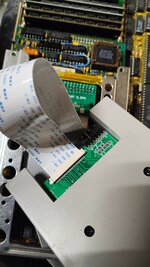 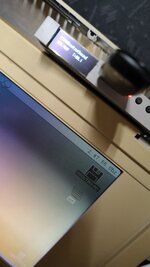 | |
| Posted by: wymtb on 2023-09-19 07:38:20 For all searching a harddisk https://www.ebay.com/itm/276054451002 might be an option. Even if it is only 20MB I know with adapters and/or maybe custom made cable it can be used inside a outbound laptop. But you would have to be able to boot your outbound without harddisk. If you can not boot and need a bootable harddisk you should still be able to write a image to the harddisk using an old PC that has an old real IDE connector running linux with dd. USB adapters can not be used. Never tried if maybe a sata/ide adapter could be used. 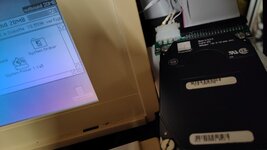 | |
Posted by: cheesestraws on 2023-09-19 08:01:54For all searching a harddisk https://www.ebay.com/itm/276054451002 might be an option. Even if it is only 20MB I know with adapters and/or maybe custom made cable it can be used inside a outbound laptop. But you would have to be able to boot your outbound without harddisk. I couldn't find any way of formatting the hard disc in the laptop - does a clean image exist anywhere? | |
| Posted by: wymtb on 2023-09-19 09:03:19 To my experience you need the right harddisk. I own an original 40MB one, the later 40MB already using to today used 2,5" connector and the one from the ebay offer. All are PRAIRIETEK drives. The both 40MB drives share the same drive geometry. The 20MB two heads instead of four. I got them formatted by installing system to the RAM disk. Switch off while still powered either by battery or wallpower. Install the harddisk and power on. During system startup you will be asked to format the harddisk. This is the same process like when there was now power and you first start again, it will prompt you to format the RAM-Disk. If your system should be a floppy based one you probably would need to execute flash the ROM. I was not able to use internal floppy disk and harddisk at the same time. No success so far using a conner 2064/2024 drive or all sort of ide/cf/sd card adapters. | |
| Posted by: cheesestraws on 2023-09-19 09:20:34 Thankyou! | |
Posted by: trag on 2026-05-18 02:00:11As also the floppy was discussed inside this thread. It is possible to use gotek drive (at least as internal drive) and boot the Outbound laptop. Slow but it works. Have not checked if it might be possible to optimize something. With the right cable also a standard floppy is working. As far as I remember I used a drive modified to be working inside an Amiga. Just to be clear, you connected the Outbound Floppy circuit board in between the Outbound and the gotek floppy drive? | |
Posted by: SuperSVGA on 2026-05-18 10:44:58Just to be clear, you connected the Outbound Floppy circuit board in between the Outbound and the gotek floppy drive?You still need the Outbound floppy controller board, since that's where the floppy controller chips live. But it works with both the internal and external floppy boards. | |
Posted by: trag on 2026-05-18 11:29:24You still need the Outbound floppy controller board, since that's where the floppy controller chips live. But it works with both the internal and external floppy boards.Thank you. So that's a proof that a standard PC floppy will work with the Outbound, as long as the Outbound Floppy Controller Board is present? Suggesting these Citizen W1D floppy drives should also work if connected? | |
Posted by: SuperSVGA on 2026-05-18 12:34:02Thank you. So that's a proof that a standard PC floppy will work with the Outbound, as long as the Outbound Floppy Controller Board is present? Suggesting these Citizen W1D floppy drives should also work if connected?I'm not entirely sure about compatibility with all standard PC drives, I haven't done much testing there. I've heard others have tried standard PC drives, some worked and some didn't. I don't really have enough variety of 3.5" drives around to test it. Floppy emulators work with 1.44MB MFM disk images. Theoretically I think they should be capable of emulating GCR disks as well, but I never figured out how to get it to pretend to be a PC drive with a GCR disk. | |
Posted by: trag on 2026-05-18 14:35:27I'm not entirely sure about compatibility with all standard PC drives,I guess I should back up and ask, what, specifically, is a "gotek" drive? Is it different, somehow, from a standard PC floppy disk drive? | |
Posted by: SuperSVGA on 2026-05-18 19:07:48I guess I should back up and ask, what, specifically, is a "gotek" drive? Is it different, somehow, from a standard PC floppy disk drive?It's basically a floppy emulator using a ST or Artery microcontroller. There isn't much else to them hardware wise. Commonly used for replacing floppy drives in pretty much anything that uses an IBM/Shugart interface or variations. | |
Posted by: trag on 2026-05-18 19:08:34It's basically a floppy emulator using a ST or Artery microcontroller. There isn't much else to them hardware wise. Commonly used for replacing floppy drives in pretty much anything that uses an IBM/Shugart interface or variations.Thank you. | |
| < 4 |