68kMLA Classic Interface
This is a version of the 68kMLA forums for viewing on your favorite old mac. Visitors on modern platforms may prefer the main site.
| Click here to select a new forum. | |
| Mac LC and DB15 to VGA adapter problem... | |
| Posted by: dragon_x on 2020-09-07 02:09:26 Case after bakingsoda cleaning 🙂 most scratches desapeared, case is not as much yellow as i thought. board was cleaning with ipa and toothbrush. How long i have to wait before i can try to turn on after ipa? 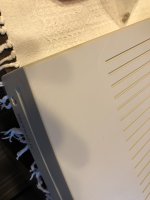 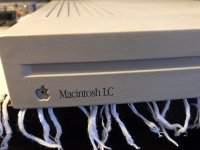  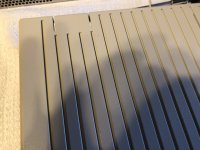  | |
| Posted by: dragon_x on 2020-09-07 14:44:48 LC is completed. It is working as You can see on the video. I hope monitor will come soon, then i will be able to try to build an adapter. Unfortunately vram is 256KB for sure 🙁 | |
| Posted by: dragon_x on 2020-09-07 16:06:57 forgotten video... 🙂 View attachment IMG_0024[1].MOV | |
| Posted by: Oberlehrer on 2020-09-07 19:31:53 Not sure if it is "working" in the complete sense. (Please correct me if I'm wrong.) That the floppy gets ejected immediately seems to indicate that the LC is not booting from the hard drive. Hence it's waiting for a bootable floppy - which the floppy in the movie obviously isn't. If it were actually booting from the hard drive the floppy would either not get ejected at all (if it was readable) or only after interaction (I think there would be a dialog box if it should get formatted or ejected). So it seems that the mainboard might work somewhat but the hard drive might have problems. Have you tried a bootable floppy? Again, I might be wrong about this. | |
Posted by: dragon_x on 2020-09-07 19:45:20Not sure if it is "working" in the complete sense.hard drive has no system. hdd need to be formated and partitioned. The floppy disk is also not bootable because I do not have one, unfortunately, After turning on the computer makes the correct sound and tries to read a floppy disk, which is not readable by it because it is not bootable. I'm waiting for the monitor, maybe I can get an image. for now I'm looking for a way to create a bootable floppy using a usb floppy drive and mac pro or pc windows. | |
| Posted by: bibilit on 2020-09-07 21:14:23 https://www.macgeek.org/downloads/ You can create a bootable disk here using a PC and a 1.44 blank disk and drive. | |
Posted by: dragon_x on 2020-09-07 21:22:42https://www.macgeek.org/downloads/Thanks, I will try to make it. I see that there is a tools and system disks. Maybe then mac will boot 🙂 | |
| Posted by: dragon_x on 2020-09-08 04:42:21 I've tried to make a boot disk using Dtools75. Tool start writing track with success, but after write about 10 track, tool shows error: FNTFastReadTrack failed at rest tracks. There is no problem with disks, there are new, ut i have only usb floppy drive. Is there any method to write img or dsk disk image using usb floppy drive? | |
| Posted by: bibilit on 2020-09-08 22:04:25 worked for me last time i used this method. can be an issue with the PC you are using (maybe a new Windows SW is not able to cope with it) maybe your USB drive is faulty... | |
Posted by: dragon_x on 2020-09-08 22:20:45worked for me last time i used this method.i did it on Windows 7, oldest OS that I have. FDD works normally with msdos disk. I use it for moving sound banks between PC and my synth. Monitor camed, today or tommorow i will try to make an adapter. | |
| Posted by: bibilit on 2020-09-09 00:25:38 Been a long time for me, probably Windows XP or even 98SE, worked a treat. | |
| Posted by: sutekh on 2020-09-09 08:00:29 Windows 7 should work fine. I write Mac disk images from a Win7 PC with a USB floppy all the time. Are you using winimage? Maybe try a different image file? If you haven't already, check out https://winworldpc.com. They have a lot of Mac software packaged in PC-friendly formats. For instance, after grabbing and unzipping copy of OS 7.5.3 (https://winworldpc.com/product/mac-os-7/75), or whatever version you plan on installing, try using winimage to write the "Disk Tools 1.img" file to a floppy. That's a bootable image and will allow you to partition the HD prior to install. BTW, I have my LCIII connected to a multi-sync LCD via a dip switch configurable DB15 - HD15 adapter. If you don't make any headway on the adapter build, I can meter the pinout of the configuration I was able to get working with mine. | |
Posted by: dragon_x on 2020-09-09 18:23:57Windows 7 should work fine. I write Mac disk images from a Win7 PC with a USB floppy all the time. Are you using winimage? Maybe try a different image file? If you haven't already, check out https://winworldpc.com. They have a lot of Mac software packaged in PC-friendly formats. For instance, after grabbing and unzipping copy of OS 7.5.3 (https://winworldpc.com/product/mac-os-7/75), or whatever version you plan on installing, try using winimage to write the "Disk Tools 1.img" file to a floppy. That's a bootable image and will allow you to partition the HD prior to install.My NEC EA191M monitor arrived yesterday. Today I will try to check two patterns. It would be great if you wanted to check the connections according to the settings in your adapter. It would help a lot. can you indicate any program that under windows 7 or 10 correctly saves floppy images to floppy disks? Highest working versions of OS is 7.5 on LC? | |
Posted by: sutekh on 2020-09-09 22:57:47can you indicate any program that under windows 7 or 10 correctly saves floppy images to floppy disks? Highest working versions of OS is 7.5 on LC?Winimage: http://www.winimage.com/download.htm Your LC will run 7.5.5, but I'd only install that if you have all 10MB of RAM installed (motherboard only has 2MB). You might be happier performance-wise with 7.1. | |
Posted by: dragon_x on 2020-09-09 23:13:12Winimage: http://www.winimage.com/download.htmI have 6MB od RAM. I will gry to install 7.1 . Nów i ma starting work with adapter... | |
Posted by: cheesestraws on 2020-09-09 23:29:18Your LC will run 7.5.5, but I'd only install that if you have all 10MB of RAM installed (motherboard only has 2MB). You might be happier performance-wise with 7.1. I have 6MB od RAM. I will gry to install 7.1 . Nów i ma starting work with adapter... I'd go with 7.1 personally. 7.5 is ... pretty much 7.1 with a lot of extras pre-installed. So you can either start with 7.1 and add stuff that you want, or start with 7.5 and remove stuff until it fits. I find starting small and building up easier, but some people work better the other way around. | |
Posted by: dragon_x on 2020-09-10 00:33:27Windows 7 should work fine. I write Mac disk images from a Win7 PC with a USB floppy all the time. Are you using winimage? Maybe try a different image file? If you haven't already, check out https://winworldpc.com. They have a lot of Mac software packaged in PC-friendly formats. For instance, after grabbing and unzipping copy of OS 7.5.3 (https://winworldpc.com/product/mac-os-7/75), or whatever version you plan on installing, try using winimage to write the "Disk Tools 1.img" file to a floppy. That's a bootable image and will allow you to partition the HD prior to install.I have tried first scheme of pinout and result is like on the video. Mouse is working, Mac waiting for boot disk hit screen is like You can see. Can You sen me pinout of Your configuration? I saw that some pinouts use diode. I hope my Mac start working .... View attachment IMG_0037.MOV 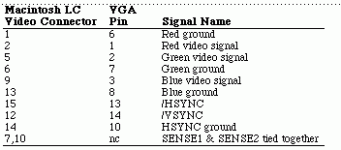 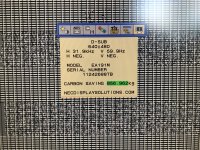 | |
| Posted by: dragon_x on 2020-09-10 00:45:50 Mac is booting 🙂 last thing is a correct picture View attachment IMG_0040.MOV | |
| Posted by: sutekh on 2020-09-10 09:48:17 I'm not able to see any video in those MOVs. Is your LC booting and the display working, or do you still need the adapter pinout? | |
Posted by: dragon_x on 2020-09-10 13:58:50I'm not able to see any video in those MOVs. Is your LC booting and the display working, or do you still need the adapter pinout?Video is in QuickTime format MOV. Mac is booting, but display still do not work properly then I need the adapter pinout. Screen looks like on the screenshot. 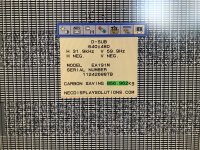 | |
| < 4 > |