68kMLA Classic Interface
This is a version of the 68kMLA forums for viewing on your favorite old mac. Visitors on modern platforms may prefer the main site.
| Click here to select a new forum. | |
| Houdini II DOS compatibility card 486-66 with SB16 - software, hardware considerations on 68K | |
Posted by: zefrenchtoon on 2024-01-27 05:02:44The card is in a Quadra 950 (it has 486SX on board), PC Setup 1.6.4 is installed on both Mac OS 7.6.1 and 8.0. When I start the PC in PC Setup, it only says “PC is booting”… and hangs in the booting stage. Switching to PC mode fades the screen to black and it remains black until I switch back with the hotkey combo. Tries with 2 different monitors (one apple 1212 CRT and a Samsung TFT), same happened. I reseated the 486 CPU and the RAM as well. What can be the issue? Where can I download PC Setup 1.01 or 1.5? Would that maybe help?No help with my reply but to tell you that I have the same behavior on my 6100/66 DOS … sometimes 🤪 Sometimes it works then sometimes it freeze 😕 | |
Posted by: julys on 2024-01-27 07:21:51Is the extension blue or black while the Mac is booting?This is how it looks like while booting: 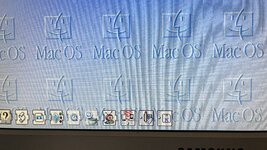 Reseating and repasting didn't help 🙁 Some people told me it can be an issue with the monitor. I have an Apple M1212 CRT, and a Samsung TFT with an adapter (with those DIP switches). Can it be a problem that the DOS card is not recognizing the monitor, and that's why it doesn't boot up? Maybe with a compatible Apple monitor it wold work? | |
Posted by: julys on 2024-01-27 07:22:23No help with my reply but to tell you that I have the same behavior on my 6100/66 DOS … sometimes 🤪I just wish it would work sometimes. Mine never boots, just keeps saying "booting"... | |
Posted by: Phipli on 2024-01-27 07:33:10This is how it looks like while booting:Erm... I can't see the DOS control panel. Are you sure you're using the right version? | |
Posted by: Phipli on 2024-01-27 07:40:11This is how it looks like while booting:The icon should look like this : 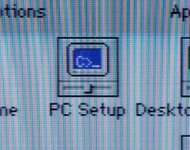 During boot on my P630 DOS Compatible. A weird glitch clears all the previous icons. Blue means the card has responded, black screen in the icon means the card didn't respond. 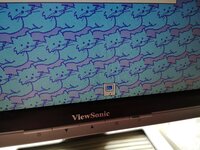 | |
Posted by: julys on 2024-01-27 07:44:17The icon should look like this :I downloaded PC Setup 1.6.4 from MR. (screenshot in my earlier post) Can you please drop me a link where I can find the proper version? | |
Posted by: Phipli on 2024-01-27 07:48:43I downloaded PC Setup 1.6.4 from MR. (screenshot in my earlier post) Can you please drop me a link where I can find the proper version?Where have you put the file, out of curiosity? | |
| Posted by: julys on 2024-01-27 07:50:15 It was s floppy image, I mounted it with floppy emu, and just ran the installer. I didn't copy any files manually. Should I have done that? | |
Posted by: Phipli on 2024-01-27 07:53:01It was s floppy image, I mounted it with floppy emu, and just ran the installer. I didn't copy any files manually. Should I have done that?The reason I ask, is your photo shows the PC Setup control panel running from your desktop? It's meant to be in Control Panels of the active System Folder. If you have it on your desktop, that explains why it isn't loading during boot, and also why it isn't working. 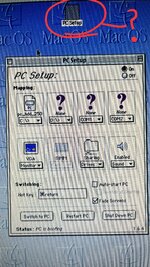 | |
Posted by: julys on 2024-01-27 08:28:28The reason I ask, is your photo shows the PC Setup control panel running from your desktop? It's meant to be in Control Panels of the active System Folder. | |
| Posted by: Phipli on 2024-01-27 08:44:49 Ok, but have you put it back and restarted the computer? Because it wasn't installed in the photo you sent me of extensions loading, so I couldn't see if it was recognising the card or not. | |
| Posted by: julys on 2024-01-27 10:44:35 After putting it back and restarting, this is what I see at the start screen. First a lot of icons are coming, then all those are disappearing, and only the C> icon comes... What does this mean? 🙂 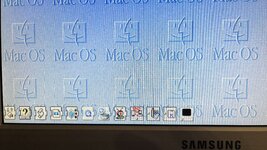 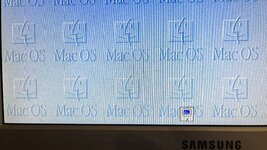 | |
Posted by: Phipli on 2024-01-27 10:47:07After putting it back and restarting, this is what I see at the start screen. First a lot of icons are coming, then all those are disappearing, and only the C> icon comes... What does this mean? 🙂That's good 🙂 it is able to talk to the card. Have you tried starting the card now? | |
Posted by: julys on 2024-01-27 10:48:43That's good 🙂 it is able to talk to the card. Have you tried starting the card now?Yes, I tried. Same result... Booting forever, and if switching to PC mode, only blank screen after the fade out... Now I am installing Mac OS 8.1, and give a try there... Maybe a fresh install helps. Maybe... Which Mac OS do you recommend for this DOS card on the Quadra 950? | |
Posted by: Phipli on 2024-01-27 10:54:26Yes, I tried. Same result... Booting forever, and if switching to PC mode, only blank screen after the fade out... Now I am installing Mac OS 8.1, and give a try there... Maybe a fresh install helps. Maybe...I don't think 8.1 will help.II think I have it on 7.6.1? I forget. Not 8.1 anyway Remove the RAM SIMM for now. It isn't absolutely required. Try without it. How do you have the cables wired in? What disk image are you using it with? | |
Posted by: zefrenchtoon on 2024-01-27 11:40:30I just wish it would work sometimes. Mine never boots, just keeps saying "booting"...Once mine turn "black", it does it until next Mac reboot. :-/ Also, my 6100 is connected to a LCD monitor using an official dip-switch-less Apple DB15 -> VGA adapter and it does not like PC's resolution. My monitor says that I should use another resolution (even if it can display PC's one) until it switches off by itself. Playing to digger it a pain with that setting. I have to try with a dip-switch adapter to force the resolution to check if this can change the behaviour. One question ... how do you connect your monitor to the DOS card ? 🤔 Are you using the infamous octopuss cable that came with it ? | |
Posted by: julys on 2024-01-27 13:53:30I don't think 8.1 will help.II think I have it on 7.6.1? I forget. Not 8.1 anywayJust installed Mac OS 7.5.5, with the same PC Setup 1.6.4, and same results... Removed the SIMM RAM from the card, and it caused the whole machine to freeze once I hit "Start PC" in PC Setup, so it is even worse. Regarding cables: I use the 4 ended cable, which came with the card. There is only one way to use it, so no big magic. Picture attached. Regarding image: I downloaded the file called "PC-Setup-FloppyEmu-Images.zip" from MR, and used that one. 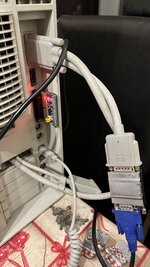 | |
Posted by: julys on 2024-01-27 13:58:23Once mine turn "black", it does it until next Mac reboot. :-/I use the default 4 ended cable that came with the card. One end goes to the card, one end to the MAC video out, and one goes to the monitor (adapter with dip switches) | |
Posted by: Phipli on 2024-01-27 13:58:49Regarding image: I downloaded the file called "PC-Setup-FloppyEmu-Images.zip" from MR, and used that one.That sounds like the installer software? Not a DOS hard disk image? What hard disk image are you using? Try TinyBootDisk.sit from here : PC Setup for PC Compatibility Card - Macintosh GardenSoftware necessary to setup and use Apple's PC Compatibility Cards. Contains installers for the Macintosh (disk 1) and Windows (disk 2) desktop environments. See stevenh's guide for installation and setup assistance. See also oliver-schubert.com/DOScard/DOScard.html
| |
Posted by: wottle on 2024-01-27 15:41:21Is the extension blue or black while the Mac is booting?I also had an issue with it not being able to boot the PC that re-seating the CPU and applying new thermal paste resolved. | |
| < 4 > |