68kMLA Classic Interface
This is a version of the 68kMLA forums for viewing on your favorite old mac. Visitors on modern platforms may prefer the main site.
| Click here to select a new forum. | |
| PowerBook 3400c Repair Stories | |
| Posted by: galgot on 2015-06-14 05:06:01 Yeah 😀 I've already "worked" on these enough time. In that stack there are , - a 200Mhz working fine but no ADB, so i don't care much about it cause i already have two fully working 3400c/200s. - a dead 200Mhz with no screen. - a 240Mhz , booting only on a Zip, and with no ADB and trackpad. - a 240Mhz, non booting at all, just the chime. Tried swapping boards, PMUs, all that… to get a working 240Mhz, no joy. So they are my spare parts store now . | |
| Posted by: Macdrone on 2015-06-14 08:26:34 What would it take to get the 240's off of you? I have more itching for another 3400 project. | |
| Posted by: galgot on 2015-06-14 09:39:12 I'm in France, I think postage would cost you an arm. | |
| Posted by: raoulduke on 2015-06-14 09:53:32 So that's very similar to the status of my repair board. Last thing I was doing was trying to replace little caps that hopefully regulate ADB - hence my request for the photos. And Macdrone... not to be rude but don't you have the boards that you are still repairing? | |
| Posted by: MikeatOSX on 2015-06-14 14:26:08 Here are two pics from a PB 3400 (128MB) RAM and a PB G3 Kanga RAM. Can anybody please tell me what size the Kanga RAM is? Seems to be equal. Hmm... 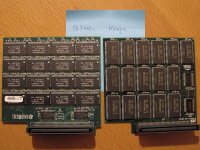 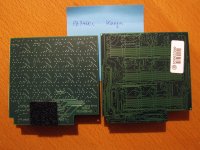 | |
| Posted by: raoulduke on 2015-06-14 15:10:19 I googled the SEC chips - each appears to be 4MB, and there are 16 - so 64 MB. | |
| Posted by: MikeatOSX on 2015-06-14 15:49:07 Thank you! 🙂 | |
| Posted by: Macdrone on 2015-06-14 16:02:18 Looks like none of mine were 240 MHz. | |
| Posted by: techknight on 2015-06-14 16:12:52 the 3400c I have, is 180Mhz. I pulled the battery out of it looong ago before it became a problem. It did have weird issues with the ATA bus freezing up, and etc. Changing out the HDD fixed it. | |
| Posted by: raoulduke on 2015-06-14 20:11:10 Well Macdrone I just meant that until either of us has successfully repaired a catastrophically damaged 3400c, I don't see any reason to stockpile boards that we can't clearly repair. If I hadn't screwed up the solder job initially the ADB problem might have a solution. MikeatOSX, are you like an expert at soldering? Because if you're willing to risk harming the board I can show you my thoughts on the ADB issue; but I don't know if fixing that will actually work. | |
| Posted by: MikeatOSX on 2015-06-15 09:14:35 I did much soldering (TV, amplifier, radio etc.) BEFORE I bought my first computer (Amiga 500) 26 years ago. And then I swapped one hobby with the new one. 🙂 Years later the parts became smaller and smaller... I have everything I need for good soldering, but I have to overcome myself, when it's necessary to solder. 🙂 | |
| Posted by: MikeatOSX on 2015-06-19 17:46:58 Continuation of the story... As I have to do more testing with the "sleeping beauty" (the Kanga), I created two NEW working backup battery packs mixing the old PowerBook 3400 & Kanga batteries connectors with the new Ebay 181762181041 batteries: Using a sharp knife I removed the plastic sheath and soldered the original cables to the new batteries (red is + !). Then I wrapped insulating tape around the whole pack. I did not put the batteries back to the original place (brightness & speaker grill), instead I put it in the hard drive bracket as I replaced the hard drive by a Compact Flash - IDE adapter and so there is enough place for the backup battery now. 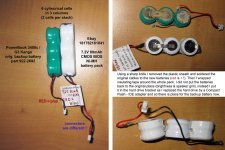 | |
| Posted by: raoulduke on 2015-06-19 17:50:06 I created a topic about that battery and mentioned the polarity issue... I put the batteries back in their original place beneath the speaker panel but putting it in the HD case is clever. However, you know you can just pull the connectors off of the 80mAh batteries and pop the old PRAM battery's connector on the new one - which is what I've done. (https://68kmla.org/forums/index.php?/topic/24904-ppc-powerbook-pram-battery-sources/) | |
| Posted by: MikeatOSX on 2015-06-19 17:54:41 I didn't dare this, because I was unsure if this will work properly. Hmm. | |
| Posted by: MikeatOSX on 2015-06-19 18:09:53 BTW: I tested the Kanga again with an original Kanga boot CDR and it seems, the Kanga is booting to desktop, because it's reading very long from the CD-Rom and then sits there waiting (it seems). But again black display AND no display via external video connector. 🙁 I also tested booting from external PowerBook (3400 in dock mode and vice versa): the Kanga looks once to the 3400 and that's it. As you can see on the picture above, the old Kanga backup battery is in lousy shape (0,3 volts). I suppose it leaked, but I don't see anything bad on the upper side of the logic board. Do you think, the lower side could look bad? | |
| Posted by: raoulduke on 2015-06-19 18:46:32 You should not have a PRAM battery in the machine if it is not working properly (I forgot what this thread was about). Yes your batteries are in surprisingly bad shape lol. Well ... if that corrosion was exposed (if there was no green plastic covering the cells) then there almost certainly is corrosion somewhere on the board. On one of mine the main corrosion was underneath/inside the PCMCIA enclosure. It's hard to see without removing the board. But be careful and do what makes you comfortable. | |
| Posted by: MikeatOSX on 2015-06-20 00:08:37 Yes I've already cleaned boards with leaking batteries (PowerBook and Amiga), but their damage was visible when I opened the case. This Kanga is really new to me, shipped from NY. So lets see, what's hiding underneath the logic board. | |
| Posted by: MikeatOSX on 2015-06-20 16:13:36 Continuation: So I took apart the Kanga and found a small PRAM battery leaking (see pic). But where is the big damage? You can see both sides of the logic board in high resolution here: http://www.mediafire.com/download/bjeydd98bbl8j24/PowerBook+G3+Kanga+Logic+Board.jpg The fact is: The PowerBook G3 Kanga starts with a fat start chime. Boot-CD, CF-IDE adapter (with LED) and floppy-disk seem to boot the Kanga, as I suppose watching the LEDs. I tested 2 working power supply boards. I connected my PowerBook 3400c in SCSI Dock-mode with the Kanga and vice versa and there are only very short contacts once per boot. I also tested with a naked board (Logic board, display, power supply board, CF-IDE adapter). The display still stays dark. An external monitor connected to the video port still stays dark. The PB 3400c display connected to the Kanga stays dark. When I got the Kanga, I found the little PCMCIA Switch Board broken and loose on the logic board with several very small metal parts. The hard disk was in a lousy shape and bombed my actual Mac when connected to it. So I think some parts of the logic board feeding the display and I/O ports are damaged. So probably I have to use this Kanga as spare parts warehouse. Hmm. Thanks for listening. 🙂 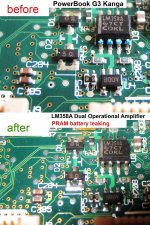 | |
| Posted by: raoulduke on 2015-06-20 16:29:28 The short story is that I don't know... I will have to look over all of this but even then that's super weird. I assume you've tried reseating the cable a bunch of times. One thing I do notice is that in the 6 vias right above the label "U4", at least two still have corrosion in them. Is there damage on the bottom right around the chip labeled 341S0433 or around C438/C439? (that's under the board - might be the pic) There's corrosion near C25 on the top of the board as well and C77. | |
| Posted by: techknight on 2015-06-20 16:32:04 Yea those vias are likely rotted out... | |
| < 4 > |