68kMLA Classic Interface
This is a version of the 68kMLA forums for viewing on your favorite old mac. Visitors on modern platforms may prefer the main site.
| Click here to select a new forum. | |
| Macintosh Plus Chirping Noise | |
| Posted by: bibilit on 2017-11-09 06:29:07 Will be hard to figured out, if The Plus is still making the ticking sound, as Techknight said before, the regulation side is not working properly and nothing will work (no screen, no chime...) Problem is, can be a lot of things (capacitors, but those are reliable, diodes, transistors) anything preventing the power supply from working properly. | |
| Posted by: MacintoshMan1999 on 2018-04-03 08:27:34 Hey, I'm back. Sorry for the absence, I should have said I was taking a break. Anyway, I've started to work on the Mac Plus again. I tried to upload a photo but the website does not want to cooperate with me right now. The picture is of a pair of tubes/light bulbs on the analog board. I'd also like to ask how to check the flyback transformer safely. Thanks! | |
| Posted by: MacintoshMan1999 on 2018-04-03 18:36:38 Would you trust this flyback? https://www.ebay.com/itm/Flyback-Transformer-Line-Output-Apple-MAC-Replacement-6174Z1003G-HR-46176/323042869316?epid=12014096612&hash=item4b36db0044:g:j5MAAOSwExlacW4o | |
| Posted by: MOS8_030 on 2018-04-03 18:59:59 I recently purchased a flyback from this seller. Good item. https://www.ebay.com/itm/157-026C-Flyback-1570026B-Replaces-Apple-HR-42031/400922654856 | |
| Posted by: MacintoshMan1999 on 2018-04-03 19:02:27 Cool, thanks 😎 | |
| Posted by: MacintoshMan1999 on 2018-04-06 19:14:39 Could the flyback be the cause of the Mac regulation problem? I've been hearing that's a common problem. Thanks, Jack | |
| Posted by: MacintoshMan1999 on 2018-04-13 11:44:33 I've found a culprit! 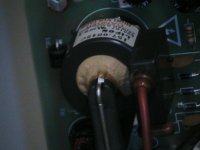 | |
| Posted by: MacintoshMan1999 on 2018-04-13 11:45:47 I don't think the Flyback is suppose to look like that! | |
| Posted by: mjhagen on 2018-04-13 12:09:30 The yellow stuff is normal, are you referring to that? | |
| Posted by: MacintoshMan1999 on 2018-04-13 12:21:44 Really? Yes, I was because all of the new flybacks I've seen don't have that on them... Also, the reason I thought that it was a culprit was because it looks like it flowed down towards the bottom of the Mac at some point. I'm not an expert so please excuse my ignorance. Thanks for pointing that out! -Jack | |
| Posted by: MacintoshMan1999 on 2018-04-13 12:28:31 The screwdriver is pointed at the bottom of the mac. 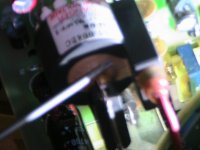 | |
| Posted by: Juror22 on 2018-04-13 13:31:34 Please take one good high-res shot of the outside of the analog board and another hi-res shot of the inside of the computer, showing as much as you can of the CRT, cables, etc. So far, most of the small items that you have focused on have turned out to be alright, so it might be helpful to look over everything, including the current symptoms (if you could list them) and work our way to a diagnoses. Oh, and be super careful not to touch anything while its plugged in or running. | |
| Posted by: MacintoshMan1999 on 2018-04-13 17:23:45 Alright, I'll do that. | |
| Posted by: MacintoshMan1999 on 2018-04-13 18:08:07 Back of analog board: 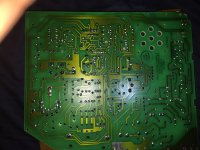 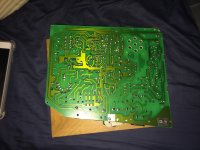 | |
| Posted by: MacintoshMan1999 on 2018-04-13 18:09:39 Inside W/ CRT: 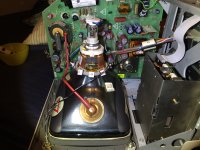 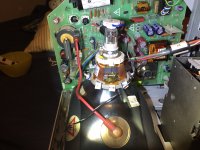 | |
| Posted by: MacintoshMan1999 on 2018-04-13 18:39:18 Symptoms: 1: When together CRT makes a static-like noise. (like when a CRT is turned off but constant) 2: The Transformer behind the magnet with the "5A" on it (is it the low voltage?) makes a chirping type noise when distant, but when close can also hear a ticking sound as well. 3: Speaker makes "fup" noise only when the logic and analog board are together 4: There is no startup chime or an image on the screen. 5: When I got the Mac Plus the startup chime would sound but no picture would be on the screen, I however eventually read if I tap the left side swiftly and a image shows up that some of the solder joints were broken/damaged and just needed soldered again. 6: The internal and external drives would make a horrible grinding noise constantly because both had a broken eject motor gear. 7: Unfortunately I was a bit of an idiot and had the Mac on with the external floppy drive connected and OPENED UP out the back "checking it out" (I didn't know about the gear yet), then the Mac shat out and went into its current state. Smoooooooth move on my part...... :-/ I'm guessing ether my stupidity did it, or the Mac really just shat out on its own. Soooooo... yeah these are the symptoms Thanks for the help! -Jack | |
| Posted by: mjhagen on 2018-04-14 03:08:13 The only obvious thing I see is the solder joints on J4 (?), they seem to be cracked. Have you read chapters 5 and 6 of Macintosh Repair & Upgrade Secrets? I think those might be helpful here. Looking at it some more, maybe a lot more solder joints could use a touch up, the flyback included. | |
| Posted by: techknight on 2018-04-14 15:53:31 Check the secondary rectifier diodes for shorts. | |
Posted by: MacintoshMan1999 on 2018-04-15 12:29:43Check the secondary rectifier diodes for shorts.Alright, I'll do that The only obvious thing I see is the solder joints on J4 (?), they seem to be cracked. Have you read chapters 5 and 6 of Macintosh Repair & Upgrade Secrets? I think those might be helpful here.I'll take a look and touch the solder joints up. And I don't think I've read any of the Macintosh Repair & Upgrade Secrets book, I'm looking at it now... | |
| Posted by: MacintoshMan1999 on 2018-04-15 16:38:16 I Checked the current coming out of the anode cap, no current whatsoever. I'm going to order a new flyback. Probably from here: https://www.ebay.com/itm/157-026C-Flyback-1570026B-Replaces-Apple-HR-42031/400922654856?hash=item5d58da3888:g:xs4AAMXQgwNSJyrC:sc:USPSPriority!78620!US!-1 -Jack | |
| < 3 > |