68kMLA Classic Interface
This is a version of the 68kMLA forums for viewing on your favorite old mac. Visitors on modern platforms may prefer the main site.
| Click here to select a new forum. | |
| RaSCSI Development Thread | |
| Posted by: kerobaros on 2017-11-16 14:28:01 Mark me as officially interested. Thanks for your work! | |
| Posted by: aperezbios on 2017-11-17 10:53:13 Awesome work on this PCB. I did a cost estimate and it would come out to around $35+s/h per so for each board, perhaps cheaper if I can find a good supplier.Is that assembled, or just for the PCB? hopefully the latter 🙂 | |
| Posted by: K55 on 2017-11-17 19:59:05 PCB alone would be as cheap as you could make it 😉 The $35 would be a at cost full assembled board. If you ordered from your local batch house it might be $20 for 10 boards? ($2ish per, don't quote me on that) Depends on how long you want to wait. If you need a board /NOW/ I think theres a japanese version for $100+intl shipping, and you need to buy a pi. I'm probably going to do a mini design tomorrow to see if I can get it to 1 pi (harhar) wide and/or using a 50pin scsi for external use. Edit: I'm looking for work atm, so I'll try to post updates as quick as possible in between application emails :lol: . | |
Posted by: CC_333 on 2017-11-18 21:26:20I'm probably going to do a mini design tomorrow to see if I can get it to 1 pi (harhar) wide and/or using a 50pin scsi for external use.As opposed to 1 pi squared :lol: c | |
| Posted by: K55 on 2017-11-19 14:30:27 2 updaterinos, both pushed to the git. 1. is the final v1. version of the internal board as small as I can get it: 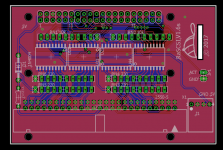 And here is a din-25 version for use externally. Would be good for people with multiple computers. 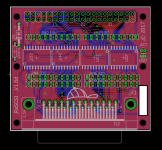 Probably will order the din25 version soon. Will will see :^) | |
| Posted by: Xeon3D on 2017-12-26 02:20:19 I've just ordered 10 pcbs of the internal version, but I'll probably only use 4 of them so if you're interested, I'll sell the excess at cost price (~2€) + shipping. | |
Posted by: Bunsen on 2018-01-22 04:23:14I personally wouldn't even have bothered supporting the zero, considering how slow it should be The Pi Compute Module is now up to speed with the current full size Pis, and tiny. It'd require a different board layout altogether with the DIMM-style module slot and possibly other support gubbins, like USB and Ethernet if you want to use those. But with Bluetooth and Wifi on board, maybe you don't need to. It's also small enough that a Powerbook 2.5" SCSI version might be possible, I'm just sayin' 😉 | |
Posted by: Bunsen on 2018-01-22 04:41:451MiB/sec was measured off a Pi3, and GPIO speeds are bound to the cpu speed Okay, I skimmed through the Garble-translated Japanese RaSCSI page, but I can't see how they're achieving that. Are they running some real-time lib alongside Linux? /edit/ Appears not, if I'm reading this right ... which suggests a possible path to speed improvements. Since RaSCSI controls the SCSI signal using GPIO, it is necessary to use it with low latency as much as possible. Therefore we recommend using it in CUI mode. Please stop unnecessary service as much as possible. | |
| Posted by: Alex on 2018-01-22 05:02:00 How would this be interfaced with the Mac? Is this internal or external. I am thoroughly confused and excited. | |
| Posted by: IlikeTech on 2018-01-22 05:20:22 It converts a PI to a standard 50 pin scsi connector. | |
| Posted by: Bunsen on 2018-01-22 07:18:07 Banana Pi have a Zero-form factor clone with a quad core CPU - http://www.banana-pi.org/bpi-zero.html | |
| Posted by: techknight on 2018-01-22 08:22:19 If I was a better programmer and more versed in programming with these older machines, I would definitely make a powerbook version. Not only be able to emulate a SCSI drive, but emulate a SCSI ethernet (and go over wifi) as well as enable acceleration for WebKit internet browsing. | |
| Posted by: jamesmilne on 2018-01-22 12:25:44 Here are some benchmarks on Raspberry Pi GPIO performance using DMA: https://github.com/hzeller/rpi-gpio-dma-demo I read recently of another project running code on the VideoCore to do GPIO, which would allow you to have a separate microcontroller completely dedicated to servicing GPIO. I found this thread on the Raspberry Pi forms referring to the idea: https://www.raspberrypi.org/forums/viewtopic.php?f=37&t=95572 You could achieve a similar thing by isolating one of the cores on the Raspberry Pi 3 from the Linux scheduler and manually pinning your server's IO thread to that core. https://stackoverflow.com/questions/13583146/whole-one-core-dedicated-to-single-process | |
| Posted by: jamesmilne on 2018-01-22 14:20:20 Here it is. This compiles some assembly code to run on the VideoCore QPUs and sends it to the VideoCore: https://github.com/TWilmer/rpi_fast_bitbang It's based on this blinker01 code, but it's not very useful because it replaces the standard bootcode.bin, so the Raspberry Pi won't boot Linux: https://github.com/hermanhermitage/videocoreiv/tree/master/blinker01 | |
Posted by: Bunsen on 2018-02-01 17:49:27Raspberry Pi GPIO performance using DMA: Raspberry Pi 1 22.7Mhz, Pi 2 41.7Mhz, Pi 3 65.8 Mhz.Granted that's toggling a single pin and doing nothing else, but that seems promising. Does the second example, "Reading Word from memory, write masked set/clr" imply that you can toggle 32 pins at the same speed, or at 1/32 of the speed or worse? | |
Posted by: Bunsen on 2018-02-01 17:51:42running code on the VideoCore / would allow you to have a separate microcontroller completely dedicated to servicing GPIO. Does the GPU have direct access to the GPIO pins? Or ... could you hijack the camera and MIPI LCD ports for super-fast IO? | |
| Posted by: johnklos on 2018-02-01 19:53:02 Real-time bitbanging in this case may be faster and easier using the PRUs on a BeagleBone. | |
| Posted by: Bunsen on 2018-02-14 19:55:43 True, but that involves porting the SCSI emulation to a whole different processor architecture. Then again, I guess the same applies to trying to run it on the GPU. | |
| Posted by: Low End Dan on 2018-02-21 11:33:53 I just learned about your project. Sounds wonderful. How many Raspberry Pi features could be used over SCSI - WiFi? USB ports? | |
| Posted by: defor on 2018-03-08 18:27:18 I'm pretty sure that in theory, probably just about anything you wanted- the problem here is that you'd need to develop a Mac OS driver for each feature (and in some cases, develop an entire stack to support features that had no equivalent, i.e. USB, on classic Mac) Also to clarify, K55 who started this thread was working to make a more accessible Mac-ready hardware kit using the schematics developed by kugimoto0715 (http://www.geocities.jp/kugimoto0715/), I don't think K55 or anyone else here has actually progressed down this route much further- I was originally interested (and have to return to the topic) in using the project to create a multi-game Apple/Bandai/Atmark Pippin game jukebox, as the SCSI2SD has some limitations to this regard that make implementation a bit difficult, but I haven't done any more investigation. On the topic of drivers, kugimoto0715 provides two drivers similar to what you're referring, but for x68000 (one that allows remote file system access, and one that allows the Pi's ethernet to be used directly, but both appear to have been developed through a mixture of already existing software to allow emulators to access their host os. I might look into an updated technically accurate re-translation of the page if no one's poked at it recently, as I see there's some updates since it first went live (I've also seen the compatible adapters for sale in shops such as BEEP recently, so it's no surprise that it's been gaining momentum). curious what this initiator and monitor mode options offer... | |
| < 3 > |