68kMLA Classic Interface
This is a version of the 68kMLA forums for viewing on your favorite old mac. Visitors on modern platforms may prefer the main site.
| Click here to select a new forum. | |
| Beige G3 RAM and PSU questions: | |
Posted by: Trash80toHP_Mini on 2026-04-08 14:18:59The pinout is compatible with 20 pin ATX. The tower PSU is basically an ATX PSU. The desktop one has the soft power the Mac way instead of the ATX way, so if you want to use a board out of a desktop with ATX you have to swap Jumper J28 over to the other position (it's in the corner near the back of the end PCI slot.Nice, thanks much for that info. The little 1U compatible 300w PSU arrives today from Amazon. The 500w PSU arrived from eBay and it's a 9" deep freakin' beast of a thing! Wouldn't even fit nicely in the 4U PEx project.🙄 It's only got ten SATA power connectors aside from Molex aarray. | |
Posted by: croissantking on 2026-04-08 14:56:09Sounds like a fun little project 😉Only one way to find out… 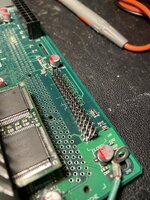 | |
Posted by: croissantking on 2026-04-08 17:15:37Has anyone ever tried to get a PC floppy drive to work with a retail board? So I have now, and it doesn't work. No sign of life. Of course I made sure the floppy cable was the right way round and that the drive was plugged into power. I also swapped in a Rev. A ROM and booted Mac OS 8.0 just in case the newer ROM/OS had dropped support for it. Interestingly theres a short mini-molex cable that hangs off the Beige G3DT PSU that isn't used for anything, but it's the perfect length to reach a PC floppy drive when it's fitted in the floppy bay. I expect it was there just for that. | |
| Posted by: Trianon on 2026-04-08 22:57:03 I'm also working on a beige G3 these days and was wondering about this connector : - there are to bays in the top plastic for an FDD, but the Apple floppy cable is only single device ? (on my LC there are 2 of those connectors). - maybe apple was thinking to have a double floppy option and for this added the PC style one but never followed up in SW ? | |
Posted by: Phipli on 2026-04-08 23:33:05maybe apple was thinking to have a double floppy option and for this added the PC style one but never followed up in SW ?They planned to move to PC floppy drives to reduce costs, but ended up not doing it on the G3 (perhaps because it didn't work). In the end they just dropped floppy drives with the iMac. | |
Posted by: Durosity on 2026-04-09 00:02:16So I have now, and it doesn't work. No sign of lifeWell that’s a bummer! And quick work.. I was gonna go try that out tomorrow when I get back from Glasgow, but you beat me to the punch 😅 | |
Posted by: CC_333 on 2026-04-09 00:56:33Well that’s a bummer! And quick work..Indeed! But, @croissantking discovered how to get the beige G3's unimplemented USB circuits working, so this couldn't be that hard? Perhaps there's some clues in the ROM's floppy driver (is it still referred to as .Sony, as in older 68k ROMs?) Clearly it works mechanically, and electrically all the circuits seem to be intact, so it not working has to be software related somehow. c | |
| Posted by: croissantking on 2026-04-09 02:18:57 It might be firmware related. I don’t quite get how a PC floppy drive would have integrated with Mac OS, though. Normally, when you insert a disk it appears on the desktop - but afaik a PC floppy drive doesn’t have any way to signal to the OS that a disk has been inserted. | |
Posted by: joevt on 2026-04-09 03:38:02So I have now, and it doesn't work. No sign of life. The rev D ROM does have support. Check the Heathrow feature control bits (32-bit register at offset 0x38 of the mac-io device). /** O'Hare/Heathrow specific registers. */
enum {
MIO_OHARE_ID = 0x34, // IDs register (MIO_HEAT_ID)
MIO_OHARE_FEAT_CTRL = 0x38, // feature control register
MIO_AUX_CTRL = 0x3C,
};
/** MIO_OHARE_FEAT_CTRL bits. */
enum {
MIO_OH_FC_IN_USE_LED = 1 << 0, // modem serial port in use in Open Firmware
// controls display sense on Beige G3 desktop
MIO_OH_FC_NOT_MB_PWR = 1 << 1,
MIO_OH_FC_PCI_MB_EN = 1 << 2,
MIO_OH_FC_IDE_MB_EN = 1 << 3,
MIO_OH_FC_FLOPPY_EN = 1 << 4,
MIO_OH_FC_IDE_INT_EN = 1 << 5,
MIO_OH_FC_NOT_IDE0_RESET = 1 << 6,
MIO_OH_FC_NOT_MB_RESET = 1 << 7,
MIO_OH_FC_IOBUS_EN = 1 << 8,
MIO_OH_FC_SCC_CELL_EN = 1 << 9,
MIO_OH_FC_SCSI_CELL_EN = 1 << 10,
MIO_OH_FC_SWIM_CELL_EN = 1 << 11,
MIO_OH_FC_SND_PWR = 1 << 12,
MIO_OH_FC_SND_CLK_EN = 1 << 13,
MIO_OH_FC_SCC_A_ENABLE = 1 << 14,
MIO_OH_FC_SCC_B_ENABLE = 1 << 15,
MIO_OH_FC_NOT_PORT_VIA_DESKTOP_VIA = 1 << 16,
MIO_OH_FC_NOT_PWM_MON_ID = 1 << 17,
MIO_OH_FC_NOT_HOOKPB_MB_CNT = 1 << 18,
MIO_OH_FC_NOT_SWIM3_CLONEFLOPPY = 1 << 19,
MIO_OH_FC_AUD22RUN = 1 << 20,
MIO_OH_FC_SCSI_LINKMODE = 1 << 21,
MIO_OH_FC_ARB_BYPASS = 1 << 22,
MIO_OH_FC_NOT_IDE1_RESET = 1 << 23,
MIO_OH_FC_SLOW_SCC_PCLK = 1 << 24,
MIO_OH_FC_RESET_SCC = 1 << 25,
MIO_OH_FC_MFDC_CELL_EN = 1 << 26, // Heathrow/Paddington only
MIO_OH_FC_USE_MFDC = 1 << 27, // Heathrow/Paddington only
MIO_OH_FC_ADB_CELL_EN = 1 << 28, // Heathrow/Paddington only
MIO_OH_FC_ETH_EN = 1 << 29, // Heathrow/Paddington only
MIO_OH_FC_ETH_XCVR_EN = 1 << 30, // Heathrow/Paddington only
MIO_OH_FC_RESET_ETH_CELL = 1 << 31, // Heathrow/Paddington only
};The PC floppy feature control bit is MIO_OH_FC_USE_MFDC = 0x08000000 If this bit is set, then the device tree in Open Firmware will have a fdc node instead of a swim3 node @15000 of mac-io.How to set the feature control bit before Open Firmware enumerates mac-io devices? You might need a ROM patch to do that if the feature control bit is not something that can be set in hardware (with a jumper?) or nvram. I would check the HWInit code to find places that set the feature control bits. Maybe use DingusPPC to step through the boot code with si 10000000 in the DingusPPC debugger.I suppose we could modify the feature control bits and the device tree in Open Firmware. Connect via serial port, boot into Open Firmware with input-device and output-device set to ttya:57600, type dl to begin download, paste the code below (the text is not echoed which makes it faster than a normal paste), then press Control-D to execute the pasted code.unselect-dev : !unprotected ( val addr -- ) ! ; : parent >dn.parent @ ; : delete-node >r r@ >dn.peer-nxt @ r@ = if 0 r@ parent >dn.child !unprotected else r@ parent >dn.child dup @ r@ = if r@ >dn.peer-nxt @ swap !unprotected else drop then r@ >dn.peer-nxt @ r@ >dn.peer-bak @ >dn.peer-nxt !unprotected r@ >dn.peer-bak @ r@ >dn.peer-nxt @ >dn.peer-bak !unprotected then r> drop ; " /pci/mac-io/swim3" find-package if delete-node then dev /aliases " fd" delete-property " /pci/mac-io/fdc" encode-string " fd" property dev /pci/mac-io new-device " fdc" device-name " block" device-type " floppy" aapl,connector " fdc" compatible 15000 h#100 encode-reg 8100 h#100 encode-reg encode+ "reg" property 13 1 2 aapl,interrupts -1 0d byte-load-file finish-device unselect-dev The feature control bit is not set yet. Opening the device will set it. You can do that by typing this: " fd" select-dev Or you can try the dir command which will open the device to get a directory listing from a floppy: dir fd You can read the feature control bits with this: dev fd hrfeaturecontrol@ 8 u.r | |
| Posted by: joevt on 2026-04-09 03:40:36 Read the feature control bits with this: F3000038 rl@-flip 8 u.rwhich works without opening the PC floppy device in Open Firmware. | |
| Posted by: NJRoadfan on 2026-04-09 03:52:36 Manual inject PC style floppy drives support auto mounting inserted disks by monitoring the "disk change" signal. Amigas use it to automount inserted disks. | |
Posted by: croissantking on 2026-04-09 04:17:34Manual inject PC style floppy drives support auto mounting inserted disks by monitoring the "disk change" signal. Amigas use it to automount inserted disks.Thanks for clarifying this. EDIT: 'Disk change' is pin 34 on an MFM drive, which is labelled 'no connect' on the Gossamer schematics – so that couldn't work. | |
| Posted by: croissantking on 2026-04-09 04:25:08 The schematics show that only drive B is supported - but the twist in my floppy cable sets mine as drive A. I'll try a cable without a twist. | |
Posted by: Phipli on 2026-04-09 04:36:48The schematics show that only drive B is supported - but the twist in my floppy cable sets mine as drive A. I'll try a cable without a twist.If you can't find one, some drives have jumpers on them to change the drive. It was more common on drives intended for platforms other than IBM PC Clones. My Sony PC floppy drive supports it. | |
| Posted by: NJRoadfan on 2026-04-09 04:49:38 I wish Apple didn't insist on such confusing terminology with the drive select signals. PCs were weird in that the first drive was wired as DS1 as opposed to DS0. Some docs refer to DS1 as "Drive B".... not be be confused with DOS drive letters! Later PC motherboards (and maybe the beige G3?) confused things further by flipping the DS0 and DS1 lines on the motherboard, thus requiring the use of a cable without the twist. The pinout for the floppy connector is here: https://www.chzsoft.de/site/hardware/preserving-a-floppy-disk-with-a-logic-analyzer/ | |
Posted by: Phipli on 2026-04-09 05:19:02The schematics show that only drive B is supported - but the twist in my floppy cable sets mine as drive A. I'll try a cable without a twist.Actually, thinking about it, @croissantking - if you link the pins on the rear of the PCB connector like this : 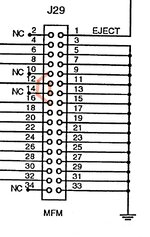 It will work with A or B drives. The other pins are NC anyway. Just don't connect two drives ever. | |
| Posted by: finkmac on 2026-04-09 05:30:20 the implementation is probably similar to the one in the lpx-40 reference design. glad someone is messing with it now, saves me the trouble 😆 now you gotta populate the cache slot and downgrade the cpu | |
Posted by: Phipli on 2026-04-09 05:42:49now you gotta populate the cache slot and downgrade the cpu It didn't pan out well if I remember, sadly. | |
| Posted by: croissantking on 2026-04-09 06:41:34 So I discovered my floppy drive has DS0 and DS1 solder pads on the PCB, and I moved the solder blob over. I do now get signs of life - the floppy drive indicator light comes on with the Mac's power light, and then stays on until the grey screen with mouse pointer. Just before the Mac starts to boot off its hard drive, the floppy drive makes a seek noise and the light turns off. Other than that, it still doesn't work. I still wonder how the Mac would know that it had a disk inserted, though, without pin 34 (disk change) going anywhere on the logic board. Also, I wonder if R340/R341 need to be populated. But it's a bit weird since that pin on a PC drive is just ground - maybe Apple were planning on using non-standard PC drives with an eject motor. 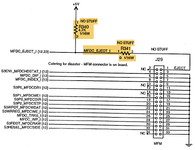 the implementation is probably similar to the one in the lpx-40 reference design. I was hoping someone else would, haha. now you gotta populate the cache slot and downgrade the cpu @stynx sent me a 604e3/333 so I could certainly downgrade the CPU. | |
| Posted by: croissantking on 2026-04-09 07:01:57 OK, the LPX-40 dev note (thanks @finkmac) gives us some clues: Auto eject is fully supported by the MFM driver when the appropriate jumpers on the LPX-40 logic board are set and an auto-eject MFM floppy drive is installed. So, auto-eject MFM drives exist, but sounds like it could be an optional feature here. The MFM drive is an industry standard 3.5 inch MFM-only floppy disk drive with the following required features: Right, so the Mac is looking for a Disk In Place signal - you can see that on the Gossamer schematics labelled MFDC_DIP_I. But regular PC drives do not output anything on pin 6. PC drives also don't output anything on pin 4. Looks like this isn't going to work, guys. | |
| < 3 > |