68kMLA Classic Interface
This is a version of the 68kMLA forums for viewing on your favorite old mac. Visitors on modern platforms may prefer the main site.
| Click here to select a new forum. | |
| DumbDD | |
| Posted by: ironborn65 on 2026-04-10 04:42:51 I see a lot of enthusiasm here—that’s great. That said, speaking as a layman, could someone please clearly outline the expected use cases for this “DumbDD” app? | |
Posted by: CuriosTiger on 2026-04-10 05:05:10I see a lot of enthusiasm here—that’s great. On UNIX systems, dd is used for writing raw data to a block device (such as a raw SCSI disk) below the file system layer. The applications are numerous. For example, it's a fast way to clone one disk to another (as long as the destination is at least as large as the source.) It's a decent way to exercise every sector of the disk and discover any read/write errors. And it's a way to wipe a corrupted disk, as some types of disk corruption can upset traditional formatting tools. There are other uses, but those are three that come to mind. | |
| Posted by: ironborn65 on 2026-04-10 05:20:43 Thanks mate, I do use 'dd', especially in the past with the previous generation of SCSI emulators; now they use file images instead. What is the deal with DumbDD? | |
Posted by: Phipli on 2026-04-10 05:39:10What is the deal with DumbDD?Other hard disk imaging programs don't tend to copy the whole disk, only the partitions, so you don't get a copy of the drivers and partition map etc. Also you can't tell them to only copy or write to/ from a specific location. That's what DumbDD is being made to do. | |
Posted by: CuriosTiger on 2026-04-10 06:01:52Thanks mate, I do use 'dd', especially in the past with the previous generation of SCSI emulators; now they use file images instead. As far as I know, no such program existed in classic MacOS, except perhaps as part of A/UX. DumbDD is just an app that offers you that same functionality without having to use another computer/OS. Using file images rather than raw partitions is a convenience ZuluSCSI and the like are offering. That requires additional file system handling (in this case, ExFAT or FAT32 are supported, if memory serves) and some extra code to deal with parsing file names and such. It also comes with a slight performance penalty, although that's probably a non-issue on classic Macs since the limiting factor there is the speed of the SCSI bus. But inside of that HD0.img file (or whatever you name yours) there's still a classic Apple Partition map, a SCSI driver and whichever partitions you have created. The "file images" abstraction is something you see when you mount the images on a modern computer. It's invisible to classic MacOS. As far as your classic Mac is concerned, that "file" is just a block device with a certain number of sectors. | |
Posted by: Snial on 2026-04-10 06:46:57Thanks mate, I do use 'dd', especially in the past with the previous generation of SCSI emulators; now they use file images instead.The disk imaging apps on a Mac appear to be too clever, aiming to copy individual volumes and caring about the underlying file system. DumbDD copies sectors from a real SCSI HD, indexed by sector, using the SCSI Toolbox APIs, not the file system FS or PB routines. It can also copy them back from an image. The primary use case is if you have an old SCSI HD + an old SCSI Mac and you want to copy a foreign partition map and file system into it (which is my use-case). Also, Thanks @CuriosTiger . | |
| Posted by: nathall on 2026-04-10 22:20:28 For example, there’s no way to create an image of a A/UX drive outside of maybe being inside A/UX. Certainly no MacOS apps to do it. And if your A/UX installation is unstable, you’re SOL, hence where DumbDD could save the day. | |
| Posted by: zefrenchtoon on 2026-04-15 03:42:30 FYI DiskCopy 6.5b13 (and maybe 6.4 too) is able to image a whole device. I did it many times to image old drives to use images in a BlueSCSI or an emulator. Also, you can use "Apple Software Restore" to use an image as source and a real drive as destination like in screenshots available here : I don't remember if DiskCopy is able to do image => real drive as I never had to do it in this way. | |
| Posted by: zefrenchtoon on 2026-04-15 03:46:06 The fallback of using DiskCopy 6.4+ is that is depends on MacOS 8.5.1 or 9.1. I'm using a Yikes with a SCSI card or a 6100 to image my drives | |
| Posted by: zefrenchtoon on 2026-04-15 03:59:12 After a quick check, there was this post some years ago: | |
Posted by: Snial on 2026-04-15 08:11:25After a quick check, there was this post some years ago:Thanks, very curious. Did @MrFahrenheit put it on Macintosh Garden? | |
Posted by: adespoton on 2026-04-15 15:13:34Thanks, very curious. Did @MrFahrenheit put it on Macintosh Garden?Doesn't look like it. The image is "Bill the Cat" - an "iconic" cartoon image from the Sunday comics in 1980s US. I seem to recall SCSI Cloner being on one of the dev tools CDs, but I'm not sure which one. I've kicked off a search to see if I can find it. | |
Posted by: Phipli on 2026-04-15 15:19:00Doesn't look like it. The image is "Bill the Cat" - an "iconic" cartoon image from the Sunday comics in 1980s US. I seem to recall SCSI Cloner being on one of the dev tools CDs, but I'm not sure which one. I've kicked off a search to see if I can find it.Might be in download 2 here? Haven't checked, but looks like it. Apple A/UX 2.0.0 and 2.0.1 Reference Archive - Macintosh GardenThis reference archive is a collection of clean, fresh extractions of original install disks, for Apple A/UX 2.0 and 2.0.1 operating system. Compiled and released as a 'set' by Mr. Fahrenheit, from original in-hand media, where possible.
| |
Posted by: adespoton on 2026-04-15 15:27:31Might be in download 2 here? Haven't checked, but looks like it.Could be; it doesn't appear to be in my dev cd indexes. | |
| Posted by: Builder68 on 2026-04-16 04:50:08 ... | |
| Posted by: Builder68 on 2026-04-16 05:35:45 This site seems to have what you are looking for. | |
| Posted by: LaPorta on 2026-04-16 05:43:20 This is a very intriguing and excellent idea. My only other suggestion would be to build a front-end like this for current macOS so that we no longer have to use Terminal-based dd. | |
Posted by: Phipli on 2026-04-16 05:53:46This is a very intriguing and excellent idea. My only other suggestion would be to build a front-end like this for current macOS so that we no longer have to use Terminal-based dd.Things like Etcher exist already, plus Disk Utility offers more similar capabilities than Disk Copy did. But you have to be very careful with tools like this, they're not for casual use as it is trivial to make your computer unbootable. | |
Posted by: Builder68 on 2026-04-16 06:03:17Doesn't look like it. The image is "Bill the Cat" - an "iconic" cartoon image from the Sunday comics in 1980s US. I seem to recall SCSI Cloner being on one of the dev tools CDs, but I'm not sure which one. I've kicked off a search to see if I can find it. 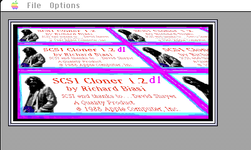 Running in BasiliskII (System 7.6.1) 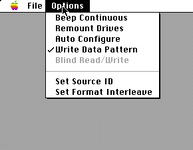 | |
Posted by: Snial on 2026-04-16 12:18:47This site seems to have what you are looking for.Well done! I’ll try and check it out! | |
| < 3 > |