68kMLA Classic Interface
This is a version of the 68kMLA forums for viewing on your favorite old mac. Visitors on modern platforms may prefer the main site.
| Click here to select a new forum. | |
| MacIPRpi beta release 6.02 | |
| Posted by: mactjaap on 2025-01-23 23:22:36 Hmmmm. Funny bug! I will have a look what is going on. But normal user is: macipgw password is the same as username. Could you try that? | |
| Posted by: dochilli on 2025-01-24 07:34:37 I can choose another user but when I try to type the username or the password, I only get arabic letters. I can not write roman letters. Then the password is wrong. I saw that I am typing arabic letters, when i tried to change the user by typing the name. In the attached picture I typed pi. | |
| Posted by: mactjaap on 2025-01-24 11:09:58 Absolute fascinating… but very strange. Don’t know directly what happens. Could you try to ssh to The MacIPRpi? Is the red light blinking? Can you use it as macipgw? File sharing? | |
| Posted by: mactjaap on 2025-01-24 15:01:03 I solved part of the puzzle The language you're typing in is Georgian! "Pi" is პი I found this using Google Translate. I tried various languages, starting with those that use different scripts, like Arabic, Ethiopian, Cyrillic, and eventually Georgian (bingo!) But I still don't understand this behavior. I downloaded the image again, wrote it to the SD card, and tried different keyboards. All of them default to the US English keyboard layout. 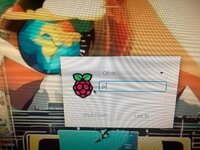 | |
Posted by: mactjaap on 2025-01-25 04:56:22There shouldn't be any need to define the local hostname in /etc/hosts, it gets it from /etc/hostname. Also, Netatalk 4 bases the server's name off of the system host name by default. 😉Could be a legacy of testing some old services. Not sure. Doesn't hurt I guess. But.. I found another one where to change: /usr/local/bin/appletalk-test.shIt checks if the host MacIPRPi is up. So if that changes the test script will fail and you won't have a blinking red light which shows your MacIPRpi is up and running fine. Will include this one in the final stable version too. And yes! I will switch to 4.* anyway. Bit first 6.02 out and in stable. Then a MacIPRpi 6.* minor update with Netatalk 4.* is made easy! No worries! | |
| Posted by: dochilli on 2025-01-28 09:36:45 I wrote the image to another sd card. Now I can login as root, the keyboard is ok. The password raspberry for the user pi does not work, but I could change it as root. A user macipgw does not exist, only a user timelord and pi. My windows computer can see the maciprpi and the shared drive. By ssh i could login to the pi. Seems to work so far. | |
| Posted by: mactjaap on 2025-01-28 14:34:28 @dochilli I'm happy to hear that a new SD card helped. Corrupted card can give weird results! On the MacIPRpi there is no user pi anymore. The two only valid user accounts are: root macipgw You could have a look for yourself if you give the command vipwas root. So, in your case, if you don't see user macipgw just go to Other... and type in the user macipgw and the password macipgw. Normal user on the MacIPRpi is: macipgw (password macipgw) Root (admin) user on the MacIPRpi is: root (password macipgw) But, the average user doesn't have to login at all. Just copy the image to SD, boot and wait a few minutes until the red light is blinking. Then all the features are enabled. You can also use the MacIPRpi as guest. And for MacIP, just configure your MacTCP or TCP/IP with a valid IP address like 172.16.2.2. If you really want to play around on the command line (ssh/telnet) or Linux GUI.... Then it is time to login and use one of these two account. | |
| Posted by: dochilli on 2025-02-03 10:08:38 The new image has the functionality to print to a modern printer. I was successful with printing to a HP MFC Laserprinter from a CC and a SE/30. Thanks to Mactjaap for his update. | |
| Posted by: mactjaap on 2025-02-09 14:05:01 @dochilli Great to hear that you can use the new beta02 MacIPRpi image for printing! I will add this to the final stable release in this way. | |
Posted by: mactjaap on 2025-02-09 14:20:50Good to see a refresh of maciprpi! I'm curious what base OS you're using now? I can confirm that the final version of the MacIPRpi 6.02 will run on Netatalk 4.1.1! Also it will use the macipgw it provides. I just tested and it seems to work OK! This is my afp.conf configuration. Maybe you could have a look if I don't forget something? I've been used to the old way of doing things so this is new to me: [Global] ; Set the server name that appears in the Chooser servername = MacIPRpi mimic model = Macintosh appletalk = yes uam list = uams_guest.so,uams_clrtxt.so,uams_dhx.so log file = /var/log/afpd.log log level = default:maxdebug [Homes] basedir regex = /home [MacIPRpi DISK] path = /AppleShare time machine = no adouble = v1 vol charset = ASCII guest ok = yes valid users = guest,@users,nobody file perm = 0640 directory perm = 0750 And this is a output form afpd -V: #afpd -V
afpd 4.1.1 - Apple Filing Protocol (AFP) daemon of Netatalk
This program is free software; you can redistribute it and/or modify it under
the terms of the GNU General Public License as published by the Free Software
Foundation; either version 2 of the License, or (at your option) any later
version. Please see the file COPYING for further information and details.
afpd has been compiled with support for these features:
AFP versions: 1.1 2.0 2.1 2.2 3.0 3.1 3.2 3.3 3.4
TCP/IP Support: Yes
AppleTalk Support: Yes
CNID backends: dbd last mysql
Zeroconf support: Avahi
TCP wrappers support: Yes
Quota support: Yes
Admin group support: Yes
Valid shell checks: Yes
cracklib support: Yes
EA support: ad | sys
ACL support: Yes
LDAP support: Yes
D-Bus support: Yes
Spotlight support: Yes
DTrace probes: Yes
afp.conf: /etc/netatalk/afp.conf
extmap.conf: /etc/netatalk/extmap.conf
state directory: /var/local/netatalk/
afp_signature.conf: /var/local/netatalk/afp_signature.conf
afp_voluuid.conf: /var/local/netatalk/afp_voluuid.conf
UAM search path: /usr/local/lib/aarch64-linux-gnu/netatalk/
Server messages path: /var/local/netatalk/msg/This is my systemd config for macipgw: root@maciprpi:~# cat /etc/systemd/system/macipgw.service [Unit] Description=MacIP Gateway Service systemd and IPtables adjustments After=network.target Requires=network.target [Service] Type=simple ExecStart=/usr/local/sbin/macipgw -n 8.8.8.8 172.16.2.0 255.255.255.0 ExecStartPost=/bin/sh -c /usr/sbin/iptables-restore < /etc/iptables-save RemainAfterExit=yes [Install] WantedBy=multi-user.target | |
| Posted by: slipperygrey on 2025-02-10 11:04:15 @mactjaap Well done getting this far with the migration! A few comments on your afp.conf: > [Global] > ; Set the server name that appears in the Chooser > servername = MacIPRpi > mimic model = Macintosh > appletalk = yes > uam list = uams_guest.so,uams_clrtxt.so,uams_dhx.so You would want to add "uams_dhx2.so" as well for modern macOS clients. > log file = /var/log/afpd.log > log level = default:maxdebug The "maxdebug" log level will generate a humongous amount of logs. In this case, "info" is a better log level I think. > [Homes] > basedir regex = /home > > [MacIPRpi DISK] > path = /AppleShare > time machine = no > adouble = v1 netatalk4 doesn't support AppleDouble v1. Besides, you would want to use EA anyways. I suggest you remove this line and let netatalk use the default. > vol charset = ASCII It is strongly recommended to use the default UTF8 instead. Don't even think netatalk4 supports a plain ASCII charset. > guest ok = yes This is not a supported option in netatalk4. > valid users = guest,@users,nobody > file perm = 0640 > directory perm = 0750 Are the perm settings having the effect you want? In my experience these two options are buggy. I think it's better to chown the shared volume dir to the users group, add all relevant users to this group, and then use default permissions. Regarding the macipgw systemd service: > ExecStart=/usr/local/sbin/macipgw -n 8.8.8.8 172.16.2.0 255.255.255.0 In netatalk4.1 I introduced a macipgw.conf file where you can configure this without messing with the service file. For your example, the macipgw.conf file should look like this: [Global] network = 172.16.2.0 netmask = 255.255.255.0 nameserver = 8.8.8.8 | |
| Posted by: mactjaap on 2025-02-10 13:01:39 Great! I very much appreciate this review before going live. It all works… but a optimal config is better! Thanks for the tip about macipgw too. I will adjust it in the new beta03 with Netatalk 4.1.1. ….something else. I also try to have afpfs-ng on board. Which version should I use and what guideline to install/compile I should follow? | |
Posted by: slipperygrey on 2025-02-10 13:46:10Great! I very much appreciate this review before going live. It all works… but a optimal config is better! Thanks for the tip about macipgw too. I will adjust it in the new beta03 with Netatalk 4.1.1. Right, I think netatalk4 simply ignored the invalid options. ….something else. I also try to have afpfs-ng on board. Which version should I use and what guideline to install/compile I should follow? Well, I'm biased, so I would suggest you use this version from my fork that I tagged yesterday! Release 0.9.0 · rdmark/afpfs-ngWhat is new in afpfs-ng-0.9.0, February 9, 2025 FUSE client improvements Support for FUSE 2.99 on Linux, and macFUSE on macOS. Shore up error handling and memory synchronization to avoid deadlock...
 github.com
Amongst other improvements and bugfixes, I made command parsing work more reliably in "afmcmd" and the output from "afpgetstatus" more comprehensive and useful. The FUSE client should be more stable on modern systems. But I'm still seeing unreliable behavior when mounting the AFP network file system on slow network connections. Is FUSE part of the configuration on maciprpi? | |
| Posted by: mactjaap on 2025-02-11 12:36:51 Wowww. Great! You maintain it yourself! I'm very glad you do. I'm now using the code of Simon Vetter. I works, but it is very old. I will start testing with your code. About fuse. I compile afpfs-ng direct without any change and install libfuse-dev. I then can mount stuff on the localhost ( just to test) mkdir /tmp/afp mount_afp "afp://localhost/MacIPRpi DISK" /tmp/afp Mounting MacIPRpi DISK from localhost on /tmp/afp Mounting of volume MacIPRpi DISK from server maciprpi succeeded. AFP share mounted successfully on /tmp/afp. I also need to adjust some thing in the code so it compiles: echo "Fixing the 'full_url' multiple definition error..." sed -i 's/^int full_url;/extern int full_url;/' ./cmdline/cmdline_afp.h | |
Posted by: slipperygrey on 2025-02-11 21:35:07Wowww. Great! You maintain it yourself!I wonder if you're still using Simon's fork here by mistake? For one, I renamed "mount_afp" to "mount_afpfs" in my fork (to be able to install cleanly on macOS, which has a native "mount_afp"). And secondly, I fixed the "extern" declaration of full_url last year with this commit: https://github.com/rdmark/afpfs-ng/commit/aab66ce1e9c6b94e3a95a590416a4421c4aa9caf So if you still have to patch the code, it cannot be the latest version that I made. | |
| Posted by: mactjaap on 2025-02-12 10:07:50 Sorry about the confusion. Yes .... these remarks about fuse (libfuse-dev) and the sed action are about Simon his code... At that time I didn't start testing yours yet. But later that evening I did. And... works beautiful! root@maciprpi:~# mkdir /tmp/afp
root@maciprpi:~# mount_afpfs "afp://localhost/MacIPRpi DISK" /tmp/afp
The afpfs daemon does not appear to be running for uid 0, let me start it for you
Mounting MacIPRpi DISK from localhost on /tmp/afp
        fuse version=29 args={'maciprpi:MacIPRpi DISK','/tmp/afp','-f','-osubtype=afpfs,fsname=@maciprpi:MacIPRpi DISK'}
Mounting of volume MacIPRpi DISK from server maciprpi succeeded.root@maciprpi:~# afpgetstatus localhost
AFP response from localhost:548 via IPv6
Attempting connection to ::1 ...
Server name: maciprpi
Server type: Netatalk4.1.1
AFP versions:
AFP2.2
AFPX03
AFP3.1
AFP3.2
AFP3.3
AFP3.4
UAMs:
No User Authent
Cleartxt Passwrd
DHCAST128
Flags:
SupportsCopyFile
SupportsServerMessages
SupportsServerSignature
SupportsTCP/IP
SupportsSrvrNotifications
SupportsOpenDirectory
SupportsUTF8Servername
SupportsUUIDs
SupportsExtSleep
SupportsSuperClient
Signature:
a9 31 26 2c 26 03 66 89 cc 46 0d f1 4d aa 82 3d
.1&,&.f..F..M..=
Resolved IPv6 address: ::1
Resolved IPv4 address: 127.0.0.1And of course I really like your -i option! ASCII art logo! very cool. I have seen this in the atalk-perl libary. #####
# ##
##### # #
# ## ### ####
##### # # # # #
# ## ### # ##########
##### # # ##### # #
# ## ### ####### #### #
# # # ### ### # #
# #### #### ### ###### #
# # #### # #### # #
# # ### ## # # # #
# # ##### ## ####
# # ##### ### #
# ###### # ### #
# # ### # #
######## ##### # ########
#### #
##############################
# #
##########################
# #
# #
###
# #
# # ######### # ########## # #
# #
# # ########## ########### # # | |
Posted by: mactjaap on 2025-02-12 10:09:49@mactjaap Well done getting this far with the migration! A few comments on your afp.conf:So this will be the new: [Global] ; information about config ; https://netatalk.io/4.0/htmldocs/afp.conf.5 ; Set the server name that appears in the Chooser servername = MacIPRpi mimic model = Macintosh appletalk = yes ; add "uams_dhx2.so" as well for modern macOS clients. uam list = uams_guest.so,uams_clrtxt.so,uams_dhx.so,uams_dhx2.so log file = /var/log/afpd.log ; log level normal log level = default:info ; debug or different: loglevels: severe, error, warn, note, info, debug, debug6, debug7, debug8, debug9, maxdebug ; log level = default:maxdebug [Homes] basedir regex = /home [MacIPRpi DISK] path = /AppleShare time machine = no vol charset = UTF8 valid users = guest,@users,nobody ; Deprecated: These permission settings are buggy and not recommended. ; file perm = 0640 ; directory perm = 0750 | |
| Posted by: slipperygrey on 2025-02-13 14:33:35 This is more like it! Glad that you like the icon ASCII art. In fact it can print the AFP icon of a genuine AppleShare server too, not just netatalk. When it comes to the improvements to the afpgetstatus app, I wanted to get the functionality as close to the asip-status Perl script that is shipped with netatalk. So I borrowed the logic that iterates over the bytes in the icon data, and converted the routine from Perl to C. It was a fun project. | |
| Posted by: mactjaap on 2025-03-15 14:04:44 Final beta version now: beta_4. https://www.macip.net/beta.html I now have all the improvements I wanted and maintenance is much simple for me because I automated the setup and testing more and more. I basically now can run one Ansible playbook and one test script and the whole image is build and checked. It is also running Netatalk 4 (4.1.1). Some improvements over the last update: AFP-Perl installed. This is a Perl module that provides support for the Apple Filing Protocol (AFP). It allows you to interact with AFP servers. Examples are in /usr/local/bin. https://github.com/demonfoo/afp-perl
afp-mdns-test.pl is more extensive and even shows VolumeIcon in ascii. and.... chooser.pl is my attempt to make a command line Chooser which works over AppleTalk. root@maciprpi:~# chooser.pl Found AppleTalk AFP Server: maciprpi at 65280.24 (Port: 133) Found AppleTalk AFP Server: BasiliskII at 65280.123 (Port: 249) Available AFP Servers: [1] maciprpi (65280.24:133) [2] BasiliskII (65280.123:249) Choose a server (1-2): 2 Username: macipgw Password: macipgw Fetching available volumes for BasiliskII... Available Volumes on BasiliskII: [1] mac76sys [2] 200MB DATA [3] 76-DATA-DISK [4] MAC76-200MB [5] BIGDISK1GB VOL [6] BACKUP1GB [7] BACKUP2-Van-Quadra-ETC-500M [8] System 7.1 20MB [9] HDBACKUP-SE-7.01 [10] OpenRetroSCSI Choose a volume (1-10): Print support out of the box. MacIPRpi will find every capabele printer on the network and make it available for old Macintosh. You can also test if everything works on the command line: Print support out of the box. MacIPRpi will find every capabele printer on the network and make it available for old Macintosh. You can also test if everything works on the command line: root@maciprpi:~# papd-test.sh Print mode disabled. Only checking printer status. Searching for available AppleTalk printers... Found AppleTalk printers: HP LaserJet Pro M118dw 6071AC Checking status of "HP LaserJet Pro M118dw 6071AC"... Available Skipping print job for "HP LaserJet Pro M118dw 6071AC". If you really want to print a test page add --print root@maciprpi:~# papd-test.sh --print Print mode enabled. Searching for available AppleTalk printers... Found AppleTalk printers: HP LaserJet Pro M118dw 6071AC Checking status of "HP LaserJet Pro M118dw 6071AC"... Available Sending enhanced PostScript test print to "HP LaserJet Pro M118dw 6071AC"... Trying 65280.214:134 ... status: idle; info: "HP_LaserJet_Pro_M118dw_6071AC" is ready ; %%[ status: idle; info: "HP_LaserJet_Pro_M118dw_6071AC" is ready ; ]%% Connected to HP LaserJet Pro M118dw 6071AC:LaserWriter@*. %%[ status: idle; info: "HP_LaserJet_Pro_M118dw_6071AC" is ready ; ]%% %%[ status: idle; info: "HP_LaserJet_Pro_M118dw_6071AC" is ready ; ]%% %%[ status: idle; info: "HP_LaserJet_Pro_M118dw_6071AC" is ready ; ]%% %%[ status: idle; info: "HP_LaserJet_Pro_M118dw_6071AC" is ready ; ]%% %%[ status: idle; info: "HP_LaserJet_Pro_M118dw_6071AC" is ready ; ]%% Connection closed. Print job sent successfully. afpfs-ng/libafpclient This is an open-source client for the Apple Filing Protocol (AFP) written in C. It allows access to AFP shares from Mac OS X, Linux (via Netatalk), Apple Airport, Time Capsule, and various NAS devices. It supports mounting AFP shares using FUSE or a command-line client. This project, now maintained by rdmark is a continuation of multiple forks, originally by Alex deVries and then Simon Vetter. Here is an example how to use it on the MacIPRpi just to show how it works root@maciprpi:~# mount_afpfs "afp://localhost/MacIPRpi DISK" /tmp/afp
The afpfs daemon does not appear to be running for uid 0, let me start it for you
Mounting MacIPRpi DISK from localhost on /tmp/afp
fuse version=29 args={'maciprpi:MacIPRpi DISK','/tmp/afp','-f','-osubtype=afpfs,fsname=@maciprpi:MacIPRpi DISK'}
Mounting of volume MacIPRpi DISK from server maciprpi succeeded.afpgetstatus can be used to get information about the AFP server. IPv4 and IPv6 only, no AppleTalk. (afpgetstatus -i will give you the nice ascii logo of the AFP server!) root@maciprpi:~# afpgetstatus localhost
AFP response from localhost:548 via IPv6
Attempting connection to ::1 ...
Server name: maciprpi
Server type: Netatalk4.1.1
AFP versions:
AFP2.2
AFPX03
AFP3.1
AFP3.2
AFP3.3
AFP3.4
UAMs:
No User Authent
Cleartxt Passwrd
DHCAST128
Flags:
SupportsCopyFile
SupportsServerMessages
SupportsServerSignature
SupportsTCP/IP
SupportsSrvrNotifications
SupportsOpenDirectory
SupportsUTF8Servername
SupportsUUIDs
SupportsExtSleep
SupportsSuperClient
Signature:
a9 31 26 2c 26 03 66 89 cc 46 0d f1 4d aa 82 3d
.1&,&.f..F..M..=
Resolved IPv6 address: ::1
Resolved IPv4 address: 127.0.0.1Many thanks to: https://github.com/rdmark/afpfs-ng Test script Is everytrhing working as it should? motd will help you but you can also test for your self. Also a test print can be made. Usage: check-maciprpi.sh [options] Options: -a Run all tests except --print-page --help Display this help message --webone Check WebOne Proxy --url Test URLs --services Check required services --packages Installed packages --tftp Test TFTP functionality --afpfs-ng Test afpfs-ng mount --afp-perl Check afp-discover.pl --httpd Check if the HTTPD homepage is accessible --print Test print status --print-page Send a real print job --ports Test ports --samba Test Samba --tcpdump Test tcpdump to tun0, the 172.16.2.0/24 network --all Run all tests including --print-page --all-no-print Run all tests except --print-page (same as -a) Example: check-maciprpi.sh --webone --tftp Example: check-maciprpi.sh -a So feel free to download and test and let me know what you think! | |
| Posted by: slipperygrey on 2026-01-13 22:59:32 @mactjaap I'm pleased to announce a massively improved version of my afpfs-ng fork, v0.9.2 Release 0.9.2 · Netatalk/netatalk-clientWhat is new in afpfs-ng-0.9.2, January 14, 2026 FUSE client improvements Rearchitectured to a one afpfsd process per mount model for better stability and performance: Launch the manager afpfsd pr...
github.com
The FUSE client has been completely overhauled and should work reliably now on any supported OS (Linux, FreeBSD, macOS), to mount multiple volumes in parallel and perform large file transfers without choking (too much.) We also now also compliant with AFP 3.0 (was completely broken before), AFP 3.2 (Extended Attributes), AFP 3.3 (Replay Cache) and AFP 3.4 (error handling). Earlier afpfs-ng versions were effectively hard coded to a pseudo-AFP 3.1 mode with partial AFP 3.2 support. Now we're compliant with the whole AFP 3.x standard, minus ACLs in AFP 3.2 which is a project for later. There are numerous bug fixes and improvements across the board. Try it out! | |
| < 3 > |