68kMLA Classic Interface
This is a version of the 68kMLA forums for viewing on your favorite old mac. Visitors on modern platforms may prefer the main site.
| Click here to select a new forum. | |
| Converting 1990s TVOD Mac video files to something current | |
Posted by: bigmessowires on 2024-06-21 16:01:22It will save it as DV! Just tried it using MoviePlayer 2.5 and QuickTime 4 on Mac OS 9.1Sorry but could you clarify - do you mean QuckTime Player, or what is "MoviePlayer"? I'm looking on my OS9.2 system and there's no application called MoviePlayer. It has QuickTime 5.0.2, I don't see any version number on QuickTime Player but it doesn't have any menu options related to saving or exporting the video. | |
Posted by: robin-fo on 2024-06-21 16:13:53Sorry but could you clarify - do you mean QuckTime Player, or what is "MoviePlayer"? I'm looking on my OS9.2 system and there's no application called MoviePlayer. It has QuickTime 5.0.2, I don't see any version number on QuickTime Player but it doesn't have any menu options related to saving or exporting the video."MoviePlayer" is the previous name of the QuickTime Player bundled with early QuickTime versions. Since it is only a front-end for QuickTime, it is fully upwards compatible later QuickTime versions and then offers more supported file formats yet still offering features which became "Pro-only" in later versions of the MoviePlayer/QuickTime Player. You should be able to get it from a QuickTime 1.x or 2.x installation. It should run fine under Mac OS 9 / Classic environment. | |
| Posted by: bigmessowires on 2024-06-21 16:38:29 OK, under OSX 10.4.11 QuickTime 7.6.4 I registered for QuickTime Pro, and then used QuickTime Player's "Save As... Save as a Self-Contained Movie". But the resulting file still doesn't seem to work on my current MacBook Air running Ventura 13.4. When I try to open it, first it says "This file contains some media which isn't compatible with QuickTime Player. Would you like to open the file anyway?" If I chose yes, a window appears with a spinning wait cursor but nothing further happens. Did I miss something obvious? Maybe I should try exporting to DV Stream instead? EDIT: Even though they wouldn't play on my Mac, I was able to take the converted files and further convert them to MP4 with an online tool. That probably caused a quality reduction, but it's good enough for now. I then found a second CD with an Avid Cinema presentation, but I didn't try seeking out a 90's copy of Avid Cinema so I could play it. The CD also included the source media for the presentation, which was a ton of still images. Although all of the images have thumbnail icons, they appear as blank rectangles when I open them with Preview under Ventura. I also tried GIMP and a few other image utilities without success. I suspect they're PICT images so the image is in the resource fork. | |
Posted by: Daxeria on 2024-06-21 22:58:49No need to recompress. You can retain the QuickTime MOV container and video data as-is. You need to merge the data from the resource fork into the data fork. Once you have a proper MOV container file, modern tools like VLC and ffmpeg should be able to process the files. I don't suggest recompressing due to the low resolution and small size of these files, best to leave them as-is.A program that does that under System 7 was posted this week to Macintosh Garden: flattenMooV | |
| Posted by: pl212 on 2024-08-09 21:09:11 You can probably do this with either flattenMooV, as Daxeria mentioned, or MoviePlayer 1.0 or 2.0 on a machine that has QuickTime 1.x-2.x installed. Here is QuickTime 2.1 under System 7.1; you want to do a Save As... and hit "Playable on non-Apple computers": 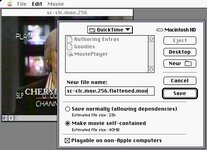 However don't expect modern QuickTime player to understand a Codec that old; we'll need VLC: 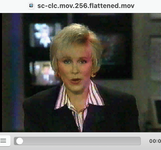 ...because the codec is the original Road Pizza from QuickTime 1.0... 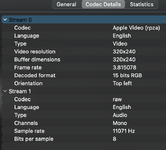 ...but ffmpeg can probably take care of that! Or, it could if it's support for very old codecs wasn't wonky: 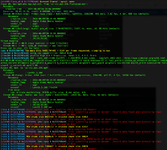 (I'm hoping "this should not happen" shows up in a future FloppyEmu error message.) ... so let's deconstruct the movie into lossless frames and audio: ffmpeg -i sc-clc.mov.256.flattened.mov frames/frame%05d.pngffmpeg -i sc-clc.mov.256.flattened.mov audio.wav... and weave them back together: ffmpeg -framerate 4 -i frames/frame%05d.png -i audio.wav -c:v libx264 -pix_fmt yuv420p -c:a aac -b:a 192k sc-clc.mov.256.mp4This (specifically, the yuv420p statement) gets us a file that will both QuickLook correctly, and play back in modern QuickTime Player. The frame rate was a guess (based on classic MoviePlayer reporting ~4 fps on a 040, and VLC thinking it was 3.8 something), but it turned out to be correct. 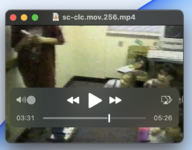 | |
Posted by: pl212 on 2024-08-09 21:12:54I suspect they're PICT images so the image is in the resource fork.My go-to tool under classic MacOS is DeBabelizer, which has very powerful batch operations, and I'm sure can convert resource PICTs into either file PICTs, or something more useful such as tif/png/jpg... | |
| < 3 |
