68kMLA Classic Interface
This is a version of the 68kMLA forums for viewing on your favorite old mac. Visitors on modern platforms may prefer the main site.
| Click here to select a new forum. | |
| My first 68k Mac - Macintosh SE 2x 800k | |
| Posted by: olePigeon on 2024-04-30 08:15:20 OK, now I'm really curious what the last two extensions are. The Big Mac and the "Splat" cursor. | |
Posted by: Jase on 2024-05-07 23:35:33OK, now I'm really curious what the last two extensions are. The Big Mac and the "Splat" cursor. I haven't got the SE set up at the moment but I'll take a look in a few days and let you know. 🙂 | |
| Posted by: olePigeon on 2024-05-08 08:30:53 @Jase I really hope it makes a splat noise when the mouse hits the edge of the screen. 😀 | |
Posted by: Jase on 2024-05-19 23:21:46@Jase I really hope it makes a splat noise when the mouse hits the edge of the screen. 😀 Disappointment time - this doesn't happen. 😆 I've been unable to ascertain what exactly the Splat extension does or where to locate it. This is all that Find File turned up... 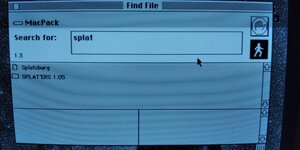 Every time the SE boots up, these programs immediately start... 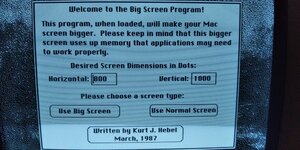 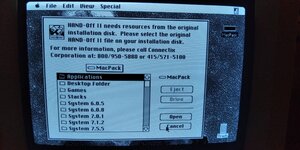 ...and I'm unable to find a way to uninstall them or at least stop them from starting up after every time the SE boots. It's really annoying because I'm sure that whoever created this image meant well but I don't need these programs and HAND-OFF II isn't even complete anyway. There's nothing in Control Panel that provides the option to remove or disable them. 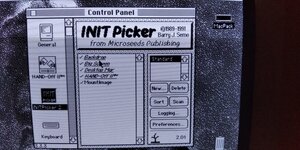 Deleting the program folders hasn't made a difference because they still appear after the OS has booted. Any suggestions? | |
| Posted by: bibilit on 2024-05-19 23:44:32 In the System folder, there is a startup one (IIRC) Removing what is inside should solve your issue. | |
Posted by: Jase on 2024-05-20 00:53:30In the System folder, there is a startup one (IIRC) Yes, that did it! 🥳 The set-up is slightly different - the files were located inside the System 6.0.8 folder - it doesn't appear to have a startup one. I sent them to the trash, emptied it, rebooted and the annoyance was at an end. Thanks for that. 🙂 | |
| Posted by: cheesestraws on 2024-05-20 02:45:56 Yes, control panels and extensions live in the System Folder in 6.0. They were moved into subfolders in 7.0 to help clean up the system folder, because it was getting extremely chaotic | |
Posted by: Jase on 2024-05-20 04:56:27Yes, control panels and extensions live in the System Folder in 6.0. They were moved into subfolders in 7.0 to help clean up the system folder, because it was getting extremely chaotic Got it. I'll have to spend some time brushing up on System 6 (and 7) - most of my Mac experience has been with OS X/XI and occasionally 9. | |
Posted by: olePigeon on 2024-05-21 08:26:34Disappointment time - this doesn't happen. 😆Well, it's a good idea! Especially if you had a second "Rated R" version where your mouse splats against the edge too hard, it'll leave blood splats and start trailing blood after a while. | |
| < 3 |