68kMLA Classic Interface
This is a version of the 68kMLA forums for viewing on your favorite old mac. Visitors on modern platforms may prefer the main site.
| Click here to select a new forum. | |
| Problem with Mercury Electra SSD in beige MiniTower G3? | |
Posted by: Phipli on 2023-09-01 14:49:33Rev C ROM.Sigh. Going to need to drag out a Beige G3. Which means unsetting up the Centris 650 or the B&W. Another time perhaps. Both have ongoing projects. | |
Posted by: cgp on 2023-09-01 15:11:12This is why I said I don’t think the 8GB restriction applies to classic Mac OS, just OS X. Looks like you're right. And to confirm, I dug out an old 12GB drive which has an 8GB OSX volume plus a 4GB OS9 (which is above the 8GB limit) and I stuck it in my Beige G3 Tower. It booted the OS9 volume just fine. This was the original drive from a B&W G3. I've always understood the limitation applies to OS9 as well as OSX - but clearly not. I've always taken this report as gospel - https://lowendmac.com/mail/mb07/1210.html#0 - since Ken was in a position to know. So I theorize that the limitation is due to the OpenFirmware IDE support which BootX, the OSX booter, uses. Whereas OS9 uses IDE support in the ToolBox ROM and doesn't use OFW. | |
Posted by: croissantking on 2023-09-02 00:24:42So I theorize that the limitation is due to the OpenFirmware IDE support which BootX, the OSX booter, uses. Whereas OS9 uses IDE support in the ToolBox ROM and doesn't use OFW.This makes sense to me. What I find interesting is that the original iMac (Rev A only?) has the OF limitation too. It’s not strictly an Old World thing. | |
Posted by: CC_333 on 2023-09-04 22:09:54What I find interesting is that the original iMac (Rev A only?) has the OF limitation too. It’s not strictly an Old World thing.The original iMac was an odd one. If I'm not mistaken, it was a sort of transitional machine that was predominantly New World, but with notable Old World vestiges still extant (internal use of legacy ports (for example, DA-15 for connecting the internal CRT to the LB and serial for the IrDA sensor on early iMacs (Rev. A for sure, and maybe also Rev. B?), the presence of an unimplemented but more or less functional internal floppy support). I'm sure some of the Old World OpenFirmware quirks were carried over too. c | |
Posted by: Phipli on 2023-09-04 22:26:39The original iMac was an odd one. If I'm not mistaken, it was a sort of transitional machine that was predominantly New World, but with notable Old World vestiges still extant (internal use of legacy ports (for example, DA-15 for connecting the internal CRT to the LB and serial for the IrDA sensor on early iMacs (Rev. A for sure, and maybe also Rev. B?), the presence of an unimplemented but more or less functional internal floppy support). I'm sure some of the Old World OpenFirmware quirks were carried over too.The iMac is 100% New world, in that what this means is that they stopped using the traditional large logic board based ROM. Those features are a separate thing to old world / new world really. Note they have an unpopulated ADB port on the logic board too, but serial and ADB were retained until the Yikes on the board, beyond with serial (it was used for the modem ports). ADB was retained in the chipset in the form of the cuda chip embedded in other chips for ages, but Yikes boards were the last time the footprint existed that I know of. | |
| Posted by: CC_333 on 2023-09-05 00:03:29 Ah, of course! The disk-based RAM thing is pretty much what makes a Mac New World (that and the inclusion of onboard USB), and I totally forgot that point! c | |
Posted by: Phipli on 2023-09-05 00:10:56that and the inclusion of onboard USBNot this, it happened at the same time, but New World just refers to the ROM change. | |
Posted by: croissantking on 2023-09-05 03:34:05Not this, it happened at the same time, but New World just refers to the ROM change.I think it made sense to make this transition with Mac OS X on the horizon, which would no longer need the Toolbox. So they could save costs by using a smaller chip, and add flexibility by making it flashable. Apple were traditionally very protective of their ROM code - but maybe by this point it was less of a concern. I imagine it would be easy to extract the contents of the Mac OS ROM file. | |
| Posted by: ktkm on 2023-09-08 06:01:54 Here’s an update on the Mercury Electra SSD in a Beige G3 MT. The Acard ATA-133 AEC-6280M arrived an hour ago with cabling. Instalment was instant, and the system recognised the card right away. I booted from a 9.2.1 CD, opened Drive Setup, found Mercury Electra SSD (120 GB), made two partitions and installed MacOS 9.2.1. So far, everything works nicely. After benching the drive against the stock configuration, I can gladly say it’s almost five times faster. If I had known, I would only have bought the AEC-6280M, which cost me roughly 24 USD. I’ll do some more tests and post some pictures later this weekend. Thanks for all the help so far! | |
Posted by: SparrowRat on 2023-09-08 06:56:07DA-15 for connecting the internal CRT to the LBThis is present for at least the rev C as well. | |
Posted by: croissantking on 2023-09-08 07:28:28I just ordered the PCI IDE/ATA card with a 2.5-inch SSD drive and a 3.5-inch adapter. It set me back 200 USD the AEC-6280M, which cost me roughly 24 USD How did you go down from 200 to 24 dollars? Haha. | |
Posted by: ktkm on 2023-09-08 07:54:00How did you go down from 200 to 24 dollars? Haha.Well, the extra SSD drive was 170 USD, but it seems as if I don’t need it now when Mercury is working. | |
Posted by: croissantking on 2023-09-08 07:56:22Well, the extra SSD drive was 170 USD, but it seems as if I don’t need it now when Mercury is working.That seems really expensive. Last I checked, a 1TB Crucial MX500 was around £70 over here in the UK. | |
Posted by: ktkm on 2023-09-08 08:12:21That seems really expensive. Last I checked, a 1TB Crucial MX500 was around £70 over here in the UK.Yes, really expensive! The drive I ordered was an new old stock 2.5 Transcend 64 GB IDE/ATA SSD. I went with it because I use one in my Pismo and it feels reliable. | |
| Posted by: ktkm on 2023-09-13 00:37:31 Hello again! After fiddling for a while and installing a ton of software, everything seems to work smoothly and no “deep sleep” issues. The only weird thing I can think of is that the Acard ATA-133 is recognised as “SCSI-buss 1” -- and I haven't found anything in the manual that explains why. 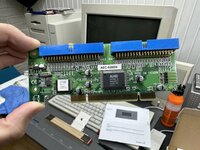 Here’s the Acard ATA-133 AEC-6280M (version 2.14). 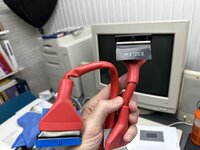 The (PATA?) flat cable came with thick rubber insulation that I had to peel off in order to make it fit inside the Minitower. 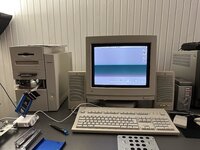 Proof of concept! (Btw. If someone knows a good source for a 3.5-inch mounting bracket adapter, I’d love to know!) | |
Posted by: Phipli on 2023-09-13 00:46:25The only weird thing I can think of is that the Acard ATA-133 is recognised as “SCSI-buss 1” -- and I haven't found anything in the manual that explains why.That's normal. SATA cards are too. They interface to the SCSI hooks in open firmware to be bootable. I forget why, probably faster or something. | |
Posted by: ktkm on 2023-09-13 00:56:23That's normal. SATA cards are too. They interface to the SCSI hooks in open firmware to be bootable. I forget why, probably faster or something.Well, as long as it’s faster I’m okey! 😉 Thanks! | |
Posted by: MacKilRoy on 2023-09-13 04:24:55Here’s an update on the Mercury Electra SSD in a Beige G3 MT. What are your read/write speeds? I’m interested to know as I’ve only been able to get 10MB/sec from a PCI SATA card and SATA SSDs. | |
Posted by: ktkm on 2023-09-13 05:20:23What are your read/write speeds? I’m interested to know as I’ve only been able to get 10MB/sec from a PCI SATA card and SATA SSDs.Here are some read/write tests performed using Hard Disk ToolKit 2.0.6. Looks pretty solid!? 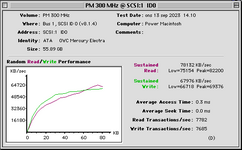 | |
Posted by: macuserman on 2023-09-13 06:13:00Btw. If someone knows a good source for a 3.5-inch mounting bracket adapter, I’d love to know!I use this one from amazon, I've found it works in nearly any situation as it has so many different mounting holes in it. https://www.amazon.com/dp/B00G57BN1M?ref=ppx_yo2ov_dt_b_product_details&th=1 | |
| < 3 > |