68kMLA Classic Interface
This is a version of the 68kMLA forums for viewing on your favorite old mac. Visitors on modern platforms may prefer the main site.
| Click here to select a new forum. | |
| Classic Mac Restoration (First Post) | |
| Posted by: LaPorta on 2023-09-16 05:24:14 The screen is way too large. A classic screen should display 7.11" wide by 4.7" high (I assume being outside the US, 18.06 x 12.06 cm would be easier). The screen won't even project where you are seeing that distortion at the bottom. If it persists, one of the deflection magnet rings on the back of the CRT yoke might need some adjustment. I'd get the height and width adjusted first, though. | |
Posted by: s_pupp on 2023-09-16 06:56:08So I started adjusting the screen and have it looking really nice! I do notice a slight bow at the bottom of the screen, attached some photos hardly noticeable but it is there, anyone shed any light on to what maybe causing this ? Would it be fixable with the adjustments at the rear? or is it something more sinister. It seems that it’s time to adjust the magnets at the back of the CRT, fiddling with them very near the lethal voltages. Oh what fun. Be careful; have the magnets facing you, and look at the screen through a mirror. Wear insulating gloves, and keep one hand in your pocket to avoid providing an inadvertent path to ground. When you are done, be sure to use something to keep the magnets from moving. I used to use my wife’s nail polish for this. It’s not a simple process - when you adjust one magnet, it doesn’t just affect that part of the screen, but also adjacent parts. You then have to adjust the adjacent magnets, which then leads to endless fiddling, trying to get it right. I have not been successful at this. Some here who are far more patient than I am have been successful, though. | |
Posted by: 68kPlus on 2023-09-16 18:58:16Lonnie is ok, it has everything I need, yes been looking for more broken Macs. I had the original iMac Bondi Blue, which I though I had stored under my house but can't find it anywhere, raised on Apple II's and remember them being tossed out at school 😢, I have my old Floppies and the disk II drive. I still have my Apple G5 tower but not quite vintage, so yeah no others but now on the hunt!!What a shame you can't find your iMac - the Bondi Blue would be an awesome restoration project (if it didn't work correctly). It's always painful looking back knowing what you could have saved or what was thrown out. I also own a 2007 iMac, but I forgot to add it to my signature. Yeah, that's all I did with the image. It worked perfectly, probably because they're both disk images. The emulator idea probably does work, but I never tried it. From memory you can emulate it with Basilisk II. Perhaps if we can find enough people around Australia who are interested something could be organized. I know a place in Deloraine that would be great (Meander Valley Performing Arts Centre, they have a hall). Just an idea anyway 😄 | |
Posted by: 68kPlus on 2023-09-16 19:00:17It seems that it’s time to adjust the magnets at the back of the CRT, fiddling with them very near the lethal voltages. Oh what fun.Be careful with the CRT neck though, I wrecked a Classic doing this (by opening it, the neck board just came off suddenly). They are very fragile! | |
Posted by: s_pupp on 2023-09-16 19:22:41Be careful with the CRT neck though, I wrecked a Classic doing this (by opening it, the neck board just came off suddenly).When I removed the neck board from my wife’s Classic to service the analog board, I saw that the board was hot glued to the CRT neck. While reassembling it, I found myself worried about applying hot glue to the glass, for fear of the heat shattering it. Does anyone have advice on safely securing the neck board to the CRT neck so that it does not detach during shipping? | |
Posted by: 68kPlus on 2023-09-16 19:25:04When I removed the neck board from my wife’s Classic to service the analog board, I saw that the board was hot glued to the CRT neck. While reassembling it, I found myself worried about applying hot glue to the glass, for fear of the heat shattering it.That's a good question actually. Generally I don't believe they just fall off during shipping, as I've had two compacts sent (An SE and the Classic) and neither had that problem, but I guess it's possible. Not sure to be honest, perhaps some kind of putty/silicon? | |
| Posted by: LaPorta on 2023-09-16 19:34:08 I've re-hot glued them: no issue. Remember: the neck there glows warm from the element inside the glass - it's meant to warm up. | |
| Posted by: 68kPlus on 2023-09-16 21:09:37 Good point, I forgot about that | |
| Posted by: LaPorta on 2023-09-16 21:34:49 If you were really that concerned, I suppose some plain old rubber cement would work. | |
Posted by: Benno on 2023-09-17 00:32:47The screen is way too large. A classic screen should display 7.11" wide by 4.7" high (I assume being outside the US, 18.06 x 12.06 cm would be easier). The screen won't even project where you are seeing that distortion at the bottom. If it persists, one of the deflection magnet rings on the back of the CRT yoke might need some adjustment. I'd get the height and width adjusted first, though. Thanks, I will try that first, don't think it worries me enough to go messing with magnets, hopefully adjusting the screen size will help. I read somewhere to cut some A4 paper to the size attach to the screen and adjust that way, sounds feasable. | |
| Posted by: Benno on 2023-09-20 00:53:04 Went looking through old stuff in storage, hoping the Indigo Blue iMac was there not looking good 😞 I did find the power cord though, but also found the Imation Super Disk, which got me thinking would I be able to format and write to disks(1.44mb) using the Super Disk and then use them in the Mac Classic as it has a super drive ? Also finally received the CR2032, which will replace the lithium battery. | |
| Posted by: Benno on 2023-09-20 02:10:11 More research maybe possible now just need t find my original 1.44mb floppies or buy one to test; 1.) Plug-in your Imation SuperDisk SD-USB-M into the main power. 2.) Plug-in the USB cable into your iMac, MBP, etc. 3.) Wait around 10 minutes. 4.) Only now insert your Floppy Disk into your Imation SuperDisk SD-USB-M. 5.) Open up 'Disk Utility' - it should now appear in the Disk Utility named "Untitled'. 6.) A Floppy Disk icon will now appear on your Desktop. From here simply open the file and copy the content. | |
| Posted by: LaPorta on 2023-09-20 02:32:04 Short answer: yes. I have one of those drives. Can't use 800k disks, though. Question: Which Mac will you use it with? The Mac needs to be able to use/write to HFS disks. Also: why the 10-minute wait time? | |
Posted by: Benno on 2023-09-20 02:39:11Short answer: yes. I have one of those drives. Can't use 800k disks, though.Yeah it would be 1.44, the idea is to plug it into the current MacMini (Silicon) running Ventura, then create disk images..maybe using basilisk? or just download images. Have no idea of the ten minute wait it was just researched from the net | |
| Posted by: Forrest on 2023-09-20 02:59:47 If you have an older Mac that runs OSX 10.4.x, then you can write 1.4 MB disks with your Imation SuperDisk. | |
Posted by: Benno on 2023-09-20 03:16:15If you have an older Mac that runs OSX 10.4.x, then you can write 1.4 MB disks with your Imation SuperDisk.Ah so 13.5 is not good, I did find my old MacBook G4, will see if that fires up | |
| Posted by: LaPorta on 2023-09-20 05:09:52 Yes the MacBook G4 is best. I was afraid you’d be running something like Ventura, which won’t even read HFS, let alone write a disk. The nice thing about using your G4 is you won’t have to write images to the disk: you can just copy files as you’d copy any files from one Mac to another (drag and drop) using a floppy, greatly simplifying this whole thing. | |
| Posted by: Forrest on 2023-09-20 08:16:47 A MacBook G4 is an excellent machine for this purpose because you can still browse the internet and download programs for your Classic Mac, using the TenFourFox or InterWebPPC web browsers and write them to floppy disk. | |
| Posted by: Rfx222 on 2023-09-25 09:41:57 As LaPorta stated your screen adjustments are a bit large, I think classics looked similar to this when left factory... reduce VSize and a bit on HSize. 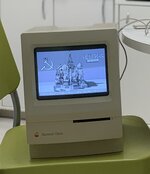 | |
Posted by: Benno on 2023-09-25 22:55:16As LaPorta stated your screen adjustments are a bit large, I think classics looked similar to this when left factory... reduce VSize and a bit on HSize.View attachment 62668 Hi, thanks is this ok or should I go more on the vertical height ? Edit or should I say less! | |
| < 3 > |