68kMLA Classic Interface
This is a version of the 68kMLA forums for viewing on your favorite old mac. Visitors on modern platforms may prefer the main site.
| Click here to select a new forum. | |
| Bombed Macintosh Classic Failing to start after attempted fix + recap | |
Posted by: Phipli on 2023-07-09 14:38:10The problem might be this general area, but as far as I can tell all the traces have proper continuity (I've done quite a bit of prodding here):For future reference - a flat head screwdriver and care is ok for a ROM chip. Best is a wide and thin one so you can get it in the gap at the end. Once it starts lifting, angled tweezers work really well to lift evenly, one side at a time, *between* the pins. | |
Posted by: Kouzui on 2023-07-09 14:44:05Do you have some liquid flux? Its the secret trick. Flux makes your soldering better, as if by magic.I do. I've got a syringe of the no-clean stuff everyone recommends. On the topic of soldering, though, I don't quite understand where those 10/11 spots are on the board. I was going to use the burn-in connector anyway, since I agree it would be easier. | |
Posted by: Kouzui on 2023-07-11 18:12:54Using the burn in connector is likely easier:Would you be able to point out where this is on the board? I've received the cable. | |
Posted by: zigzagjoe on 2023-07-11 18:46:08Would you be able to point out where this is on the board? I've received the cable. 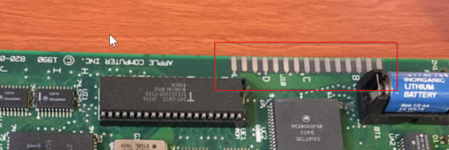 | |
| Posted by: Kouzui on 2023-07-11 19:59:54 Well, I've shorted the connection, but although it's not supposed to display any video as per the instructions, I get these lines. 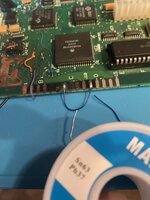 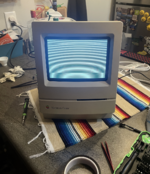 I'm looking into how to set up the OS X terminal to get the correct settings and see if the classic is sending anything via serial. Edit: I figured out the correct settings, but I double checked the cable I ordered and it seems like the pinout is different despite being an 8 pin mini DIN. Reordered new cables that are specifically for Macs but I'm not getting them until next Tuesday. So much for progress, unless anyone knows why the Classic's screen is behaving like that. It did it without the serial cable connected btw, so it's nothing to do with that cable. | |
| Posted by: davidg5678 on 2023-07-11 21:22:36 Bummer about the wrong pinout serial cable. For the USB-serial adapter, I had success using a standard DB9 adapter with a second DB9 to DIN cable connected between it and the Macintosh. Something like this: Does the stripe pattern you see onscreen appear only when the jumper is soldered on the burn-in connector? | |
Posted by: Kouzui on 2023-07-11 22:01:49Bummer about the wrong pinout serial cable. For the USB-serial adapter, I had success using a standard DB9 adapter with a second DB9 to DIN cable connected between it and the Macintosh. Something like this:Hah - those are the exact cables I just bought. Funny. As for the stripes, yes AFAIK, because it was showing a sad Mac previously. I haven't unsoldered it to check that it still does it, but I assume it would. | |
| Posted by: Kouzui on 2023-07-17 15:50:06 Alright, I finally got the cable, hooked everything up, and... nothing. The Mac is still doing that lined screen, as well. 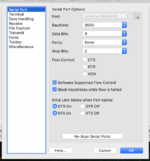 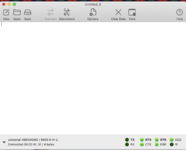 Am I doing something wrong? | |
| Posted by: Kouzui on 2023-07-17 16:48:30 And just to confirm, when I desolder the jumper wire the Mac goes back to chiming with the same sad mac error as before. | |
Posted by: Phipli on 2023-07-17 16:56:57And just to confirm, when I desolder the jumper wire the Mac goes back to chiming with the same sad mac error as before.Does it output any serial when it sadmacs? | |
Posted by: Kouzui on 2023-07-17 17:00:51Does it output any serial when it sadmacs?nope, nothing. | |
| Posted by: davidg5678 on 2023-07-17 18:23:40 Have you confirmed the serial adapter works with another computer? I think you can use a program called Zterm on a vintage Mac to test this. Another program that I used a couple of years back is called MicroPhone (I can't remember, but this one might be better than Zterm?). You should be able to type into the serial terminal on one computer and see the same letters appear on the other terminal. How did you decide which pins were the right ones to connect together? Maybe it's worth trying to connect directly to the SMD IC rather than the burn-in connector. Did you use a multimeter's continuity mode to verify you soldered to the right parts of the burn-in connector? | |
Posted by: Kouzui on 2023-07-17 18:49:42Have you confirmed the serial adapter works with another computer? 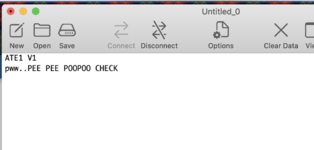 works when my Mac Plus talks to it on Zterm. How did you decide which pins were the right ones to connect together?See the electrical diagram posted somewhere on page 2 of this thread. Maybe it's worth trying to connect directly to the SMD IC rather than the burn-in connector. Did you use a multimeter's continuity mode to verify you soldered to the right parts of the burn-in connector?I did confirm continuity between the pin and the burn-in connector. | |
| Posted by: zigzagjoe on 2023-07-17 19:39:54 You could try the other serial port on the chance it's an error in the instructions | |
Posted by: Kouzui on 2023-07-17 20:22:58You could try the other serial port on the chance it's an error in the instructionsNothing on the other ports. For curiosity's sake, I soldered a wire straight from the pad next to the pin on the VIA chip. Same stripes, same radio silence from the Mac. | |
| Posted by: Kouzui on 2023-08-03 21:07:29 Ok, I've got one last effort I can make to save this thing. I have a reloaded board. I have the parts. We can rebuild him. We have the technology. 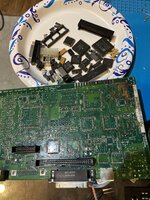 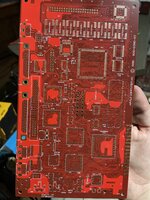 | |
| Posted by: joshc on 2023-08-04 03:56:18 Good luck. I was going to suggest the Reloaded board is the way to go with that one. The bombed board has a lot of damaged traces and vias near the CPU. | |
Posted by: davidg5678 on 2023-08-04 06:53:28Ok, I've got one last effort I can make to save this thing. I have a reloaded board. I have the parts.Where did you find this? Are they still available for sale somewhere? I've been thinking about doing a similar job to my battery-damaged classic board. I tried the same serial diagnostic that you did, but I couldn't get it to work either. My Classic must be too far gone. I think it might be possible for me to fix it if I try for long enough, but my efforts would probably be better spent transferring the components to a new PCB like you are doing. | |
Posted by: joshc on 2023-08-04 07:05:06Where did you find this? Are they still available for sale somewhere?@maceffects seems to be out of stock, but the gerbers are here https://github.com/kr239/Macintosh-Classic-Reloaded | |
Posted by: Kouzui on 2023-08-04 19:17:06Where did you find this? Are they still available for sale somewhere?I bought the very last one Mac Effects had, sorry to say. You'd probably have to hit up a PCB fab company if you want one yourself, because I haven't seen it for sale anywhere else. | |
| < 3 > |