68kMLA Classic Interface
This is a version of the 68kMLA forums for viewing on your favorite old mac. Visitors on modern platforms may prefer the main site.
| Click here to select a new forum. | |
| PowerBook 540c black coffee edition | |
| Posted by: MacUp72 on 2023-10-10 22:21:57 hm, have you tried Cache-22 ? or different versions of MacBench? 4 , 3 , 2 Gauge Pro is PPC-only if I'm correct | |
| Posted by: croissantking on 2023-10-22 01:23:43 I backed off on the overclock as it wasn’t stable running MacBench 3. I have another 33MHz processor card and I tried installing the oscillator in this one to see if it would fare better, but with the mod it weirdly stopped working with my 32MB RAM card (giving death chimes). | |
| Posted by: MacUp72 on 2023-10-22 02:02:11 with the original 16,6Mhz oscillator back in and the 32MB RAM card, was it stable? | |
Posted by: croissantking on 2023-10-22 04:11:29with the original 16,6Mhz oscillator back in and the 32MB RAM card, was it stable?Yes, indeed. | |
| Posted by: croissantking on 2023-10-22 04:13:30 Try running ‘all graphics tests’ in Macbench 3 and see if yours gets through it. At 40MHz it would crash every time. | |
| Posted by: MacUp72 on 2023-10-22 04:32:57 this is your 40 Mhz osci( top right) ? I have not looked up its' PDF specifics, maybe it is not fully compatible? soldering ok? 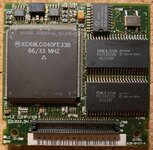 | |
Posted by: croissantking on 2023-10-22 04:35:47this is your 40 Mhz osci( top right) ? I have not looked up its' PDF specifics, maybe it is not fully compatible? soldering ok? Yes that’s the one. | |
Posted by: jmacz on 2023-10-22 07:53:54I backed off on the overclock as it wasn’t stable running MacBench 3. I have another 33MHz processor card and I tried installing the oscillator in this one to see if it would fare better, but with the mod it weirdly stopped working with my 32MB RAM card (giving death chimes). Ok, I just received the oscillator but going to hold off on installing it. | |
Posted by: croissantking on 2023-10-22 09:53:02Ok, I just received the oscillator but going to hold off on installing it.Well, you might have more luck than me? | |
| Posted by: 3lectr1cPPC on 2023-10-22 09:54:27 I still haven't ordered them myself - now I am a bit hesitant to try... If jmacz succeeds then I might. It does seem to me like it may be a heat issue though - AFAIK people are usually able to successfully overclock the desktop 040 chips from 33 to 40MHz without trouble, especially since they only crash under load. | |
Posted by: croissantking on 2023-10-22 10:02:31I still haven't ordered them myself - now I am a bit hesitant to try... If jmacz succeeds then I might.I agree, it could be a heat issue. I’ll try the other CPU card again under stress with a 16MB RAM card I have and see how it goes. | |
| Posted by: MacUp72 on 2023-10-23 05:28:40 well I now ran MacBench 3 and there were no errors, shutdowns or similar. the disk test were running about an hour..so I shut it down then😎 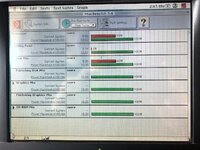 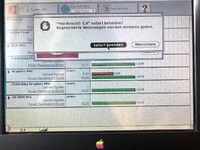 | |
| Posted by: 3lectr1cPPC on 2023-10-23 05:36:03 Is this at 40MHz? | |
| Posted by: MacUp72 on 2023-10-23 09:41:14 yes, still @40Mhz | |
| Posted by: jmacz on 2023-10-23 18:23:30 So I installed the oscillator. System comes up and TattleTech identifies the CPU at 40Mhz. Now working on getting MacBench installed. | |
Posted by: jmacz on 2023-10-23 20:21:29So I installed the oscillator. System comes up and TattleTech identifies the CPU at 40Mhz. Now working on getting MacBench installed. My PB540c was able to get through that MacBench 3.0 All Graphics Tests without any issues. This was at 40MHz. But note that although I did have the metal heatsink attached, I did not have the keyboard installed as I ran the test before closing everything back up again. After the tests completed, I touched the heatsink and it was hot but not enough where I couldn't keep my hand on it. I'm guessing having the keyboard installed would raise the temperature some more. Don't have time to test again right now with the keyboard installed as it's open right now as I'm trying to work on that rebuilt battery still. My system has a 16MB memory card (for a total of 20MB). I don't have a 32MB card to try. Also note I did run some disk operations (large copy of both big and small files) and it did fine on those. No issues. So I guess it's a success on mine? But will have to try the test again after I button everything back up in a few weeks after I either get my battery working or give up. | |
| Posted by: MacUp72 on 2023-10-24 01:20:06 looks good so far, right? heat..yes, I noticed that it got warmer when I overclocked my 3400c and 1400c, there's not much you can do about it, and these are ppc. So I replaced the old yellow thermal pads with Arctic blue ones (the 3400c also has an additional little fan inside). I also had some probs with a stable overclock in my 3400c, I tried two different crystals, 42 and 48Mhz (190/216Mhz) and @216Mhz it was unstable, so I went back to now stable 190Mhz.. 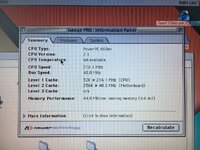 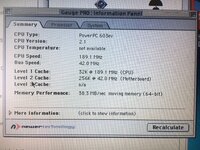 I will try to install an additional small copper heatsink, tiny Raspberry size but full copper, directly onto the thin heatsink.. it is under the powerboard, the heat sink is only 5mm thick, so it clears under the powerboard. 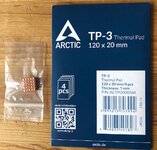 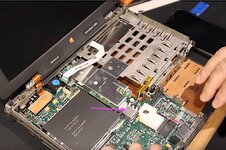 and for the 540c, well, there's no space to place a better/additional heatsink or even thermal pad between the CPU und the thin metal cover.. ( older photo, new crystal was not installed) 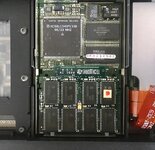 | |
Posted by: croissantking on 2023-12-04 07:51:56I backed off on the overclock as it wasn’t stable running MacBench 3. I have another 33MHz processor card and I tried installing the oscillator in this one to see if it would fare better, but with the mod it weirdly stopped working with my 32MB RAM card (giving death chimes).An update after poking at this a bit more. My second modded processor card apparently death chimes with either my 32MB RAM card, or my 8MB RAM card, but works fine with my 16MB card. With the 16MB card, it is totally stable, gets through MacBench. What the 32MB and 8MB cards have in common is that they have 70ns chips. The 16MB card has 60ns chips. Perhaps the slower chips can't keep up with the 40MHz bus. Although I'm pretty sure the processor card itself has 70ns chips on it, so this isn't a sound theory. A quick Google shows that: 70ns = 14.28 MHz 60ns = 16.6 MHz Which doesn't make sense to me either, considering the RAM is on a 33MHz bus - is the RAM addressed at /2 frequency? | |
Posted by: croissantking on 2023-12-04 08:01:11so today I made the last mod to my black coffee edition 540c, installed an extended 32MB RAM card and a little CPU boost with a new 20 MHZ oscillator.Does your 32MB RAM card have 60 or 70ns chips? | |
| Posted by: jmacz on 2023-12-04 09:42:23 FWIW, my system has been stable. I haven't had a single issue with it. And it's still using the 16MB which I'm assuming is just like yours with the 60ns chips. | |
| < 3 > |