68kMLA Classic Interface
This is a version of the 68kMLA forums for viewing on your favorite old mac. Visitors on modern platforms may prefer the main site.
| Click here to select a new forum. | |
| Power Mac 7500 | |
Posted by: Phipli on 2023-04-14 14:49:17Did all your steps. When taking out the cpu card to clean It i found that it wasn’t in all the way. Reseated it and cleaned the cards memory and the cpu. Nothing different happened.Try a different RAM SIMM and clean the CPU pins again. After that, I'm sorry to say that the next thing to try is a replacement processor. | |
| Posted by: joshc on 2023-04-14 14:50:22 Do you have a multimeter? And if so, can you measure the voltages from the power supply? Does the CPU get warm at all if you leave it running for a few minutes? | |
| Posted by: macuserman on 2023-04-14 16:11:21 Where are you located? I can probably help out with a couple known good components to test. | |
Posted by: ExplorerZ on 2023-04-14 23:13:30Do you have a multimeter? And if so, can you measure the voltages from the power supply?The CPU gets incredibly hot to the touch after a minute. | |
Posted by: ExplorerZ on 2023-04-14 23:14:00Where are you located? I can probably help out with a couple known good components to test.Acworth, Georgia | |
Posted by: ExplorerZ on 2023-04-15 05:09:47Do you have a multimeter? And if so, can you measure the voltages from the power supply?What should the voltage be? And how do I check it, | |
Posted by: ExplorerZ on 2023-04-15 06:00:04The CPU gets incredibly hot to the touch after a minute.Cut that. After checking again after changing the switches up like you said earlier, it gets just a little warm after a minute | |
Posted by: macuserman on 2023-04-15 06:01:05Acworth, GeorgiaI’m in Woodstock so I might be able to help you out. | |
Posted by: Phipli on 2023-04-15 06:01:09Cut that. After checking again after changing the switches up like you said earlier, it gets just a little warm after a minuteYeah, I halved the clock speed. Sounds like the processor is trying to run. | |
Posted by: ExplorerZ on 2023-04-15 06:55:46What should the voltage be? And how do I check it,Tried looking up YouTube videos but none of them were about vintage computers. I also don’t know how much it should be outputting. | |
Posted by: Phipli on 2023-04-15 07:50:57Tried looking up YouTube videos but none of them were about vintage computers. I also don’t know how much it should be outputting.Youtube is a weird place to look for a picture 🤣 Not verified. Take care, do not short it. Best to only have one probe on the power connector, pick up ground from somewhere else. Best way might be to clip the negative probe to something that is grounded, (make sure it does not slip), then poke the positive probe in the back of the connector. Make sure your probes are in the correct sockets on the multimeter for measuring Voltage, if you plug them in wrong, you are likely to kill the PSU. If you haven't done this before, it might be worth asking a friend with practice doing this to show you how to do it? | |
Posted by: ExplorerZ on 2023-04-15 09:20:59Youtube is a weird place to look for a picture 🤣Will this multimeter work? 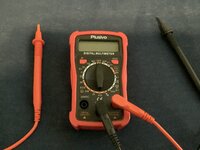 | |
Posted by: ExplorerZ on 2023-04-15 09:42:21Youtube is a weird place to look for a picture 🤣10 pin molex connector, 1&6 are 3.7v 2&7 are 3.7v 8&3 are 3.7v 9&4 are 3.7v 10&5 are 3.3v 22 pin molex connector, 1&12 are 4.9v Everything else is 0v, probably messed something up | |
Posted by: Phipli on 2023-04-15 09:45:1010 pin molex connector,No 12v, -12v -5v? | |
Posted by: ExplorerZ on 2023-04-15 10:54:27No 12v, -12v -5v?I’m having trouble turning on the power supply to test the 22 pin. | |
Posted by: ExplorerZ on 2023-04-15 11:03:49No 12v, -12v -5v?Ok, I’m getting 5v from black on 11 and red on 22. Pretty sure that’s supposed to be 12v. May just be because it’s not turned on | |
Posted by: ExplorerZ on 2023-04-15 11:11:36I’m having trouble turning on the power supply to test the 22 pin. 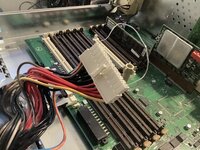 As long as this paperclip is in there, it’s on As long as this paperclip is in there, it’s on | |
Posted by: ExplorerZ on 2023-04-15 11:12:48View attachment 55298As long as this paperclip is in there, it’s onStill having trouble getting readings though | |
Posted by: Phipli on 2023-04-15 11:18:58Still having trouble getting readings thoughErm, no. Measure from the /back/ of the connector with it plugged into the board and it powered on. | |
Posted by: ExplorerZ on 2023-04-15 11:38:01Erm, no. Measure from the /back/ of the connector with it plugged into the board and it powered on.Oh... That makes more sense. | |
| < 3 > |