68kMLA Classic Interface
This is a version of the 68kMLA forums for viewing on your favorite old mac. Visitors on modern platforms may prefer the main site.
| Click here to select a new forum. | |
| Macintosh SE and a HyperCharger '020 Accelerator | |
Posted by: Phipli on 2023-04-12 05:17:51The extra accelerator RAM can be used as a RAM disk but that's about it, so even if it did recognise it, its of limited use. If the system is able to see/use 4MB then you should be good to go as that's a good amount for an SE.I've seen this written a few times, but I don't quite agree - the RAM showing as a disk is how they implemented the extra RAM on boards with a MMU. It shows like this when they aren't quite set up correctly. You needed virtual, set up in a very specific and careful way, with most boards, but sometimes there were other things to get right. If you have a board doing this, drop me a message and I'll see if we can get it behaving. The board in this thread... the logic board and card RAM are overlaid in the same address space it seems. There is no MMU. You should have 1MB on the logic board and 4MB on the card for best performance. You should be testing using System 6.0.7 or older, and need to try to get the ECC branded drivers working, to minimise unknowns. Please leave the jumpers alone. This isn't plug and play USB. In the olden days, doing things wrong sometimes let the magic smoke out. You don't want to kill the card or SE. You have a board that makes your SE about 6x faster at the moment. Let's not create a card that makes the computer run at 0% of stock. | |
Posted by: bredfrown on 2023-04-12 05:19:24Really, with accelerators this old, you tend to either get the system RAM or the accelerator RAM, not both. The extra accelerator RAM can be used as a RAM disk but that's about it, so even if it did recognise it, its of limited use. If the system is able to see/use 4MB then you should be good to go as that's a good amount for an SE. The real benefit is from the CPU upgrade itself and sometimes an FPU.I'm content with the speed as is. 🙂 One thing that @Phipli brought up had to do with the ROM – he had a hunch that trying different drivers could possibly help getting this card's ROM into the RAM, and possibly have it run a bit faster. I noticed on my card, that the card wasn't able to load its ROM into RAM, even with the correct driver, and references "ROM Copy" (like it might be an extension of some sort). This configuration might not be correct, also: | |
Posted by: bredfrown on 2023-04-12 05:21:12I've seen this written a few times, but I don't quite agree - the RAM showing as a disk is how they implemented the extra RAM on boards with a MMU. It shows like this when they aren't quite set up correctly. You needed virtual, set up in a very specific and careful way, with most boards, but sometimes there were other things to get right.I will be leaving the jumpers 100% alone. | |
Posted by: Phipli on 2023-04-12 05:22:01I noticed on my card, that the card wasn't able to load its ROM into RAM, even with the correct driver, and references "ROM Copy" (like it might be an extension of some sort).Put 1MB RAM on the logic board. This will 75% chance solve that issue. | |
| Posted by: bredfrown on 2023-04-12 05:25:37 Will do! I'm going to use another set of 1 MB SIMMs. Also, I figured it would be wise for me to include this (I forgot to yesterday). This is what happened when booting with my previous set of 1 MB (4 256 KB SIMMs) on the logic board and 4 MB on the accelerator. I though that one of the SIMMs could be bad (bank 3?), but maybe this could be accelerator related?: | |
Posted by: Phipli on 2023-04-12 05:29:16Will do! I'm going to use another set of 1 MB SIMMs.No way of knowing without doing a load of testing. Probably just a dirty contact. Sometimes you have to reseat RAM a couple of times before it works. | |
Posted by: lobust on 2023-04-12 05:54:45No way of knowing without doing a load of testing. Probably just a dirty contact. Sometimes you have to reseat RAM a couple of times before it works.In the world of keeping old industrial electronics alive, Stabilant 22 is liquid gold. I dare say it would be equally great on simm socket contacts.... | |
Posted by: joshc on 2023-04-12 06:13:07the RAM showing as a disk is how they implemented the extra RAM on boards with a MMURight, yes, that's what I was referring to. Hadn't realised this one was absent of that so my comment can be ignored. Thanks for the correction. | |
| Posted by: bredfrown on 2023-04-12 07:31:35 OK – I just installed 1 MB (4 x known working sticks) and tried booting it up with 4 MB on the accelerator, and… I get the same Sad Mac error (attached). I just want to reiterate that I will not be touching the jumpers, but I watched a video and saw something interesting - it looks like Adrian is having a (maybe?) similar issue…?: I plan on double-checking those sticks on the accelerator, and swapping them out with another set of 4 MB, but I have a hunch this might be jumper related. I don't want to touch any of those jumpers unless we have a manual or someone happens to have the same card or other guidance. | |
Posted by: Phipli on 2023-04-12 07:34:53OK – I just installed 1 MB (4 x known working sticks) and tried booting it up with 4 MB on the accelerator, and… I get the same Sad Mac error (attached).Have you soldered in the resistors for the RAM? | |
| Posted by: bredfrown on 2023-04-12 07:36:42 I have not - could I "borrow" some from my broken SE/30? | |
Posted by: Phipli on 2023-04-12 07:42:52I have not - could I "borrow" some from my broken SE/30?Oh, I wouldn't - they're pennies. | |
| Posted by: Phipli on 2023-04-12 07:45:56 Just search Amazon or eBay for the cheapest 150 Ohm resistors. | |
| Posted by: bredfrown on 2023-04-12 07:46:28 Found some 🙂 | |
Posted by: ObeyDaleks on 2023-04-12 08:07:19Really, with accelerators this old, you tend to either get the system RAM or the accelerator RAM, not both. The extra accelerator RAM can be used as a RAM disk but that's about it, so even if it did recognise it, its of limited use. If the system is able to see/use 4MB then you should be good to go as that's a good amount for an SE. The real benefit is from the CPU upgrade itself and sometimes an FPU. True, in this case you would be able to either use the logic board’s 4MB or the card’s 4MB. I don’t know about this specific 020 card, but the 030 cards that I have (all support 16mb with connectix virtual - not just as RAM disk but actual RAM) have a much faster memory bus and that offers a pretty substantial boost in performance. Obviously in this case, you don’t get the extra RAM, so the bus speed would be the only benefit but it could be a pretty noticeable difference. | |
| Posted by: bredfrown on 2023-04-12 08:27:43 I saw this older thread as well after looking for the Connectix Virtual utility and figured I would add it here as well (for possible reference): Levco / SuperMac Prodigy SE accelerator and utilityI also tried the Prodigy RAMDisk application and it said I don't have enough RAM... Perhaps this is due to the lack of MMU too? The lack of sound is a show stopper too, as I wanted a SE to play some of the original B&W games that either don't like System 7 or don't run well on a 68030 Mac...
 68kmla.org
| |
Posted by: Phipli on 2023-04-12 08:48:13all support 16mb with connectix virtual - not just as RAM disk but actual RAMIn the background, hidden from view, a RAM disk is created and Connectix virtual uses it for virtual memory. It is like a double flip. It's how these cards work. At least that is what I've been told in the past, I realise that I should never completely trust things 🤣 | |
Posted by: Phipli on 2023-04-12 08:49:39I saw this older thread as well after looking for the Connectix Virtual utility and figured I would add it here as well (for possible reference):You don't have an MMU, Virtual won't do anything for you specifically. | |
| Posted by: bredfrown on 2023-04-12 11:31:30 I wanted to show something I found – I got the SE back together, and tinkered a bit with some different drivers. I came across one called the Dove Marathon Racer v2.3 that I decided to try out, and I noticed something odd. I don't know if this driver is actually doing anything, or is tricking MacEnvy, but with it installed, it's saying that the accelerator has a PMMU onboard. Among other things, it's saying I have a 68030 (which I know isn't correct), so I'm thinking it's definitely "faking it". 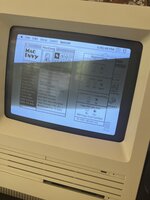 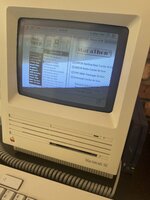 | |
| Posted by: Realitystorm on 2023-04-12 11:48:40 So... I did what I've been doing for a lot of accelerators, I dug up some contact names and went on linkedIn. I Just sent a message to Kevin Curran, let's hope for a repeat of my success with Lincoln from NewLife. "GCC was founded in 1981 during the onset of the video game craze. C.E.O. Kevin Curran and MIT classmates Doug Macrae and John Tylko." (GCC website 1998). Unfortunately no docs from the 80s on the cached website. | |
| < 3 > |