68kMLA Classic Interface
This is a version of the 68kMLA forums for viewing on your favorite old mac. Visitors on modern platforms may prefer the main site.
| Click here to select a new forum. | |
| Yet Another Netatalk 2.2 Fork | |
| Posted by: WombatPredator on 2022-01-19 13:38:46 I wanted to mention that I just found this thread, uttered a very loud "OMG YES" and woke up a small child in the process. I'm so happy you did all this work. Thank you. | |
Posted by: slipperygrey on 2022-01-26 20:34:47I wanted to mention that I just found this thread, uttered a very loud "OMG YES" and woke up a small child in the process. I'm so happy you did all this work. Thank you.You are very welcome! I'm glad that this is helpful for you. Did the child go to sleep again? | |
| Posted by: slipperygrey on 2022-01-26 20:49:23 Thanks to the continued contributions by @NJRoadfan and others, more patches are gradually being merged into this fork. If you checked out branch-netatalk-2-2-x a few weeks ago, I'd encourage you to pull the latest code and try it out! There may be bugs lurking, so please report back if you run into issues. Since the changeset was getting fairly substantial at this point, I drafted tentative release notes in the NEWS file. As a bonus, I also retroactively summarized the 2.2.6 release notes, which were actually never written to my best knowledge. One neat feature of Netatalk 2.2.x that I discovered fairly recently, is a fully functioning service discovery / zeroconf / Bonjour implementation. I knew of this from earlier, but wasn't able to get it to work at the time. If you configure Netatalk with '--enable-zeroconf', and have libavahi installed, Mac OS X / macOS will detect the AFP server in the Network browser. This works at least in Tiger, Big Sur, and Monterey that I've tested. So you may actually have an AFP file share running that something as old as System Software 6.0.7 and as new as Monterey both can connect to and get files off of! The caveat is that, to my best knowledge, you can't have a chain of authentication methods that both systems are able to use simultaneously for write access. So what I have here, for instance, is uams_randum.so for System 6, with a fallback to uams_guest.so for Monterey (read-only.) If someone knows of a way to configure a series of authentication methods that allow both full access, please do share with us! 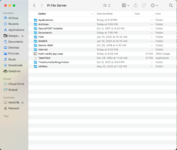 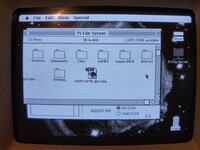 | |
| Posted by: davewongillies on 2022-01-26 21:40:07 @slipperygrey are you intending to switch the netatalk version to your fork in the RaSCSI easy_install.sh (I guess once you've cut a new release)? | |
Posted by: WombatPredator on 2022-01-27 00:09:01You are very welcome! I'm glad that this is helpful for you. Did the child go to sleep again?I lulled the child back to sleep with tales of the atalkd and afpd daemons that, once again, were whispering in the wires all through the house. Tomorrow, I'll tell the tale of papd who makes machines vomit paper. Always a favorite, that one. | |
| Posted by: NJRoadfan on 2022-01-27 04:05:36 Vomit indeed (there is evidence of debugging papd with the Apple IIgs scattered around here)..... By default A2SERVER scripts setup the UAMs as follows: - -ddp -tcp -uamlist uams_guest.so,uams_clrtxt.so,uams_randnum.so,uams_dhx.so,uams_dhx2.so If the setup script detects a RPi, it turns off DHX because of some weird string length bug. # disable DHX (DHCAST128) on Raspberry Pi, which refuses uams if the config string is too long - -ddp -tcp -uamlist uams_guest.so,uams_clrtxt.so,uams_randnum.so,uams_dhx2.so I haven't had any problem logging on from OS X, but I haven't tried both an older client and a new one at the same time. | |
| Posted by: WombatPredator on 2022-01-27 04:22:10 I'm running into some difficulties having the file server appear in the Chooser of a classic Mac using Ethernet on the same subnet as the Netatalk server. I have taken inspiration from the config of a MacIPpi (which works) and, as far as I can tell, they're pretty much identical. Using an older version of Open Transport, I can connect to afpd using the IP address of the Netatalk server but it just won't show in the Chooser. Is there a particular setting that needs to be enabled for this to work? Digging through the existing Netatalk documentation doesn't turn up much at all. Thanks! | |
| Posted by: NJRoadfan on 2022-01-27 04:30:22 Make sure atalkd is configured with the -router switch if you don't have any other routers (ex: Shiva Fastpath) on the network. I've had issues with netatalk on networks without a seed router or zone configured. Example atalkd.conf enp0s3 -router -phase 2 -net 1 -zone "My Zone" Substitute "enp0s3" with the correct Ethernet device name for your system. | |
Posted by: WombatPredator on 2022-01-27 04:56:54Make sure atalkd is configured with the -router switch if you don't have any other routers (ex: Shiva Fastpath) on the network. I've had issues with netatalk on networks without a seed router or zone configured.Thank you. I made the chance but to no avail. I do have an instance of MacIPRpi running, and it tunnels 192.168.0.x to 172.16.2.x. Its own atalkd.conf is completely empty, but it shows up in the Chooser of an old Mac. When I run nbplkup on both machines, I get: * on the MacIPRpi machine: macippi:TimeLord 65280.11:132
MacIPpi:AFPServer 65280.11:129
172.16.2.1:IPGATEWAY 65280.11:72
MacIPpi:netatalk 65280.11:4
MacIPpi:Workstation 65280.11:4
Hooper:ARA - Personal Server 65280.119:2
Hooper:Multi-User Client 65280.119:48
Hooper: Macintosh PowerBook 65280.119:252
Hooper:Workstation 65280.119:4* on the Ubuntu server I'm setting up: ubuntu:ProDOS16 Image 65280.179:3
ubuntu:Apple //e Boot 65280.179:3
ubuntu:Apple //gs 65280.179:3
ubuntu:TimeLord 65280.179:129
Netatalk:AFPServer 65280.179:128"Hooper" is a PowerBook. It's seen by (and sees) MacIPRpi. The Ubuntu server seems to grab adresses from the same range (65280) but doesn't show in the MacIPRpi list, and is not seen by Hooper. I'm very puzzled. | |
| Posted by: NJRoadfan on 2022-01-27 05:26:37 Make sure only one of the machines has the "-router" switch in atalkd.conf. Looks like you have a seed router clash, a common problem with Appletalk. | |
Posted by: WombatPredator on 2022-01-27 05:28:35Make sure only one of the machines has the "-router" switch in atalkd.conf. Looks like you have a seed router clash, a common problem with Appletalk.I'll double check, thanks. The MacIPRpi doesn't have anything in its atalkd.conf file but maybe the default is -router. I'll take a look. | |
Posted by: mactjaap on 2022-01-27 09:28:51I'll double check, thanks. The MacIPRpi doesn't have anything in its atalkd.conf file but maybe the default is -router. I'll take a look.In my MacIPRpi project I try to do things not to complicated. My goal is always for a user to start the Pi and use evrything without any configuration. If you just have a simple network with old Macintosh, MacBooks or Windows machines the MacIPRpi is in the middle. So no special atalkd.conf. You can connect with all kind of protocols to it. When you are running more complicated setup, with more Netatalk instances you can have problems. Also with boxes like the AsantéTalk. They sometimes show up, they sometimes don't. (if you reboot them they will probably show up). I have seen these problems too. A machine that is seen by one computer, but not by others. Sometimes it helps just to restart, trow away AppleTalk prep, these things. But I can be also in the network. On the MacIPRpi you can use some tools to dig into this more deeply, like tcpdump:
18:39:33.933608 AT 65280.65.253 > 0.nis:  nbp-lkup 2: "virtquadra:  Macintosh@*"
18:39:34.052149 AT 65280.65.253 > 0.nis:  nbp-lkup 2: "virtquadra:  Macintosh@*"
18:39:34.160021 AT 65280.65.253 > 0.nis:  nbp-lkup 2: "virtquadra:  Macintosh@*"
18:39:37.128791 AT 65280.65.253 > 0.nis:  nbp-lkup 3: "virtquadra:AFPServer@*"
18:39:37.964517 AT 65280.65.253 > 0.nis:  nbp-lkup 3: "virtquadra:AFPServer@*"
18:39:38.822588 AT 65280.65.253 > 0.nis:  nbp-lkup 3: "virtquadra:AFPServer@*"
18:39:39.686038 AT 65280.65.253 > 0.nis:  nbp-lkup 3: "virtquadra:AFPServer@*"
18:39:47.371449 AT 65280.65.nis > 0.nis:  nbp-lkup 4: "=:IPGATEWAY@*"
18:39:47.382667 AT 65280.239.nis > 65280.65.nis:  nbp-reply 4: "172.16.2.1:IPGAT   EWAY@*"(0) 72
18:39:47.414037 AT 65280.65.nis > 0.nis:  nbp-lkup 5: "172.16.2.5:IPADDRESS@*"
18:39:48.251150 AT 65280.65.nis > 0.nis:  nbp-lkup 5: "172.16.2.5:IPADDRESS@*"
18:39:49.090926 AT 65280.65.nis > 0.nis:  nbp-lkup 5: "172.16.2.5:IPADDRESS@*"
18:39:49.924194 AT 65280.65.nis > 0.nis:  nbp-lkup 5: "172.16.2.5:IPADDRESS@*"
18:40:01.577924 AT 65280.239.nis > 0.nis:  nbp-lkup 1: "=:=@*" [addr=65280.239.130]
18:40:01.584062 AT 65280.65.nis > 65280.239.130:  nbp-reply 1: "172.16.2.5:IPADDRESS@*"(0) 72 "virtquadra:AFPServer@*"(0) 251 "virtquadra:  Macintosh@*"(0) 252 "virtquadra:Workstation@*"(0) 4
18:40:01.584507 AT 65421.175.nis > 65280.239.130:  nbp-reply 1: "Asant▒Talk 94081D2A:Asant▒Talk@*" 252
18:40:01.584874 AT 65403.247.nis > 65280.239.130:  nbp-reply 1: "Asant▒Talk 940863E7:Asant▒Talk@*" 252
| |
Posted by: slipperygrey on 2022-01-27 09:30:26I'll double check, thanks. The MacIPRpi doesn't have anything in its atalkd.conf file but maybe the default is -router. I'll take a look.Yes, atalkd will try to be helpful and attempt to detect the topology of your network and dynamically alter its settings. So it makes sense that if you have two instances of Netatalk running in the same subnet in routerless mode you'll get a conflict there... | |
Posted by: WombatPredator on 2022-01-27 10:01:32In my MacIPRpi project I try to do things not to complicated. My goal is always for a user to start the Pi and use evrything without any configuration.Thank you so much for taking the time to respond. I'll look into this. And thank you for MacIPRpi - it's been in constant use for months and it's wonderful. I also need to check whether there might be a firewall issue. Maybe some ports are blocked and I'm not aware. | |
Posted by: slipperygrey on 2022-01-27 10:20:39@slipperygrey are you intending to switch the netatalk version to your fork in the RaSCSI easy_install.sh (I guess once you've cut a new release)?Indeed, this is my plan B. My plan A is still to try to convince Netatalk maintainers to merge all the patches and cut an upstream 2.2.7 release for us, and then pivot to using that with RaSCSI. 🙂 | |
| Posted by: mactjaap on 2022-01-27 14:08:24 Yes! 2.2.7 would be lovely. Modern times for old Netatalk! | |
Posted by: Byte Knight on 2022-01-27 17:01:07Indeed, this is my plan B. My plan A is still to try to convince Netatalk maintainers to merge all the patches and cut an upstream 2.2.7 release for us, and then pivot to using that with RaSCSI. 🙂That sounds awesome! How about throwing in Macproxy for the trifecta? 🙂 | |
Posted by: slipperygrey on 2022-01-27 18:38:30Vomit indeed (there is evidence of debugging papd with the Apple IIgs scattered around here)..... Small tip: You can use "-transall" as shorthand for "-ddp -tcp" 🙂 If the setup script detects a RPi, it turns off DHX because of some weird string length bug. How did you figure out that there's such a bug, and is it tracked somewhere by any chance? This completely explains why the DHX UAM has never worked for me, since I've always been running Netatalk on a Pi. This was a very valuable piece of information! # disable DHX (DHCAST128) on Raspberry Pi, which refuses uams if the config string is too long - -ddp -tcp -uamlist uams_guest.so,uams_clrtxt.so,uams_randnum.so,uams_dhx2.so Armed with this information, I dug into why DHX2 wasn't working for me either, and realized that the UAM wasn't being even compiled. Digging further into the configure script, I found that it looks for the libgcrypt library which I didn't have installed. Using apt to install "libgcrypt20-dev" and configuring/compiling got me the DHX2 UAM, and now I am able to authenticate with one and the same AFP server with a System 6.0.7 client, Mac OS 8.6, as well as Tiger and Monterey. This is now truly the Swiss army knife of Apple File Sharing. 😀 | |
Posted by: slipperygrey on 2022-01-27 18:41:15That sounds awesome! How about throwing in Macproxy for the trifecta? 🙂Macproxy is already (lightly) integrated with RaSCSI, and can be installed through the RaSCSI easyinstall.sh script. Or did you mean something else? | |
| Posted by: NJRoadfan on 2022-01-27 18:56:38 The A2SERVER scripts download libgcrypt20-dev, so I suppose that's why its working. I don't know why Ivan made the change to remove one of the UAMs when a Pi is detected. That comment in the script is all I got. If you really want to see a hat trick, there is AFPBridge for the Apple IIgs. It redirects the native AppleTalk stack to talk AFP over TCP/IP and takes advantage of the fact that Netatalk can natively speak AFP2.0 over TCP/IP complete with ProDOS extensions! | |
| < 3 > |