68kMLA Classic Interface
This is a version of the 68kMLA forums for viewing on your favorite old mac. Visitors on modern platforms may prefer the main site.
| Click here to select a new forum. | |
| Connecting a ImageWriter II To a Modern computer | |
| Posted by: Themk on 2017-07-03 13:51:18 Good point too. | |
| Posted by: bigmessowires on 2017-07-03 21:42:36 Hmm, maybe setting up a network print server with CUPS (Raspberry Pi?) is the best solution. I just feel like there must be a simpler answer - I can't possibly be the first person who tried to use an Imagewriter II under Windows 7, 8, or 10 can I? I actually just spent a little while researching what would be involved in writing my own Imagewriter printer driver, but it looks daunting. On a positive note, I was able to set up the Imagewriter using the "Generic / Text" driver option in Windows 7, and it works. But now it's just a Textwriter instead of an Imagewriter. 🙂 | |
| Posted by: bigmessowires on 2017-07-03 22:27:33 Progress! The C-Itoh 8510 printer driver is built-in to Windows XP. So I ran a copy of XP under Virtual Box on my Windows 7 PC, and used Virtual Box to map the host's COM2 to the guest's COM2, and it worked! I was successfully able to print the Windows XP printer test page on the Imagewriter II. If there's some way to export the C-Itoh 8510 driver from XP and install it under Windows 7, then I'll be good to go. But I may be talking madness. 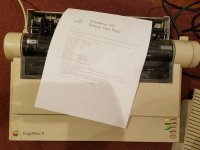 | |
| Posted by: Themk on 2017-07-03 22:34:19 I'll have to check if XP x64 has the C-Itoh 8510 driver. That will be more useful on a modern computer. | |
| Posted by: bigmessowires on 2017-07-03 22:52:56 Oh yeah! I don't have XP64, but if you have it, that would be awesome! Under XP-32, I was able to get the C-Itoh 8510 driver this way: 1. Go to the Printers and Faxes control panel, and install a new C-Itoh 8510 on any random COM port. 2. Go to C:\Windows\System32\spool\drivers\ 3. Somewhere in there should be a subdirectory containing 9 files, with names like CITOHRES.DLL. The exact name of the subdirectory will depend on the CPU architecture. For example the 32-bit subdirectory is named w32x86. 4. Copy all the files out 5. Under Windows 7, rename CITOHRES.INI to CITOHRES.INF | |
| Posted by: bigmessowires on 2017-07-03 23:49:38 I've been thinking more about what I would actually do with this Imagewriter II, if I got everything working. I mean other than print some test pages and say "gee, that's neat", and bore my kids with tales of Print Shop banners. The most interesting application I could think of was to print the invoices and labels for items people buy at the BMOW store. Since people are buying retro computer hardware, it might be fun if the invoice they receive with their hardware were obviously printed on an old impact printer. Maybe I'd even put something at the bottom of the page like "this invoice was printed on a 1985 Apple Imagewriter II". To do something like that, I don't even really need a printer driver. My invoices are already printed from custom software that I wrote, and they're mainly text, so I could just spew that text to COM2 instead and have it print on the Imagewriter. For bonus points, I could spend some time learning the Imagewriter escape codes and try to embed a logo or other graphics in there too. But I don't think it would need a full-on printer driver. | |
| Posted by: bigmessowires on 2017-07-04 00:27:41 For anyone stumbling onto this thread in the future who wants to control the Imagewriter II directly like I've proposed, or write their own printer driver, here is the printer's technical reference manual. Lots of good info! https://archive.org/details/AppleImageWriterIITechnicalReferenceManual | |
| Posted by: techknight on 2017-07-04 14:18:05 I tried printing UPS labels with an imagewriter II. That was an epic fail.... But it was fun trying 😉 | |
Posted by: CC_333 on 2017-07-04 20:24:29Oh yeah! I don't have XP64, but if you have it, that would be awesome!I have XP64! And I can confirm it has the driver! If you want to try it, I can send it to you? I'll have to figure out where it lives on XP64 first.... c | |
| Posted by: Themk on 2017-07-04 20:42:43 I have it to, I can take a look tomorrow for sure. | |
Posted by: bigmessowires on 2017-07-04 21:22:37I have XP64! And I can confirm it has the driver!Yes! Did you try the process I used on XP-32-bit? Basically you go through the motions of setting up a new printer and select the C-Itoh 8510 from the list. Then when it's finished, go look in C:\Windows\System32\spool\drivers. On XP64 maybe it's just C:\Windows\System\spool\drivers? | |
| Posted by: rsolberg on 2017-07-05 14:31:58 On x64 Windows, 64-bit System components reside in %WINDIR%\System32\. 32-bit components are in %WINDIR%\SysWOW64\. It seems backwards, I know! %WINDIR%\System\ used to be for 16-bit compatibility, but I'm unsure if it has a role now. | |
| < 3 |