68kMLA Classic Interface
This is a version of the 68kMLA forums for viewing on your favorite old mac. Visitors on modern platforms may prefer the main site.
| Click here to select a new forum. | |
| Portable - two steps forward one back | |
Posted by: desertrout on 2020-10-28 16:14:45Actually the same part number according to this but likely different firmwareAh, yep, confirmed by actually looking at the respective logic boards - 342S0753-A | |
| Posted by: at0z on 2020-10-28 16:47:10 Leaving aside the technical we have the moral dilemma should a PB100 give up its silicon life for a Portable.... | |
| Posted by: desertrout on 2020-10-28 17:07:40 IMO, not a working one. | |
| Posted by: at0z on 2020-11-10 09:51:33 Well it’s a funny old game where a measure of success is a chime and a Sad Mac code compared to dead silence. But I'll take that as a half step forward(ish). So Mr 360alaska kindly offered a PMGR chip from one of his PB100 boards and that arrived yesterday. I swapped it out for the presumed dead one (after some discussion about part number interchangeability) and fired up the power full of anticipation but silence reigned and the power draw on the lab supply was zero. Couple of PMGR reset button holds and still nothing. Sad Mac Face. Coincidentally my digikey parts order came in too and in that were some replacement 74AC02/10/157 based on techknight's comments in another thread. I had not been able to determine a thermal issue with any of these using fingers or IR camera but I figured cheap as chips test so swapped them out. Power up board, nothing, no power draw, more Sad Mac Face. OK, maybe the PB100 isn't compatible or something, let's put back the original PMGR chip. Powered it up and I see current draw from the supply. Reset the PMGR, and hit the keyboard. CHIME. Then Sad Chime. Looked at the display to see if it was the old 00003 code as before but new one - 0014 with subcode CD38. Which according to my list says PMGR unable to turn all the power on to the board, and the CD38 suggests a handshaking communication problem... Of course if I can get past this, I might still be back at the Bad RAM 0003 code, but for now at least something is alive. You got to take those small wins.... | |
Posted by: techknight on 2020-11-11 04:41:31Well it’s a funny old game where a measure of success is a chime and a Sad Mac code compared to dead silence. But I'll take that as a half step forward(ish). you have bad traces at the PMGR still. the VIA is coupled with the PMGR so the machine can communicate with it. if this nexus is broken, you get these CD36/CD38 errors. Thats probably why when you remove the chip, and then reinstalled the original again, it started working. theres something bad in that section of the board electrical connection wise. Plain and simple. Then again, I cant see your re-work job so you could have issues with that still as well. like some pins that arnt soldered properly or connected. | |
| Posted by: at0z on 2020-11-11 09:13:58 I admit I did remove the VIA to look for anything amiss underneath and replaced it. I did have an open on VIA TEST between PMGR and VIA but fixed that. On the PMGR, I have a missing pad on P20 but according to my schematic that doesn't lead anywhere so I ignored it (tell me off I missed something). Here is an iPhone shot of the board as I don't have a camera on the scope. I have not cleaned up the tacky flux at this point. I also discovered my "Amtech" may be a fake but still reviewing that with eBay/Amazon. Is it possible to drag solder the VIA successfully or is it a case of resorting to solder paste ? I cont tested the PMGR pins to their corresponding pads and all beeped out (apart from 20) so I believe they are good. I will do the same with the VIA. After restoring the VIA TEST I still get the same codes. 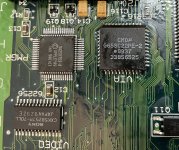 | |
| Posted by: at0z on 2020-11-11 15:37:09 For those still following along at home, I pin/pad tested the VIA chip and found a few open where the solder may not have fully flowed. Changed to a Rosin flux pen instead of the tacky gel flux which I kind of prefer and fixed the opens. I had also pulled the SWIM chip so I went and tested that too, all good. Fingers crossed, breath bated, power on. 400mA draw and a chime, longer pause then my original 0003 code is back. I guess I need to order some RAM chips to swap out unless someone has an idea how to narrow it down. Anybody recommend part numbers from Mouser or Digi-Key? But at least I’m back a square one with a recapped board that powers on... | |
| Posted by: techknight on 2020-11-11 17:57:14 You probably need to remove the RAM ICs and inspect the traces/vias leading in and out of them, or verify against the schematics. I have found a few open connections to the RAM before, as well as bad RAM. | |
| Posted by: 360alaska on 2020-11-11 18:02:30 Pretty easy, all of the pins except 1 should ohm out to the chip in front of it. | |
Posted by: at0z on 2020-11-11 18:39:18Pretty easy, all of the pins except 1 should ohm out to the chip in front of it.Could you give an example? What orientation is “in front “ ? Sorry need a little added color... | |
Posted by: at0z on 2020-11-11 18:41:14You probably need to remove the RAM ICs and inspect the traces/vias leading in and out of them, or verify against the schematics. I have found a few open connections to the RAM before, as well as bad RAM.That would save some spendy- in your experience is it a case the RAM itself is usually okay? | |
Posted by: techknight on 2020-11-12 04:15:46That would save some spendy- in your experience is it a case the RAM itself is usually okay? Again as I stated, its a mixed bag. seen traces bad, seen RAM bad. its a tossup. | |
Posted by: 360alaska on 2020-11-12 10:50:47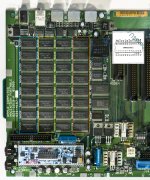 Like this, all of the pins are shared except CS (Chip Select). Front and back for sure and maybe even left to right For more info: https://ece-research.unm.edu/jimp/310/slides/8086_memory2.html | |
| Posted by: 360alaska on 2020-11-14 21:42:43 After researching a little more I wonder If the problem might be in this area? 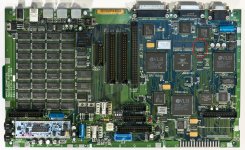 | |
| Posted by: techknight on 2020-11-16 04:36:56 its possible. ive had to rework that area on probably 20 or so of those boards. | |
| Posted by: at0z on 2020-11-16 13:21:04 I pulled that chip and didn't see anything untoward but I guess I need to buzz out each pad to its destination. I have a few new '244 and I mentioned I had already replaced the 157/10/02. In other news, my Color Classic lives again and the fluttering sound of Flying Toasters can be heard once again in the corner... | |
| Posted by: at0z on 2020-11-17 11:57:02 Well maybe it really is a bad RAM issue - replaced all three of the 244s and looked over the traces under the chips while there and all looked good and seemed to buzz out okay. As I said, there was no apparent cap or battery corrosion on this board but I don't know the history of the machine so I guess it is possible that it was on a shelf with Sad Mac RAM codes and I came along and recapped it as a necessary measure. The battery was dead of course and I'm rebuilding that. I didn't get a power brick with it (now sourced the proper Portable PSU and the standalone charging base) so I don't think the person I got it from abused it with the wrong powerbook supply. It would explain the clean and non-yellow casework if it had been parked up as non functional. I think my EEPROM programmer has an SRAM/DRAM test function so I might get the SOP adaptor to test the chips as I pull them off the board... Oh well time to play with the Cube as a little light relief... | |
| Posted by: techknight on 2020-11-18 04:50:19 Thats just it @at0z We never know why these machines were retired and shelved. We all love to think it was due to just obsolescence. But thats not always the case. it could be anything. | |
| Posted by: at0z on 2020-11-18 07:03:27 It's like adopting senior cats or dogs, we don't know their history, we hope they don't destroy the furniture and pee on the floor and can get a quality of life in their later years 🙂 | |
| Posted by: 360alaska on 2020-11-18 21:56:46 I stumbled across this: View attachment 26259951.pdf There is mention of a Maccat test. I wonder if it would shed light on anything by running tests similar to a techstep. I have a techstep (which obviously is not compatible with Portables) that has helped me fix a couple of other boards simply by elaborating on a sad mac error code. | |
| < 3 > |