68kMLA Classic Interface
This is a version of the 68kMLA forums for viewing on your favorite old mac. Visitors on modern platforms may prefer the main site.
| Click here to select a new forum. | |
| Houdini II DOS compatibility card 486-66 with SB16 - software, hardware considerations on 68K | |
| Posted by: dr.zeissler on 2022-04-24 11:22:37 I reinstalled 7.5.3. now it works...for now. We will see how the next days will go out... ...and I can't find a bigger SIMM (16/32) for my houdini II. Now I only have 4 or 8MB. | |
Posted by: jeremywork on 2022-04-24 18:35:57I reinstalled 7.5.3. now it works...for now. We will see how the next days will go out...Same hardware/software configuration intermittently works, or was consistently broken and reinstall fixed it? I’m intrigued by what you find out because I have the exact same issue with several of my DOS compatibility cards.What patterns have you noticed with yours? | |
Posted by: MrFahrenheit on 2022-04-24 20:35:24Same hardware/software configuration intermittently works, or was consistently broken and reinstall fixed it? If I start the PC using the software, if claims to be running. I hear the PC beep indicating it’s starting, but screen is black. Switching to Mac works. Switching back to PC it’s just a black screen. Card gets untouchably hot. | |
Posted by: jeremywork on 2022-04-24 21:12:55If I start the PC using the software, if claims to be running. I hear the PC beep indicating it’s starting, but screen is black. Switching to Mac works. Switching back to PC it’s just a black screen. Card gets untouchably hot.A few ideas I have: (Simple to obtuse) • You’ve got the four ended cable, not the three? • Have you tried with no SIMM, just using shared RAM from the host machine? • Is your preference set to fade the screen when switching? I’ve heard the switch doesn’t always function properly if not set to fade. • If running in a Quadra 9x0, the Serial Switch control panel may need to be set to compatible mode. • I’ve heard some make reference to a “6100 version” of the adapter cable. This could just be differentiating from the PCI models’ later 3-ended cable, as I’d suppose any such version intended specifically for the 6100 would’ve had HDI-45 connector instead of DA-15, and I’ve never seen one like this. The clunky adapter-fest usually gets comments for being a known factory requirement when run with a 6100 and AudioVision 14. • Now that I know it exists, what is the status of your cards in regards to the jumper @dr.zeissler pointed out? • Tried swapping for a known good 486 chip? | |
| Posted by: dr.zeissler on 2022-04-24 22:02:28 Always blackscreen, or sometimes blackscreen? Are you using a TFT or CRT and one or two monitor-setup? you wont get a picture if you use 14" or 16" Apple-Monitor in the PC-Setup 1.6.4 if you are using a TFT. please use "VGA-Monitor" and get such a adapter: https://www.worthpoint.com/worthopedia/nec-multisync-universal-apple-1829658407 | |
Posted by: dr.zeissler on 2022-04-24 22:03:32Same hardware/software configuration intermittently works, or was consistently broken and reinstall fixed it?Yes nothing changed. Now it worked for several boots. Seemed to be a software issue on mine, but not sure about that? Btw. if you look at LGR's video you will see that the jumper on his card is at "SX" but the cpu is "DX"...a bit strange. | |
Posted by: jeremywork on 2022-04-24 22:09:29Yes nothing changed. Now it worked for several boots. Seemed to be a software issue on mine, but not sure about that?Quite curious... To my point to MrFarenheit above, is your switching preference set to ‘fade when switching’ (or equivalent language)? It seems some report intermittent failure to start if set to ‘switch immediately.’ | |
| Posted by: dr.zeissler on 2022-04-25 04:36:13 I never touched that switch | |
| Posted by: dr.zeissler on 2022-04-30 12:22:17 Does the 486 card need FP-Ram with or without parity ? | |
| Posted by: Byrd on 2022-05-01 00:38:04 72-pin RAM, FP - not EDO | |
| Posted by: dr.zeissler on 2022-05-01 03:39:16 Thx, parity? | |
| Posted by: Byrd on 2022-05-01 04:01:11 Non parity; parity RAM will also work fine in a 486 chipset board but if looking for new, go NP | |
| Posted by: dr.zeissler on 2022-05-01 04:21:49 Thx! I just bought 2x1MB FP-Ram non parity | |
| Posted by: julys on 2024-01-24 05:30:17 Hi All! How do you fix the Houdini II card to a Quadra 950? The card is significantly shorter than it supposed to be in order to fix it to the back of the machine. The PDS is almost in the middle of the logic board, behind the NuBus slot. Any good solutions to fix it with some 3rd party tool? Thanks! | |
Posted by: Phipli on 2024-01-24 05:36:37Hi All! How do you fix the Houdini II card to a Quadra 950? The card is significantly shorter than it supposed to be in order to fix it to the back of the machine. The PDS is almost in the middle of the logic board, behind the NuBus slot. Any good solutions to fix it with some 3rd party tool? Thanks!There were extension boards made back in the day. The lazy solution is to run a cable in through the back though. | |
Posted by: julys on 2024-01-24 11:01:41There were extension boards made back in the day. The lazy solution is to run a cable in through the back though.Thanks for the quick answer! I also thought running the cables through the back, but the card itself is so heavy, that the PDS slot alone will not keep it at its place if the tower is standing vertically as it supposed to stand. What frame should be used there? Any links to a 3D printed frame? | |
| Posted by: Byrd on 2024-01-25 00:38:20 That's the adapter, never seen one for sale. Looking at it would could probably fabricate similar with the cable stuck in the slot and some sort of metal bracket that holds it in the PDS slot? 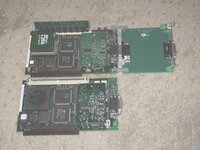 | |
| Posted by: zefrenchtoon on 2024-01-25 02:04:32 Here is a replica of the adapter: GitHub - alxlab-zone66x/Apple_DOS_Compatibility_Card_PDS_Extender: A Macintosh PDS DOS Compatibility card extender that allows you to use the DOS card in computer like the Quadra 700 and Quadra 950.A Macintosh PDS DOS Compatibility card extender that allows you to use the DOS card in computer like the Quadra 700 and Quadra 950. - alxlab-zone66x/Apple_DOS_Compatibility_Card_PDS_Extender
 github.com
| |
| Posted by: julys on 2024-01-26 14:59:53 The card is in a Quadra 950 (it has 486SX on board), PC Setup 1.6.4 is installed on both Mac OS 7.6.1 and 8.0. When I start the PC in PC Setup, it only says “PC is booting”… and hangs in the booting stage. Switching to PC mode fades the screen to black and it remains black until I switch back with the hotkey combo. Tries with 2 different monitors (one apple 1212 CRT and a Samsung TFT), same happened. I reseated the 486 CPU and the RAM as well. What can be the issue? Where can I download PC Setup 1.01 or 1.5? Would that maybe help? 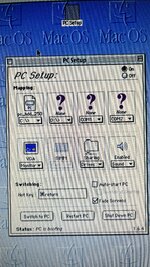 | |
Posted by: Phipli on 2024-01-26 15:02:00The card is in a Quadra 950 (it has 486SX on board), PC Setup 1.6.4 is installed on both Mac OS 7.6.1 and 8.0. When I start the PC in PC Setup, it only says “PC is booting”… and hangs in the booting stage. Switching to PC mode fades the screen to black and it remains black until I switch back with the hotkey combo. Tries with 2 different monitors (one apple 1212 CRT and a Samsung TFT), same happened. I reseated the 486 CPU and the RAM as well. What can be the issue? Where can I download PC Setup 1.01 or 1.5? Would that maybe help?Is the extension blue or black while the Mac is booting? Weird, I fixed one of these once just by reseating the CPU and repasting it... That was all. Felt like a cheat... Especially as someone shipped it across the Atlantic to me. | |
| < 3 > |