68kMLA Classic Interface
This is a version of the 68kMLA forums for viewing on your favorite old mac. Visitors on modern platforms may prefer the main site.
| Click here to select a new forum. | |
| I need help with setting up SCSI2SD in my Mac Color Classic | |
Posted by: Shymon184 on 2019-12-13 07:13:55So you think it may be a problem with the CC after all? With everything you've tried I'm not sure what else it could be at this point.Not really, I'm just replacing the capacitors to prevent the leakage of the electrolytes on the logic board, they are nearly 30 years old... | |
| Posted by: LaPorta on 2019-12-13 07:32:38 It is unfortunate that you don’t have another SCSI device to try on this to see if it is indeed a hardware issue. | |
| Posted by: Shymon184 on 2020-04-01 08:10:47 This is an old thread but I've got some results, when I open SCSI2SD monitor and it said SCSI Test: OK and SD Test: FAIL, I got these results by connecting SCSI2SD to the Mac Color Classic with SCSI Cable and Molex power connector, and I also connected it to my MacBook via USB. | |
Posted by: brayne on 2020-04-01 14:56:11This is an old thread but I've got some results, when I open SCSI2SD monitor and it said SCSI Test: OK and SD Test: FAIL, I got these results by connecting SCSI2SD to the Mac Color Classic with SCSI Cable and Molex power connector, and I also connected it to my MacBook via USB.Can you provide a screen snap of your SCSI2SD settings from SCSI2SD Util? What software did you use to format the drive? | |
Posted by: davidg5678 on 2020-04-01 15:30:48SD Test: FAILHave you tried using an alternative SD card? Maybe the one you have been using is defective. | |
Posted by: Shymon184 on 2020-04-02 03:28:29Can you provide a screen snap of your SCSI2SD settings from SCSI2SD Util? What software did you use to format the drive?I'm using this guide and I'm using a patched version of HD SC Setup, another interesting thing is that when I connect SCSI2SD only to MacBook and run SCSI2SD-monitor it says SD Test: OK My configuration is: 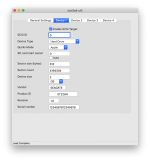 | |
Posted by: Shymon184 on 2020-04-02 03:35:00Have you tried using an alternative SD card? Maybe the one you have been using is defective.I think that's unlikely because the card appears to be fine, maybe it's not... I can't really tell but I have additional SD card but that one is 64GB and I think it's a waste to put 64GB card into a 25 years old macintosh, it's an overkill and I also don't know if SCSI2SD can read SDXC. An interesting occurrence I described in my other reply, is when I connect SCSI2SD only to my MacBook it says SD Test: OK. | |
Posted by: brayne on 2020-04-02 04:39:39I'm using this guide and I'm using a patched version of HD SC Setup, another interesting thing is that when I connect SCSI2SD only to MacBook and run SCSI2SD-monitor it says SD Test: OKSo when you run HD SC Setup, does it recognise the SCSI2SD drive at all? What happens when you try and format it? Have you tried any other formatting utilities such as Hard Disk Toolkit, Silverlining or Lido? | |
Posted by: Shymon184 on 2020-04-02 04:46:23So when you run HD SC Setup, does it recognise the SCSI2SD drive at all? What happens when you try and format it? Have you tried any other formatting utilities such as Hard Disk Toolkit, Silverlining or Lido?Well, HD SC Setup gives me error along the lines of "no suitable disk found" and it displays no disks in the list. I tried Lido some time ago and it recognized the drive, I don't quite remember how did I make Lido recognize the drive, but it gave me a SCSI Arbitration failed error. There's also something about terminators but Terminating resistors are present on the SCSI2SD... 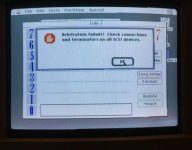 | |
| < 3 |