68kMLA Classic Interface
This is a version of the 68kMLA forums for viewing on your favorite old mac. Visitors on modern platforms may prefer the main site.
| Click here to select a new forum. | |
| Free Macintosh Plus! | |
| Posted by: LaPorta on 2019-03-28 06:12:46 Different spikes for different groups...I remember organic chem! | |
| Posted by: LaPorta on 2019-03-28 06:13:28 This is the same as the OEM floppy drive lube...everyone is guessing, but its impossible to find documents as to what it really was. | |
Posted by: Paralel on 2019-03-28 07:11:36Different spikes for different groups...I remember organic chem!Bingo This is the same as the OEM floppy drive lube...everyone is guessing, but its impossible to find documents as to what it really was.Same situation. There are at least 3-4 things in the vintage mac community I could solve with a decent lab. One of these days it will happen. | |
| Posted by: PotatoFi on 2019-03-28 09:52:34 Ok, here's what the case and CRT look like today, all nice and restored other than the burn mark. The lighting makes it look a lot more yellow than it really is. It's a very pleasant beige now. The full submersion retrobright seems to have brightened it up just a little bit, which is exactly what I wanted. 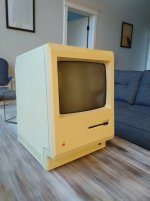 I didn't replace all of the caps on the analog board, but I did replace all of the ones on this upgrade list. I had about $15 left in my "geek budget" for the month so I decided to just replace these specifically at first. Here's my tape job on the anode cap. I still don't feel like the metal clip is holding on very tight. 🙁 I put down a square of tape first (not touching the hole in any way), and then another layer of tape holding the cap down: 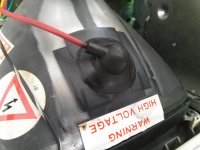 Then I put the case back on, flipped the switch aaaaaaaaaaand... Black screen, no bong, and a low "whooooorrrrrrrrrrrr" buzzing sound. It's not high pitched like a mosquito, it's very low. I quickly turned the switch back off. After a few minutes, I was brave enough to try again, and this time it went "whhhhoooooooorrrr, whhhoooooor, whooor, whor whorwhor" and I shut it down because I was terrified. Anyone want to guess about what is going on? I'm suspecting that the anode clips aren't making good contact, but that is just a guess. | |
| Posted by: PotatoFi on 2019-03-28 11:21:17 Adding another post as I can't edit anymore... but the fact that there's no chime like there was before is disconcerting. | |
| Posted by: PotatoFi on 2019-03-28 16:13:59 Here's what it sounds like. Hopefully the .mkv isn't a pain to play back. VLC handled it just fine on my modern Mac. View attachment MVI_0863.mkv | |
| Posted by: LaPorta on 2019-03-28 16:20:27 That I haven't heard before. Was anything else moved/disturbed while doing all of this? Anything mistakenly not reconnected? | |
Posted by: PotatoFi on 2019-03-28 16:41:31That I haven't heard before. Was anything else moved/disturbed while doing all of this? Anything mistakenly not reconnected?Nope, everything is properly connected. With the exception of the anode cap, which I messed with and messed with but never really felt was firmly attached. I wonder if that sound is the computer attempting to bong, but there being some crazy under/over volt issue due to the anode cap not being fully connected? Sucks... I REALLY didn’t want to touch the anode cap again! | |
| Posted by: Jinnai on 2019-03-28 17:07:04 Well, don't be so afraid of it 🙂 it won't leap out of it's case to get you, at least. If I were you I would attempt to power it on with the rear case off and figure out if the noise was the speaker, the FDD, or the CRT. I had one that somehow had a short in the CRT, and it made a noise (though not necessarily like this one) and the end glowed purple. I know you said everything is connected but to mention again the ground wire going to a top CRT screw... | |
Posted by: PotatoFi on 2019-03-28 19:24:02I know you said everything is connected but to mention again the ground wire going to a top CRT screw...Double-checked and yes, the CRT ground is properly connected. I did another test with the case off. If I turn the power off and back on rapidly, it will chime (hooray)! but then goes into that rapid on-off-on-off thing that you heard. I hear the CRT sounding like it's turning off and back in very rapidly. The sound you hear in the video is not the disk drive. | |
| Posted by: PotatoFi on 2019-03-28 20:13:48 I checked the voltage at the floppy connector. +12v is DEAD, the +5v pin is anywhere from ~2.5v to ~4.5v but it jumps around all over the place and is very hard to read. | |
| Posted by: Jinnai on 2019-03-28 21:14:50 d-did you get a capacitor backwards... the weird thing here is that it used to kind of work.... | |
Posted by: PotatoFi on 2019-03-29 15:48:52d-did you get a capacitor backwards... the weird thing here is that it used to kind of work....How DARE YOU! You think that I, the Great Potato, would install a capacitor backwards?! I am so offended right now. SO offended. ...but seriously. Yes, I might have. I tried very hard to NOT do this, but it is possible. I think tonight or tomorrow, I'll take it back apart, discharge the CRT, pull the analog board, and carefully check for polarity issues. I'll also snap some pictures of the anode connector and post them here - I'm still wondering if I bent something there, and that is the culprit. | |
| Posted by: Paralel on 2019-03-30 14:15:24 This sounds like an analog board issue for sure | |
| Posted by: PotatoFi on 2019-04-04 17:19:18 Home from a business trip and had components waiting. Here's what happened:
| |
| Posted by: bibilit on 2019-04-04 23:46:00 The flup flup is a symptom of the power supply trying to kick in. I solved a lot of those on Pluses replacing the optoisolator (a small chip near the brightness knob on the A board, labeled U3 IIRC ) those fail a lot. | |
Posted by: PotatoFi on 2019-04-05 08:53:49The flup flup is a symptom of the power supply trying to kick in.Thanks for the tip! Is there any way to test it? Have you seen this symptom resolved by replacing the optoisolator? I'm worried that I'm starting to just replace random parts instead of troubleshoot. | |
| Posted by: bibilit on 2019-04-05 09:38:11 Hi, no there is no way to test it, but i have fixed a lot of them with this symptom. I you have another board you can do a swap for a test, in the Plus this part is socketed, even can use one from a Classic, not the same reference but works the same. Don't remember but the part is pretty cheap anyway. | |
| Posted by: bibilit on 2019-04-05 09:41:54 [No message] | |
| Posted by: bibilit on 2019-04-05 09:46:30 There is a fuse also in the loom connecting LB to AB, is this ok ? | |
| < 3 > |