68kMLA Classic Interface
This is a version of the 68kMLA forums for viewing on your favorite old mac. Visitors on modern platforms may prefer the main site.
| Click here to select a new forum. | |
| [A/UX] Drop-in clean A/UX install image for SCSI2SD | |
| Posted by: Gorgonops on 2018-11-29 14:24:10 What version of SSHD do you have installed? Off the top of my head I'd suggest checking to see if you can disable DNS reverse lookups if they're enabled and you don't have working local name resolution. That can really slow down connections a *lot*. At the very least you can try to make sure that all the hosts involved are in your /etc/hosts file. | |
Posted by: bamdad on 2018-11-29 15:18:03What version of SSHD do you have installed? Off the top of my head I'd suggest checking to see if you can disable DNS reverse lookups if they're enabled and you don't have working local name resolution. That can really slow down connections a *lot*. At the very least you can try to make sure that all the hosts involved are in your /etc/hosts file. thanks man, but these were one of the first things i tried. don't remember the exact version of sshd on the image, but it didn't recognise neither UseDNS nor GSSAPIAuhthentication, the latter of which was also a suggested solution somewhere. i ended up using the ancient version of sshd also installed and just connecting with '-o Protocol=1'.. and a bit later i tried wget-ing a file and the whole sd card just pooped itself on me, it was terrifyingly fun to watch fsck spew walls of broken inodes at me. serves me right using cheap ebay cards from china. i'm re-dd-ing the image now (to a proper card), trying to learn from my past mistakes. : ) will report back as soon as i have something. | |
| Posted by: bamdad on 2018-11-30 17:55:14 okay found out the hard way: never use `wget`, especially as root.. it nukes the filesystem. don't know how, don't know why, but it does. | |
Posted by: pb3623 on 2018-12-03 13:28:02hmm, seems like on this fancy new interface i can't even edit my posts.. or i'm just a total dumbass. Oh, no doubt SSH is slow, connecting to an A/UX host. You can't use root, though. Must be a non-root user. https://github.com/unxmaal/aux_sdcard#enabling-ssh From our project page: Add a non-root user adduser -h /users/newusername newusername Set a password for the new user passwd newuser Edit /etc/rc, and uncomment the line at the bottom for starting sshd Reboot, or start sshd manually From another host, ssh yournewuser@yourauxbox It will always take a long time to authenticate you. (my edit: it's probably 90 seconds... I imagine if it took much more, like on a 16 MHz SE/30, that the connection might very well time out) The hard work was done by @unxmaal and me - troubleshooting the sshd service, entropy pool, rng, etc so your A/UX knows how to do math when a remote client connects. | |
Posted by: pb3623 on 2018-12-03 13:32:23okay found out the hard way: never use `wget`, especially as root.. it nukes the filesystem. don't know how, don't know why, but it does. Are you saying under A/UX or in general? I'm not aware of any issues with the filesystem using wget that are inherent to root/non-root, SSD vs. HD, etc... but, seeing that one would likely use root for most work, certainly the updated binaries, etc, is it possible the filesystem was borked to begin with and a bunch of disk activity made it worse? | |
Posted by: bamdad on 2018-12-03 13:36:59Oh, no doubt SSH is slow, connecting to an A/UX host. You can't use root, though. Must be a non-root user. hey, i see and respect your hard work, but as i've said further down in my post: it does the same with a non-root user. also, why couldn't i use root? according to your /usr/local/etc/sshd_config, PermitRootLogin is set to 'yes'. i have read the github page, and i'm no stranger to ssh myself. i'm running on a iici, so not exactly a quadra 900 but hey.. it should not time out. also, the sshd.old works fine and the delay is only like 5-10 seconds. | |
Posted by: bamdad on 2018-12-03 13:39:52Are you saying under A/UX or in general? I'm not aware of any issues with the filesystem using wget that are inherent to root/non-root, SSD vs. HD, etc... but, seeing that one would likely use root for most work, certainly the updated binaries, etc, is it possible the filesystem was borked to begin with and a bunch of disk activity made it worse? i use wget all the time on other systems, i mean A/UX. it did it two times in a row, on different sd cards, and without me even touching /opt beforehand.. i think the wget binary might be compiled with some funny 'fopen' implementation that wreaks havoc on the fs. but this is just a guess. i'm staying away from it until i set up and back up my sd card properly, then we can do some further testing if you'd like. one question though: does it work for you? | |
Posted by: pb3623 on 2018-12-04 07:17:21well it did it two times in a row, on different sd cards, and without me even touching /opt beforehand.. i think the wget binary might be compiled with some funny 'fopen' implementation that wreaks havoc on the fs. but this is just a guess. i'm staying away from it until i set up and back up my sd card properly, then we can do some further testing if you'd like. Yes, which is why I was puzzled by the observation. I'm wondering out loud if it could be related to the SCSI2SD firmware settings (via scsi2sd-util) or the Apple driver. I have no idea why this would be a problem seen as root and not another user. Well, at least you're aware of the issue on your machine so you could image (dd) the SD as a backup a little more often... | |
Posted by: bamdad on 2018-12-04 09:14:14Yes, which is why I was puzzled by the observation. I'm wondering out loud if it could be related to the SCSI2SD firmware settings (via scsi2sd-util) or the Apple driver. I have no idea why this would be a problem seen as root and not another user. Well, at least you're aware of the issue on your machine so you could image (dd) the SD as a backup a little more often... exactly my thoughts. i would rule out the SCSI2SD, since all other functions work flawlessly. i am able to create new drives (for my standard system 7 install), partition it and update the driver. also `wget` behaving like this is weird. never seen this behaviour even on old systems like AIX PS/2 or SunOS 2.5.1.. the only remaining culprit could drive 2 (SCSI ID 1) mounted as the /opt filesystem. i admit i'm using a 16GB card instead of a 8GB one. in theory, this shouldn't cause any issues, since SCSI2SD emulates the same physical boundaries, and, again, i was able to create additional disks. yes, you're right, backing up often is key. | |
| Posted by: bamdad on 2018-12-11 06:06:02 UPDATE: so i managed to 'fix' /opt and consequently, `wget`. tried to `fsck -y` the hell out of it, but it kept coming up with errors. i have absolutely no idea why, since it seems to work for you guys, but in the end nuking it and creating two equally sized partitions on SCSI ID 1 did the trick. i mounted them as /opt1 and /opt2 symlinking /opt1 to /opt and voilá everything is fine. what actually happened the last time is a big oversight on my part. `wget` only made the /opt situation worse, it did no harm to /.. but it did freeze the system so i had to power cycle which in turn caused the degradation in the rootfs. shame on me for acting like a newb. now my only problem is to get all the files that were conveniently placed in the original /opt.. tried to dd the second disk to another image file with the 'bs=512 iseek=4194304 count=12582912' options, and dis on my hackintosh sees all 3 partitions, but i was unable to mount a 4.2 filesystem even with `ancientfs`. : ( care to share where those files were downloaded from? also, the sshd problem is still there after lots of re-imaging the card.. so i'm now suspecting that my asante (mc3nb) network card has too low an MTU set. the problem is i really don't know how to change it.. A/UX's `ifconfig` doesn't seem to have this feature built-in. any ideas here? apologies again if i'm spamming this topic with idiotic questions, it's just my perfectionism getting the better of me. | |
| Posted by: Alphasite on 2019-06-25 21:36:19 I'm trying to use this image on an SE/30. The SE/30 has 128MB of RAM. When I start up I get the Sad Mac 000021 error. I've tried the troubleshooting steps including the recommended forcing of SCSI ID 0 followed by 1 and haven't had any luck. Does anyone have any ideas where to look next? | |
| Posted by: uyjulian on 2019-08-16 20:22:12 When I was trying to use this image on my Macintosh IIci, I got Sad Mac 000000F/000021 error. When I held Command-option-shift-delete-0, it was showing as flashing question mark. When I held Command-option-shift-delete-1, I get the aforementioned error. I fixed this issue by installing LaCie Silverlining v5.8.3 driver on SCSI ID 0. | |
| Posted by: Alphasite on 2019-12-08 10:49:34 I'm back to this after my SE/30 died. It's not repaired but I picked up a Quadra 700. It boots just fine from an SD2SCSI card that I installed A/UX on before. I've tried to get this installed again and I get the error 21 even after following the steps. It looks like giving the LaCie Silverlining v5.8.3 drive a try will be my next step. Where do I get this? I'm guessing I can boot from a floppy and install it from there? I don't have a way to write a Mac floppy image right now but I do have a BMOW Floppy Emu if someone has an image or I can download the binary to my Mac running my install of A/UX. | |
| Posted by: Alphasite on 2019-12-08 14:14:35 I did have Lido so I tried it. It could see both disks on the SCSI2SD card but when I tried to mount the one at ID 0 the light flashed for a few seconds on the card and then everything hung. I could still move the mouse but that's about it. When I insert the SD card in my MacBook Pro it is able to mount the Mac partition on the card. | |
| Posted by: Alphasite on 2019-12-08 15:45:58 I found that if I unchecked "Enable Unit Attention" and "Disable glitch filter" it started working. On my other SCSI2SD card with the install I did from scratch those are both checked. | |
| Posted by: Alphasite on 2019-12-08 18:30:19 What's the admin key for the installed AppleShare Pro Admin? | |
| Posted by: rondc on 2019-12-13 11:05:07 Hello ! It's nice to be here. I have been reading this fantastic site for many years and I have finally decided to create an account. Thank you very much for accepting me. This is Ron, from Spain. I have been an Apple ][ user and Macintosh since the beginning and today I still use these dinosaurs, I love them. I have been carefully following the whole thread and the whole process. I am frustrated and I have no choice but to ask for help, I would love to know what is happening and maybe you can guide me and finally I find a solution and I can continue using the A / UX with the SCSI2SD. I use Linux, the first time I recorded the image on the 8GB SD and connected the SCSI2SD to my Quadra 700, it started without problem and was functional until one day it got corrupted and stopped working. I also tried 32 and another SD sizes. Same result. As commented in upper posts, same behaviour, the price is always a sad mac with 000000F/000021 error. ( Quadra 700 only SCSI2SD card is connected to SCSI ) Any other Finder / System version from 7.0 to 7.6.1 works fine when using SCSI2SD, so the card is fully functional. The firmware on both SCSI2SD is version 4.8.3 and the scsi2sd_aux_3.1.1-pristine.xml file from the unxmaal git doesn't load ok. It presents wrong options 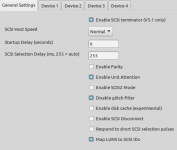 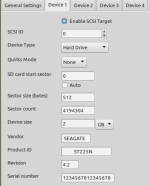 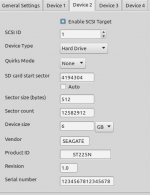 Here you can see the Overlapping data warning, then you can't save to the device until it gets fixed. 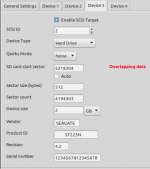 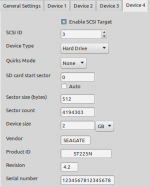 Thank You very much and Merry Xmas ! Regards, ron. | |
| Posted by: rondc on 2019-12-13 12:11:21 Hi again, I answer myself I have installed an A / UX from scratch on the Quadra 700, without using the image that is accessible from the unxmaal git at MEGA, and it is definitely unusable, the new one I created works perfectly, it was not a hardware problem. In any case, the image aux-3.1.1-03a.img seems very good to me and if it were possible to review it, I would love to make it work with all the things it brings. Thanks ! | |
| Posted by: aladds on 2020-04-22 08:05:50 I know this is a bit old to be digging up, but I managed to fix the Sad Mac/21 error using the lido.img driver from Step 3 here. And it works (albeit slowly) on my SE/30 🙂 | |
Posted by: Michael_b on 2020-05-22 15:26:44I know this is a bit old to be digging up, but I managed to fix the Sad Mac/21 error using the lido.img driver from Step 3 here.I'm having the same issue with my SE/30. How did you add the lido.img to the premade A/UX image? | |
| < 3 > |