68kMLA Classic Interface
This is a version of the 68kMLA forums for viewing on your favorite old mac. Visitors on modern platforms may prefer the main site.
| Click here to select a new forum. | |
| Wifi Extension Development Thread | |
| Posted by: joethezombie on 2018-04-18 08:38:37 A couple of hiccups... 1st, if you (stupidly) place an incorrect password for the wireless network you are attempting to connect to, the VM300 interface gives no indication that something is wrong. It just happily tells you to reboot to finalize, so make sure you are using the correct password, and not the old one you’d changed a couple months back. 2nd, the VM300 interface will not let you enter in a password with a comma, so now go back and change the password you’d just set a couple months ago to a new one without a comma. 3rd, gasp in disbelief as you slowly realize just how many wireless devices you have that now cannot connect to the network and must have their settings updated manually... ugh. Other than that, easy peasy! | |
| Posted by: ants on 2018-04-18 21:26:56 haha! It's a shame that the device needs to reboot when changing networks - I guess I'll need to make the extension poll the device until it's rebooted which is a bit yuk. Thanks for the feedback. | |
| Posted by: ants on 2018-04-19 15:41:22 No dev today, but I drew the icons for the various states - it's been a very long time since I last did pixel pushing like this!  | |
Posted by: TechEdison on 2018-04-19 15:47:57No dev today, but I drew the icons for the various states - it's been a very long time since I last did pixel pushing like this!I've been lurking on the development of this... This is a really neat project! What are the bottom 4 icons for? What state do those serve that the top don't? Or is that just for low res or 1 bit displays? | |
| Posted by: ants on 2018-04-19 16:09:49 Yep just 2 variations for colour and 1-bit displays. | |
| Posted by: markyb86 on 2018-04-19 20:21:30 Looking forward to this! Gotta get an adapter for the SE! | |
| Posted by: hfrazier on 2018-04-20 06:44:50 @ants The icons look great! @joethezombie Weird mine doesn't work then with my MacCon. I'll have to take it out and see if resetting it works. I do know that it was properly connected to my WiFi.. Hmm. The VM300 is quite flaky, I'm going to see if there's an OpenWRT route we can do as well. (Still waiting on that OpenWRT mini router from Newegg..) Once I have it I'll see what can be done. | |
| Posted by: TechEdison on 2018-04-20 07:17:26 This should be pinned honestly. | |
| Posted by: hfrazier on 2018-04-22 20:11:26 Ok, so after a few more attempts I was able to get it to work.. Not sure what went wrong in the first place since it worked on another computer without changing any settings! | |
| Posted by: ants on 2018-04-22 21:31:09 Great news. I agree that the VM300 can be flaky at times - so I'm still keen to explore the OpenWRT route. But since quite a few people have already bought a VM300, I feel somewhat obliged to get the extension working with the VM300 first. I would love for an OpenWRT device to also support a https proxy, and perhaps other proxies such as image conversion, CSS or even streaming audio conversion. I've spent more time working on the extension, but I've burned countless hours trying to get my signal strength icons working in the network list. I've tried everything I can think of, but I keep getting a blank gap where the icon should be. Are there any veteran Mac coders out there who could help me? I'm patching the MenuSelect toolbox trap, but calling SetItemIcon or SetMenuItemIconHandle inside this function refuse to work - my resources are non-purgeable. Anyway, I'm going to move onto the network connection (by displaying a dialog box to enter a WPA password). Hopefully I'll have more luck with that. @hfrazier were you able to figure out the http commands for connecting to a network? | |
| Posted by: ants on 2018-04-22 23:00:12 No sooner had I posted the above, I finally figured it out: 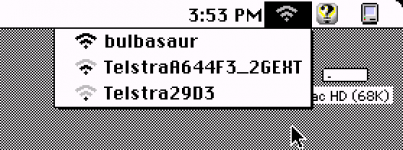 | |
| Posted by: CC_333 on 2018-04-23 08:51:41 That looks pretty neat! A very dumb nitpick, though: are the signal strength icons movable to the right side of the menu? Also, is it possible to poll the networks to see if they're secured, and display a padlock next to the names of those that are? c | |
| Posted by: ants on 2018-04-23 16:35:27 @CC_333 I knew somebody was going to ask that 😛 The functions provided by the toolbox in System 7 only allow for a single icon on the left (which I assume is the same for OS 8 and 9). However, I believe it's possible to write a custom Menu Definition (MDEF) which would allow for whatever layout you like, using QuickDraw. For now I'll put it on the "nice to have" list, as there's a lot of core functionality still missing. | |
| Posted by: TechEdison on 2018-04-23 16:47:54 Amazing progress! I may never be able to use it, but I am enjoying keeping up with the progress. | |
| Posted by: techknight on 2018-04-23 18:18:50 I am loving this thread more and more. Just having the WiFi Icon with various SSIDs show up on a 68K mac just astonishes me in a weird way. lol. | |
| Posted by: olePigeon on 2018-04-24 09:22:58 Late to the thread, just trying to understand what's going on. 🙂 This is what I understand so far, so please correct me if I'm wrong: So the VM300 wifi module has a web interface, and is connected to a standard NuBUS ethernet card. The wifi module does all the heavy lifting because it's self contained, so actual device drivers, modern encryption support, etc. aren't required by the host computer (something that's even lacking in OS 9.) The Extension works as an intermediary, interfacing with the web sever on the wifi module by sending it relatively simple HTTP commands, then reporting back. Stuff like available wifi networks, then populating the pull-down menu. Then perhaps eventually stuff like encryption options, setting a password, etc. All through HTTP requests to the web server on the wifi module. Is that correct? Also, is there something a layman like me can do to help contribute to the project? | |
| Posted by: olePigeon on 2018-04-24 09:27:51 I have one of these that I bought a while ago: https://www.netgear.com/home/products/connected-entertainment/gaming-home-theater/WNCE2001.aspx It, too, has a web interface. I'd be happy to lend it to you if you wanna fiddle with it after you get the VM300 working. | |
| Posted by: CC_333 on 2018-04-24 13:41:03 I also have a cheap Rosewill router (well, several) with OpenWRT I can volunteer as well. c | |
| Posted by: ants on 2018-04-25 02:26:19 @olePigeon your summary of the project is spot on. Thanks for the offers of help with devices & testing, inevitably this project will need a heap of testing. I've made a start on the password dialog, it just doesn't do anything yet... 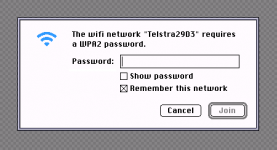 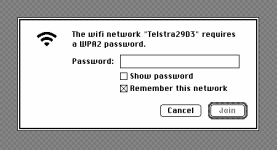 | |
| Posted by: CC_333 on 2018-04-25 07:12:44 Even so, it sure looks nice! Very similar to the modern macOS version. c | |
| < 3 > |