68kMLA Classic Interface
This is a version of the 68kMLA forums for viewing on your favorite old mac. Visitors on modern platforms may prefer the main site.
| Click here to select a new forum. | |
| Desperately seeking Mac OS Anthology 2000 & 2001 Edition | |
Posted by: uyjulian on 2018-06-15 21:49:18I take that to mean you got disk 6 to expand properly?Yes | |
Posted by: Alex on 2018-06-15 23:52:07Did you try using the other binary?Yes, I tried both. At this point I don't know if my .sit file is legitimately damaged or if some further alterations could be done to the source code. I also see the CC_333 asked if you got disc 6 to expand and you responded yes … how? | |
Posted by: Alex on 2018-06-15 23:58:17Did you try using the other binary?I ran them both again so that I could display the output for you, needless to say I ran the latest unar official and it too failed. So I have disc 6 in limbo. Can you help me out?  | |
Posted by: Alex on 2018-06-16 00:15:00I am just going to put this out there. :wink:Ahh, so from afar you are watching with a little grin huh? Ok, I get it 🙂 | |
| Posted by: CC_333 on 2018-06-16 08:21:58 Someone should post all the undamaged images somewhere, because with all this hype, I want a copy of this set now!! LOL!! :lol: c | |
| Posted by: uyjulian on 2018-06-16 08:35:38 I apologize for the error. Disc 6 of Mac OS Anthology '00 on max1zzz's server is incomplete, and not fully extractable. However, there is a new image available that max1zzz put: ftp://www.max1zzz.co.uk/+Mac OS Classic/++Apple disks/Mac OS Anthology 2000 & 2001 Edition/Mac OS Anthology '00 Disk 6.7z I haven't tried it out yet. | |
| Posted by: omidimo on 2018-06-16 09:39:41 Is there a guide out there to do the best form of disc image archiving of HFS (classic) discs? | |
| Posted by: Trash80toHP_Mini on 2018-06-16 09:51:29 Have you got both those sets in hand? :huh: | |
| Posted by: omidimo on 2018-06-16 10:49:44 Yup! Got all the sets (1999-2000-2001), plus a Service Source CD for all the system software prior to 7. I used to use the old Disk Utility to image discs (as CD/DVD master), but I have not imaged a classic CD in what feels like a lifetime! | |
| Posted by: tanaquil on 2018-06-16 12:46:18 Macintosh Garden has a series of guides, though I wish they were fuller and updated more often. tl;dr is that Disk Copy 4.2 is best if you want to create an exact copy, especially for something to be used in early System 7 or below. For larger images of CDs and such, I think they recommend Toast, although it has some issues. I have found that Alcohol 100% is best for dual layer disks (music and data, or windows and Mac) but that requires a paid license and access to a PC. | |
Posted by: Alex on 2018-06-16 14:33:48I am just going to put this out there. :wink:Ok, so do you have the discs? Is that your set. So disc 6 of my copy is probably damaged, I don't know for certain. Are you willing to upload a good copy to me? | |
Posted by: Alex on 2018-06-16 14:35:59Yup! Got all the sets (1999-2000-2001), plus a Service Source CD for all the system software prior to 7.Can I give you FTP access to my server for you to upload disc 6 and if I could ask you for a huge favour, if you could send me a tree of discs 2,3,4 of the same collection please. | |
Posted by: Alex on 2018-06-16 14:38:17I used to use the old Disk Utility to image discs (as CD/DVD master), but I have not imaged a classic CD in what feels like a lifetime!You can use Disk Utility, https://support.apple.com/guide/disk-utility/create-a-disk-image-dskutl11888/mac I would be much obliged if you could do just the one disc for me and upload it to my FTP server. | |
Posted by: Alex on 2018-06-16 14:41:38I apologize for the error. Disc 6 of Mac OS Anthology '00 on max1zzz's server is incomplete, and not fully extractable.downloading it now. I will report back. Thanks for the heads up! @omidimo I might be ok if this image works out. | |
Posted by: Alex on 2018-06-16 15:50:53Yup! Got all the sets (1999-2000-2001), plus a Service Source CD for all the system software prior to 7.Yes you can still do the same, make a master and it will work fine. By the way I got disc 6 working. https://68kmla.org/forums/index.php?/profile/4352-uyjulian/ @uyjulian looks like max had a good copy of disc 6. You have been incredibly helpful. Thank you so much. I believe this is now resolved. These discs might be available on the Macintosh Repository in short order. I will post back when they are online. @omidimo Thanks for considering, I should be ok but if I could get a tree listing of your discs it would be really great so I can vet what I have with some confidence. From the terminal enter: tree -shQDF "DRAG AND DROP YOUR DISC" > "enter_a_name_for_your_disc.txt"The greater than symbol is important, remember to enter it. What this command does is create a listing of the disc and output it to a txt file with a name. The tree command is not built in to MacOS, perhaps in Linux it might be but if you are in MacOS you will need to install brew first, https://brew.sh. After installing brew you need to issue the following command to install "tree" brew install tree If you could do I would be grateful. Cheers and thanks for considering. 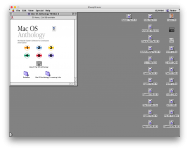 | |
Posted by: Alex on 2018-06-17 00:51:46Macintosh Garden has a series of guides, though I wish they were fuller and updated more often.I use Disk Utility in MacOS, right up to 10.13.5, it can make an exact copy of disc through the Master Disc option and it does work perfectly. Of course there are those other options you mentioned, I've used Toast but not Alcohol because I am not on a PC. You could even do it from the terminal itself. 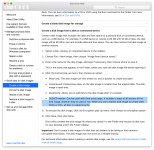 Terminal methods are outlined in superuser.com | |
| Posted by: omidimo on 2018-06-17 15:43:13 I ran the tree command via homebrew: View attachment disc6.txt Some things came up as weird text under 10.12 but that might be due to API changes and lack of support. When I used a 10.6.8 VM; the disc came up fine with no garbled files, and imaged okay as a .cdr file via Disk Utility as shown below. 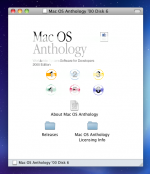 | |
Posted by: uyjulian on 2018-06-17 18:10:46Some things came up as weird text under 10.12That's because of a different encoding, and I think newer macOS removed support for converting encodings ex: MacJapanese to UTF-16. | |
| Posted by: NJRoadfan on 2018-06-18 12:32:47 What is exactly on these CDs/DVDs anyway? Just releases of System Software? | |
| Posted by: omidimo on 2018-06-18 12:46:50 Every version & localization of System 7 thru Mac OS 9.1 for developers. An early Mac OS X was also included in the final release in 2001. Mac OS 9.2 (and 9.2.2) came out after the release of the final set, so they are not in there. | |
| < 3 > |