68kMLA Classic Interface
This is a version of the 68kMLA forums for viewing on your favorite old mac. Visitors on modern platforms may prefer the main site.
| Click here to select a new forum. | |
| Connecting 68k Macs to LCD Monitors | |
| Posted by: olePigeon on 2012-11-07 17:07:12 I just got 2 Phillips 150S5FG LCD monitors for $17 each. They appear to work perfectly with a regular dip switch adapter. 1024x768 @ 60Hz-75Hz, VGA connector, internal power supply, white in color. Match pretty well. Looks great using my Precision Color Pro 24X, full 1024x768 @ Millions. 😎 | |
| Posted by: James1095 on 2012-11-07 18:04:50 I had a 486 DX2-66 with auto detection, that was one of the earliest though. Previously you'd just enter the information printed on top of the drive, it was not particularly hard, but certainly less elegant than the Apple hardware of the era. Both systems had advantages and disadvantages. I was always a PC guy back in the day, but I do love the vintage Macs, they were in many ways ahead of their time. | |
| Posted by: olePigeon on 2012-11-08 16:51:24 Here's my LCD. 🙂 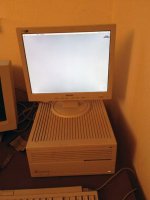 | |
| Posted by: Gil on 2012-11-15 13:58:44 Although I haven't tested on a 68k, I hooked a PowerBook 3400c to an ASUS V198 20" LCD monitor (which I bought new this year) and seems to work well.  | |
Posted by: markyb86 on 2012-11-15 17:44:43PowerBook 3400c to an ASUS V198 20" LCDWhen my ps3 gave me crap about a burned DVD, used the powerbook g3 hooked to a 46" tv and it was just fine }🙂 Although I haven't tried a 68k mac hooked to an LCD yet, a while back we had a Atari Falcon hooked to an LCD TV via a rigged composite cable my buddy soldered up. | |
| Posted by: insaneboy on 2012-11-24 13:48:26 No problems with the little 15" LG monitor I use in the basement for my G4 mini. hooked IIci up to it with just a regular mac to vga adaptor and it worked crappy iPhone shot (No, I had not wiped the HDD yet either 😛 )  | |
| Posted by: Strimkind on 2012-11-24 14:46:29 Has anyone tried the Apple Multiscan 15 display cable? I ask because the Multiscan 15 is VGA in the back but the cable converts it to the Apple Video Port. I have one unit, but two cables and I think this could be the most painless option to connect an LCD monitor. | |
| Posted by: markyb86 on 2012-11-24 16:38:28 GERI's desktop was FANTABULOUSSSSSSSS! 😱) | |
Posted by: olePigeon on 2012-12-19 11:32:06Has anyone tried the Apple Multiscan 15 display cable? I ask because the Multiscan 15 is VGA in the back but the cable converts it to the Apple Video Port. I have one unit, but two cables and I think this could be the most painless option to connect an LCD monitor.I just tried it. It's missing a pin or something compared to a regular VGA cable. When I plug it in, the image comes out washed to the point of almost grayscale, and the contrast is shot. I tried two different Apple cables with the same results. | |
| Posted by: Bunsen on 2012-12-21 04:46:42 Trash80, what is the keyboard in this shot? olePigeon, I love the way your LCD matches the look of the IIci - what make & model is it? | |
| Posted by: Trash80toHP_Mini on 2012-12-21 06:18:21 http://vintagecomputer.com/dauphin-dtr-1-pen-tablet.html 😉 NIB off eBay for a song from someone who had a batch of them. I followed Pen Computing back in the day. Vertical market solutions have always been intriguing to me. We've come a very long way . . . hardware and gui-wise . . . . . . but a KBD is still a necessity. :lol: It looks like someone else has already made good use of a similar KBD in a display hack! http://www.ebay.com/itm/ws/eBayISAPI.dll?ViewItem&item=200866277029 | |
| Posted by: markyb86 on 2012-12-21 16:21:19 What mac is that? That's what I'm wondering. I know you mentioned IIsi but I have only seen fat ones? :O | |
| Posted by: Macdrone on 2012-12-21 16:54:18 I think what he has the monitor on is a apple cd caddy cdrom. Looks like it could be a mac but pretty sure thats what it looks like. | |
| Posted by: Trash80toHP_Mini on 2012-12-21 20:27:42 Yep that's the Apple CD-SC. It wasn't working and the ATOM NetTop board was in need of a home, so it almost took up residence in there. I think the case is back in the project box with its bits, slated to for reassembly. It looked like a Snow White Design Language Mac Mini to me at the time, so naturally, I was looking for a set of black peripherals. Couldn't find my black Belkin mini-mouse, so the tiny clear one stood in for it, the tombstone mouse is there for scale. I think the ATOMICmini has finally found a home in the ZipPlus, dunno, I've got another six months to go before that project is overdue for completion, the ATOM, not the ZipPlus . . . . . . the MoBo I got eighteen months ago. :I | |
| Posted by: olePigeon on 2012-12-30 19:10:57 My LCDs are Phillips 150S5FG. | |
Posted by: RickNel on 2013-03-03 16:48:18by zuiko21 » 31 May 2012, 15:32 The monitor sense codes were very well thought, IMHO. First a bunch (0-6) of fixed resolutions, and the detected code (7) in the absence of monitor did halt video out. Then came the extended codes, read off a different method... from what would be seen by older cards as "7" (i.e., no monitor), avoiding damage to the unsupported monitor -- fixed freq. was rather common back in the day. 16" (832x642, 75 Hz) and 19" modes (1024x768, 75 Hz) were implemented this way.This doesn't get enough attention. The sense code implementation is the main reason a lot of LCD monitors won't work with Compacts, even when they are nominally capable of appropriate sync rates. The Mac video chip is programmed to be adaptive, but to shut down if it doesn't recognise an acceptable static pattern on the 3 sense lines. Monitors with advanced VGA standard implementation will try to send a serial ID code over just one of those sense lines, and that can spook the Mac adapter into shutting down or sending the wrong sync signals. The monitors that work will be the ones that have VGA firmware that can detect an adapter mode that requires the deprecated passive ID sense codes, and to switch off the serial ID signal. It's a mystery to me how the dip-switch adapter plugs handle this without any active electronics. They have to fool the Mac into believing the monitor has acceptable specs, and then rely on the monitor firmware to recognise the sync and adapt resolution to match. That's probably why success is a bit hit and miss. Rick | |
| Posted by: RickNel on 2013-03-07 14:09:41 I've just found another 17" LCD that works straight up and no fuss Samsung Syncmaster 740A. ($15 from recycler) This is a really good unit with telescopic stand for height adjustment and good onscreen menu. Whatever upscaling it did, it had no problem at all with the 66Hz sync. I wonder if we should start a list somewhere (a wiki, perhaps?) where people can add to the list any LCD monitors that they have been able to connect with a basic adapter. It could save others quite a bit of time and encourage saving of such monitors. [bTW - mods.. when I access the wiki pages I just see plain text with basic HTML format, no style-sheet presentation. Is there a problem with the style-sheet or forum software there??] | |
Posted by: Trash80toHP_Mini on 2013-03-07 17:44:13It's a mystery to me how the dip-switch adapter plugs handle this without any active electronics.Someone posted a link to a table of the sense-coding setup somewhere, there is one diode involved in the mix, however active you want to call something that simple. 😉 I'll see if i can find it. Sounds like something I'd snag for local backup. }🙂 | |
| Posted by: Aoresteen on 2013-07-07 20:42:31 I've got three 14" lcds (1024x768 native) that I use with my Macs. The last one I bought I paid $10 for from a pawn shop - it's a Dell. The others are an HP & a no-name. They all worked well with my Quadra 605. I've found that the issue is usally with the adapter not the monitor. For the Q605 make sure you have 1 MB VRAM (two video modules installed) and it will do 1024 x 768 with no issues. Both Sys 7.5.5 & OS 8.1. If you hare having issues get a different video adapter with switches & set them for 1024x768. | |
| Posted by: 68kAlex on 2013-10-25 02:41:21 I must admit, this topic has me hugely confused! I'm thinking about getting an LCD monitor for my LC475, both to take advantage of higher resolutions and against the inevitable day when my CRT packs in. The gist of this thread (from what I can make out) is that many LCD monitors don't work properly with 68k Macs, even with the appropriate Mac/VGA adapter. Is this the case? I have my eye on an old Dell E151FPp monitor on ebay (1024x728 @ 75Hz native resolution). Is this likely to work, or will it require technical jiggery pokery? | |
| < 3 > |