68kMLA Classic Interface
This is a version of the 68kMLA forums for viewing on your favorite old mac. Visitors on modern platforms may prefer the main site.
| Click here to select a new forum. | |
| HTTP block device driver | |
| Posted by: ClassicHasClass on 2012-11-30 12:11:27 I like those! | |
| Posted by: LOOM on 2012-11-30 13:14:39 Why 9? Isn't it for System 7? 😉 Very pretty icons! | |
| Posted by: bbraun on 2012-11-30 17:35:12 Very nice, I like them both tt and olePigeon. The current icon was whipped up by a friend that is way more graphically inclined than I. I'll see if I can figure out how to do the GUI magic to scale them down for the smaller icons and generate the icon masks and stuff. Thanks guys! | |
| Posted by: tt on 2012-11-30 19:05:43 Cool icons. The stock ones are cool too. Just to clarify, my graphic was intended for inside the control panel GUI. :b&w: | |
| Posted by: olePigeon on 2012-11-30 19:50:22 I can generate a full set for you in ResEdit. Why 9? Isn't it for System 7?Yeah, but it's a fairly famous colloquialism. 😛 But Cloud 7 could be fun, too. 🙂 | |
| Posted by: bbraun on 2012-11-30 20:44:54 A full set in ResEdit would be great! Also, good idea on the graphic in the CP, tt. That hadn't even occurred to me! I'll see what I can figure out there. Thanks again both of you, this is awesome. | |
| Posted by: olePigeon on 2012-11-30 20:57:19 Here ya go: http://www.wreckcenter.com/68k/Cloud-7.rsrc.sit.hqx 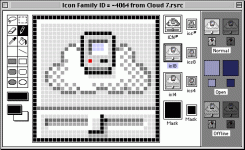 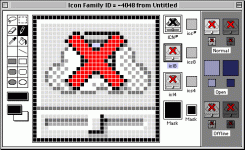 | |
| Posted by: bbraun on 2012-11-30 21:47:43 Thanks! That looks awesome. I'll integrate it in this weekend. How's this for including your graphic, tt? 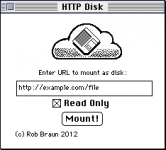 I'll plan on integrating these graphics changes, maybe a couple other minor changes, and throw together a little release on Sunday if my weekend goes as planned. | |
| Posted by: CC_333 on 2012-12-01 10:07:45 Hi, That looks very reminiscent of the MobileMe/iCloud preference pane in Mac OS X 10.6 and up:  Fascinating!! c | |
| Posted by: bbraun on 2012-12-01 14:57:01 Cloud 7 0.5.3.cpt.hqx New version. Changes are: - Renamed by popular demand - olePigeon's icon set - tt's graphic in the CP - opens the MacTCP driver on demand instead of during boot. This hopefully avoids problems on boot on systems that either don't have MacTCP/OT, or it hasn't loaded yet. - Fixed up the CP handling to work on System 6. Functionality hasn't been tested, it just shouldn't crash when opening it. 🙂 | |
| Posted by: tt on 2012-12-01 23:05:54 Cool, yeah thanks for including it, I tinkered with the shading a little more. olePigeon, feel free to improve... It does look a lot like iCloud, I was trying to go for a hybrid of 1991 and 2012, so I guess that's what happened. Name-wise CloudFloppy could bridge the eras, but sounds kind of funny. :b&w: bbraun, a tiny suggestion is to center your © and name at the bottom to balance out the rest of the window.  | |
| Posted by: CC_333 on 2012-12-02 00:01:03 Hi, I also have a small suggestion regarding the icon vs. full-size window graphic. They're inconsistent. The icon has a small compact Mac in the cloud, while the window graphic has a floppy disk. Perhaps either replacing the Mac with a disk on the icon, or the disk with the Mac on the window graphic will resolve this. Frankly, I like the floppy better, but I'll leave the decision as to what stays for the designer(s) to figure out. Other than that, it looks quite good!! I must download this sometime and try it out. c p.s. Maybe the Serial disk driver can be merged into this somehow to make an all-in-one solution for connecting classic Macs to various forms of modern-ish network storage. | |
| Posted by: Trash80toHP_Mini on 2012-12-02 08:02:35 Very nice graphics, but I've got another suggestion: How about doing a riff on the AAUI Icon with the center dot replaced by the Compact? | |
| Posted by: ClassicHasClass on 2012-12-02 08:51:00 Man, people are picky about icons. *strokes TenFourFox icon, about which he still gets mail roughly once a week | |
| Posted by: Trash80toHP_Mini on 2012-12-02 09:44:42 It's not so much being picky as trying to be helpful by comrades that aren't able to help in the actual code development process . . . . . . think of it as a creative focus group/development process for the eventual packaging, we've got a long tradition of collaboration in UI development. | |
| Posted by: olePigeon on 2012-12-02 10:50:24 Shouldn't be too hard to make up different versions of the icon. I'll whip some up and peeps can vote on it, I don't mind. Gives me an excuse to use my vintage Macs for something other than games. 😀 | |
| Posted by: bbraun on 2012-12-02 11:04:35 Thanks everyone! Cloud 7 0.5.4.cpt.hqx This includes tt's updated cloud image, centering-ish of © line, and a bug fix when connecting after a disk image had been mounted, unmounted, remount->sadness. FWIW, all of the image placement is handled in the resources. If you open up the control panel in ResEdit, 'DITL' resource -4064 is the control panel. Control Panels are a bit weird because everything is shifted right by the same size as the System 6 Control Panel where it had all the different CPs in a vertical list on the left. System 7 maintains the shift for compatibility. Which means all of ResEdit's auto-centering and stuff doesn't really work so good. Additionally, ResEdit displays things in a different font than the system uses for CPs, so the visual alignment in ResEdit doesn't reflect actual use. All of these can be programmatically set at runtime, but I haven't done that, I'm just using the 'DITL' resource for placement. The cloud graphic is 'PICT' resource 128, although size changes to the graphic need to be reflected in the 'DITL' item. Anyway, that's just an FYI for anyone that wants to play with the CP layout themselves. If anyone does mess with this, feel free to paste the resources you've changed into a new file, and send it to me. CC_333: regarding the combination of this and Serial Disk, that's something I can look at down the road. Serial Disk (I feel) is fairly solid right now. I haven't had problems using it in a variety of configurations, etc. While HTTP Disk/Cloud 7 works well in some configurations, I don't feel it is quite to the same quality as the Serial Disk yet. So, for the moment, I'd like to develop them separately. Down the road, if/when they catch up to each other in development, combining them might work well. Thanks everyone for the suggestions, the graphics, and the interest! | |
| Posted by: olePigeon on 2012-12-02 15:11:53 Some additional icon options:  | |
| Posted by: CC_333 on 2012-12-02 16:11:20 OlePigeon: I like #130 and 131. Icon #131, in particular, is pretty much what I had in mind (basically a scaled down version of tt's graphic). Since it has to do with storage, a disk in the icon seems logical to me. Isn't there a way to get a real copyright symbol (like this: ©), rather than ©? It's Option + G for me on OS X 10.8. Perhaps Systems 6 through 7.5.x are different somehow? c | |
| Posted by: olePigeon on 2012-12-02 16:39:50 It's always been option-G. | |
| < 3 > |