68kMLA Classic Interface
This is a version of the 68kMLA forums for viewing on your favorite old mac. Visitors on modern platforms may prefer the main site.
| Click here to select a new forum. | |
| IDE > SD | |
Posted by: Elfen on 2015-06-13 08:40:40Fully agree.Glad you like it. I like to know what others are doing with Macs, PCs and others with various forms of SSDs. This information is great to pass down to others. Thanks! | |
| Posted by: MikeatOSX on 2015-06-13 09:24:04 A month ago I posted a little CF/SSD/HD test here: http://forums.macrumors.com/threads/powerbook-g3-compare-harddisk-compact-flash-ssd.1879029/ | |
| Posted by: Elfen on 2015-06-13 09:55:29 Those are some interesting numbers. But at the same time, the tests says one thing and how the powerbook behaves is another. As I seen it, the SSD (Cf or SSD) is a lot faster than the HD, in all cases. I think it is because the tests are using short data blocks and SSDs prefer large data blocks. Care to post those graphs up here? | |
| Posted by: raoulduke on 2015-06-13 10:25:39 lol Elfen! I bought a 128mb 100x (speed) CF card. | |
Posted by: MikeatOSX on 2015-06-13 11:11:46Care to post those graphs up here?Here it is, I‘ve compared Harddisk, Compact Flash and SSD in two different PowerBooks G3. First (pic 1+2) PowerBook G3 Firewire (Pismo) 400 MHz, 1 GB Ram (ATA-5 HD interface) with 3 data-storages, which still are available at this time: Seagate HD ST980210A 80GB SanDisk Extreme Compact Flash 16GB KingSpec SSD (KSD-PA18.6-008MS) 8GB * The second test (pic 3+4) is different, because of the ATA interface: PowerBook G3 Series II (PDQ) 266 MHz, 384 MB Ram (ATA-2 HD interface) Same CF and SSD but older harddisk from 2006: Fujitsu MHV2100AT 100GB Mike 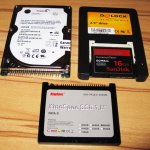 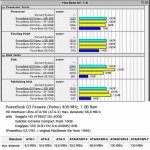 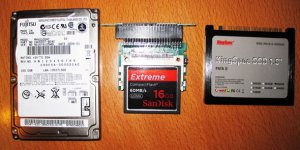 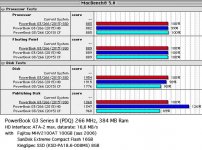 | |
| Posted by: Elfen on 2015-06-13 12:01:36 Funny, I use the same King Spec PATA II SSD. As for the CF, I use the Ultra by SanDisk though the Ultra's and the Extreme's I find to be about the same. | |
Posted by: Elfen on 2015-06-13 12:13:35lol Elfen! I bought a 128mb 100x (speed) CF card.That makes a lot sense now! LOL! 100X Speed is just a bit faster than a hard drive. A 200X would be the best for anything up to a G3-WallStreet, that is from a PB 520 to a G3 Wallstreet. 133X and 150X are good, but not as fast as a 200X. 400X are best for the G3 Prismo/Lombards and on, though a 200X is comfortable in those machines - all of these will be faster than hard drive. Price and Speed is a factor. Technically 100X is supposed be as fast as a hard drive but I find an old 75X to be equal to a hard drive; the data speed might be the same but the hard drive is doing a lot of buffering before sending and that slows it down, especially with the old hard drives. Thus 200X is a bit more than double the hard drive speed, and 400X about 4 times. Just drop the 00's. Thing is, because many adapters wont have True IDE/DMA/UDMA support without a bit of hacking to the interface, but as is, it should be fine up to a G3 Wallstreet. See: http://www.fccps.cz/download/adv/frr/cf.html | |
| Posted by: MikeatOSX on 2015-06-13 12:14:29 In my older PowerBooks - I own about 20 working PowerBooks now - I mostly use 4GB normal SanDisk CF cards and I'm very satisfied with them. For one of my PB 540c I would like to get this: http://pages.ebay.com/link/?nav=item.view&alt=web&id=261922955509 CF PowerMonster II CF-2.5" SCSI Converter Card but they are so expensive and the old SCSI harddisk still works. 🙂 | |
| Posted by: Compgeke on 2015-06-13 13:00:33 I did some similar testing using a Powermac 6400 and a few drives I had on hand, Sandisk Ultra CF card, 1.2 gig Fireball HDD and a 60 gig 7.2k IBM Deskstar. In my test the CF card was the worst of the bunch, but that might be from me using a precreated image and dding it to the drives, not sure. Here's a link to the graphs. I might redo it later using another system, such as the Powerbook 1400 or see if I can get the Mactel working. http://imgur.com/a/JxMVa | |
| Posted by: Elfen on 2015-06-13 16:39:11 That's because of this, Compgeke: http://www.fccps.cz/download/adv/frr/cf.html Though Apple IDE is brain dead on many levels, it does try to cheat in access DMA in the drive. Also, like I stated, these tests tend to use short blocks of data and SSDs, especially CFs, want large data blocks. My tests is this: How fast does it boot from Happy Mac to Desktop, how fast does it load an app, how fast does it load a large file, how fast does it take to save that file, how fast does it quit the app, and how fast it shuts down. Using a ThinkPad 190E (a 20 year old MMX 120MHz Pentium (1) Laptop loading Win 98, MS Word, it takes seconds. 12 seconds to boot - DAMN! It is faster than my i5 PC and Laptop! OSX on a G3 Dual USB takes 30 seconds, and System 7.6 on a 1400 takes 25 second. Though there is a long pause in the System 7.6 1400 from "Welcome to Macintosh" to the first extension loading up; I figure that without that pause the 1400 could boot in 15 seconds or less. Using a hard drive on these systems then the numbers of wait is in the minutes. But I'm glad to see those numbers. | |
Posted by: gsteemso on 2015-06-13 20:53:57These 500s series Powerbook also work with the CF -> IDE Adapter if they have the IDE interface in them.Short of laboriously (and dangerously, considering the fragile case plastics) opening my 540c to see what kind of hard drive it has, is there any way to tell whether it has an IDE or a SCSI hard drive? I vaguely recall that the earliest Mac IDE implementations masqueraded as SCSI to the system software, so I don’t believe the machine could tell me from its own knowledge, even if I were to find a System Profiler workalike that old. | |
| Posted by: MikeatOSX on 2015-06-14 00:56:56 Look at http://mactracker.ca | |
Posted by: Elfen on 2015-06-16 17:28:26Short of laboriously (and dangerously, considering the fragile case plastics) opening my 540c to see what kind of hard drive it has, is there any way to tell whether it has an IDE or a SCSI hard drive? I vaguely recall that the earliest Mac IDE implementations masqueraded as SCSI to the system software, so I don’t believe the machine could tell me from its own knowledge, even if I were to find a System Profiler workalike that old.I had to scour the net and the forum. The 520 - 550c uses SCSI hard drives. This I have to apologize for. Sorry for the screw up. But here is the basis of that screw up, there are a couple of old posts of members using the Aztec CF Monster Laptop SCSI Adapter to use a CF in a powerbook. CFs are IDE in nature. I've seen these adapters on Ebay go for $120 or so from a couple of Japanese sellers. | |
| Posted by: Paralel on 2015-06-18 17:42:23 Regarding dual CF adapters, the dual CF -> SCSI adapters work in my 540c, no problem. So, it must be an IDE thing. | |
| < 3 |