68kMLA Classic Interface
This is a version of the 68kMLA forums for viewing on your favorite old mac. Visitors on modern platforms may prefer the main site.
| Click here to select a new forum. | |
| RaSCSI Development Thread | |
Posted by: warmech on 2022-10-11 21:38:48Sorry in advance if this isn't the right place to ask or if it's been answered elsewhere, but:I've actually been curious about this myself. | |
| Posted by: slipperygrey on 2022-10-12 14:14:41 PowerView emulation development is currently on hold. There's a need to rewrite it to work within the abstraction model of the other emulated devices, and not rely on ugly hacks. (Tony can correct me if I misrepresent the situtation. 🙂 ) If you know C++ and have an interest in learning about SCSI, why don't you lean in and pick up the torch? The only thing holding this feature back is someone with the skills and bandwidth to work on it. See also: https://github.com/akuker/RASCSI/wiki/Roadmap | |
| Posted by: rjkucia on 2022-10-13 11:18:57 I don't know C++ super well (far more familiar with memory-safe languages), but I could give it a go depending on the lift. Is there any estimated amount of hours/work it would take to accomplish this? | |
Posted by: slipperygrey on 2022-10-14 23:19:09I don't know C++ super well (far more familiar with memory-safe languages), but I could give it a go depending on the lift. Is there any estimated amount of hours/work it would take to accomplish this?I think it's an open ended project. First of all, take a look at what has been done so far (ignore the noise from when develop was merged into the feature branch). Then look at the current state of the codebase. A lot has changed since January when the PowerView code was written. The code has been restructured quite a bit and is more object oriented. | |
| Posted by: TweedyF on 2022-10-21 02:26:21 Apologies (and please say so) if this is not the place for a hardware question. I just got a RaSCSI, and on my second or third time booting it, it unexpectedly started causing what look like kernel errors on my pi2. The pi works fine without the RaSCSI daughterboard attached. Screenshot below of what happens at boot when it is attached. Did I somehow fry the board, or get a dud? Or generally, does anyone know what's going on here? (I really don't have a clue!) Thanks in advance for any help. 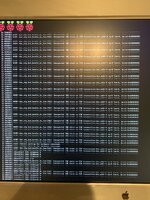 | |
Posted by: micheledipaola on 2022-11-01 00:51:39I've actually been curious about this myself.Same here. I have tested the powerview feature on my SE/30 and it seems working, even if with some issue, but this came at cost of loosing the web-ui... and (noob question...) how am I supposed ti switch back to the main branch now? I dont see any clue in the GitHub page... | |
Posted by: tecneeq on 2022-11-01 01:26:52switch back to the main branchgit checkout master Use this to see which branch you are currently on: git branch A git cheat sheet: It says that the web UI is not working here: PowerView SuperViewPiSCSI allows a Raspberry Pi to function as emulated SCSI devices (hard disk, CD-ROM, and others) for vintage SCSI-based computers and devices. This is a fork of the RaSCSI project by GIMONS. - Pi...
 github.com
| |
| Posted by: micheledipaola on 2022-11-01 01:47:01 Thanks! I knew about the web-ui, I just wanted to remind that there is that side-effect that in my opinion is affecting the choice. No clue instead for the GitHub command, thanks for the link @tecneeq | |
| Posted by: retr01 on 2023-04-03 16:06:14 Hi! I am wondering if there are any updates on this. Does anyone have pictures of the setup? Does it display color and extend to a monitor via HDMI from the SE/30 using the RaSCSI or PiSCSI? How many colors at 800x600 resolution? Is there a way we can add VRAM and then place it internally in the SE/30 with a piggy-back type of SCSI connector? By the way, IEEE did an article on the Texas Instruments TMS34010 GPU found in the PowerView and SuperrView. See attached. 🙂 | |
Posted by: micheledipaola on 2023-04-03 22:24:39Hi! I am wondering if there are any updates on this.When I tried, I had video out to an external HDMI screen connected to the raScsi, in full colors (I think Millions of colors) - but I could not manage to have It fullscreen, It was a portion of the screen only. | |
Posted by: retr01 on 2023-04-04 11:10:03When I tried, I had video out to an external HDMI screen connected to the raScsi, in full colors (I think Millions of colors) - but I could not manage to have It fullscreen, It was a portion of the screen only. Millions of colors? Cool. Were you using the RaSCSI or PiSCSI with the Rasberry Pi? The Pi has memory and may do thousands or millions of colors. As for the portion of the screen, that may be normal with HDMI monitors. I have the same issue when I use the lower resolutions at thousands of colors on my P476 on top of my HDMI monitor the screen doesn't fill up the whole screen and is slightly offset. When I use 1024x768, the screen fills the monitor but is offset and limited to 256 colors on the P476. | |
| Posted by: joshc on 2023-04-04 22:10:16 According to this post, https://68kmla.org/bb/index.php?threads/wtb-lc-pds-video-card-at-reasonable-price.43941/post-480499 The SCSI video implementation is not complete and doesn't work very well. I have personally never tried it. | |
| Posted by: rjkucia on 2023-04-05 08:59:17 How good is the refresh/update speed? I'm assuming that would vary based on resolution & color depth, but could it be used for something like Warcraft I? Or SimCity 2000? | |
| Posted by: landoGriffin on 2023-04-21 08:45:42 The refresh/update speed is decent if you're using black and white or minimal color depth. You can do high color depth, but the performance gets exponentially worse. (ex: 16-bit color is 16 times bigger than a black and white frame buffer) The way the PowerView works is to copy the entire framebuffer over SCSI to the PowerView. The graphics chips 2D acceleration capabilities aren't used at all (as far as I can tell). The SCSI video implementation is not complete and doesn't work very well. I have personally never tried it.Different people have had different luck. As long as you use the right Mac driver, it can work fine. How good is the refresh/update speed? I'm assuming that would vary based on resolution & color depth, but could it be used for something like Warcraft I? Or SimCity 2000? ShufflePuck would be great on it (black & white). The resolutions are locked in at the early Apple monitor resolutions. IIRC, 600x400, 640x480, 800x600, maybe 1024x768? Newer versions of the MacOS driver might be able to do better, but right now the PiSCSI implementation will only work with version 1.0 of the driver. The Pi has memory and may do thousands or millions of colors.Pi memory definitely isn't a problem. Since the hard work is done by the Mac, its Mac memory that is the limitation. As for the portion of the screen, that may be normal with HDMI monitors. I have the same issue when I use the lower resolutions at thousands of colors on my P476 on top of my HDMI monitor the screen doesn't fill up the whole screen and is slightly offset. When I use 1024x768, the screen fills the monitor but is offset and limited to 256 colors on the P476. I didn't ever get around to screen positioning 🙁 Just need to figure out the Linux-Fu to change the framebuffer resolution on the fly. | |
| < 26 |