68kMLA Classic Interface
This is a version of the 68kMLA forums for viewing on your favorite old mac. Visitors on modern platforms may prefer the main site.
| Click here to select a new forum. | |
| jmacz journey | |
Posted by: 3lectr1cPPC on 2025-11-16 20:32:04You have to open it up and these are on the underside hidden under some ribbon cables. @3lectr1cPPC you might want to make a note of this.Oh my goodness. Sneaky sneaky sneaky Toshiba! I will look more in to this when I'm home from college in about a week and will update the cap reference on MacDat ASAP! Thank you for letting me know about this! | |
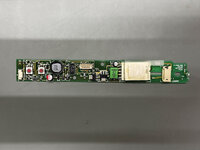
| Posted by: jmacz on 2025-11-23 18:01:32 @3lectr1cPPC, got some pictures of the PowerBook Duo 2300c for your site. Note that for the logic board, you list one 33uf 25V. There could be up to two of them. I think I saw some boards with tantalums for these which wouldn't require replacing. But mine had two electrolytic caps. The rest of the caps are correct. 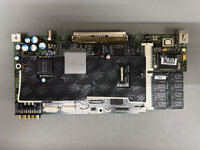 For the inverter board, there are two caps:
 For the display, there are three caps:
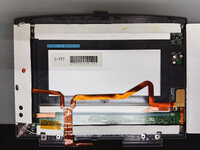 I replaced all the caps with polymer. I only have been using tantalums if I have the schematics and can verify the max voltage they will see so I can double it. In this case, I couldn't find schematics for the 2300c Duo so stuck with polymers. | |
| Posted by: 3lectr1cPPC on 2025-11-23 20:33:10 Thank you! Will try to remember to get this added soon 🙂 | |
| Posted by: jmacz on 2025-11-24 15:56:26 The center clutch cover on the PowerBook Duos is listed as a disposable part that should be replaced when the PowerBook Duo is serviced. This is because the little clips on it break off easily when removing it. Unfortunately for us, these are no longer made. I have a few with broken clips. Time for some modeling. 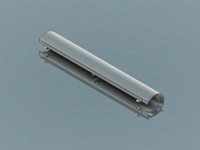 3D printed with PLA.  Removed the supports. This is prior to any finishing work. 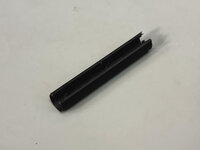 Test fitment. The below shot is just on the display housing but I also test fitted it against the body and it seems good. 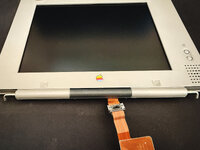 Need to test fit it again after I finish it and paint it. But once I confirm it's good with no other tweaks needed, I will provide the model on my Printables account like usual. Now we can make these no problem. | |
| Posted by: jmacz on 2025-11-29 16:35:38 I have three working PowerBook 500 series now.
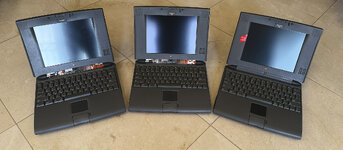 Two of them won't latch properly though... they all have normal clips, strong springs, and the palm rest hole looks fine. But two of them only partially latch (if you lift via the lid -- you shouldn't but just using an example -- they will lose grip) whereas one is rock solid. Have to open them up again to take a look. Clearly two of them are missing the center covers. I am trying to fix two of them with broken clips (which is what I did for the one that's good in the picture above) Also have two partially working PowerBook 500 series:
Although what am I going to do with 7 of these?!? .. well even 5 of them... well even 3 of them ... ?? Hoarding mentality is too strong. What I am really missing is a 550c........... and the monochromes which I should really not look for as the tunnel vision stuff would drive me nuts. | |
Posted by: 3lectr1cPPC on 2025-11-29 16:38:03Two of them won't latch properly though... they all have normal clips, strong springs, and the palm rest hole looks fine. But two of them only partially latch (if you lift via the lid -- you shouldn't but just using an example -- they will lose grip) whereas one is rock solid. Have to open them up again to take a look.My 540c has this problem and I don't know what the issue is. I did a full palmrest swap recently (to one in better condition) and the problem didn't go away, so I assume it's to do with the latch itself. | |
Posted by: jmacz on 2025-11-29 19:47:09My 540c has this problem and I don't know what the issue is. I did a full palmrest swap recently (to one in better condition) and the problem didn't go away, so I assume it's to do with the latch itself. Replaced the front facing cover panel (the one with the latch) with another, and it works fine. The latch mechanism itself seems to be the same, nothing broken or missing. But it looks like the hook itself may have deformed on the ones that aren't locking. They are bent backwards slightly (~1mm) compared to the ones that are working. I guess the plastic deformed over time or with some yanking? I guess one could try gently heating it with a heat gun and bending it back (the tip of the hook needs to be a tad higher towards the edge of the lid). | |
| Posted by: 3lectr1cPPC on 2025-11-30 13:35:15 I see. That makes sense, and yeah, careful work with a heat gun would probably be required to prevent that from breaking when you try to bend it back. Would be curious to see if you can pull it off. | |
| Posted by: adespoton on 2025-12-02 09:49:31 Do those ones use the magnetic pull? I had some newer Powerbooks that did, and the issue was that the latches became misaligned with the magnet. Once those got lined back up again, they latched properly again. | |
Posted by: jmacz on 2025-12-02 12:11:06Do those ones use the magnetic pull? I had some newer Powerbooks that did, and the issue was that the latches became misaligned with the magnet. Once those got lined back up again, they latched properly again. No, for the 500 series PowerBooks, it's purely mechanical with no magnets. Just a spring and latch. | |
Posted by: jmacz on 2025-12-02 12:13:12I see. That makes sense, and yeah, careful work with a heat gun would probably be required to prevent that from breaking when you try to bend it back. Would be curious to see if you can pull it off. Looking for ribbon cables for a spare passive and a spare active LCD panel I have, both sharps. I did receive two of those CCFL tubes and wiring connectors. But I've put the complete systems back together already with replaced clips from other lids I had. Once I find new ribbon cables, I'll spend time with both the CCFL tubes to see if they will work as well as heating the latches to see if I can get them to work better. | |
Posted by: jjuran on 2026-03-11 20:05:39Been really busy at work for the past month.. but got some time today to open my package from JLCPCB: Nubus Interposer! Wow. I LOVE this. It's one thing to come up with the idea, but then you went and actually built it. My hat's off to you! | |
| Posted by: jmacz on 2026-04-30 23:06:39 I had put my Quadra 950 up for sale but determined that I was still getting speaker pop issues as well as some random crashes on power up. 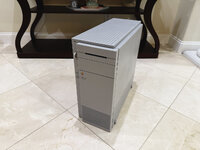 I finally got some time to debug the issues. First, the speaker pop. I had played with it enough previously to diagnose the speaker pop to the use of an ATX power supply. This power supply matched/exceeded the specs of the stock Q950 power supply but because ATX doesn't require all 3 power rails (+12V, +5V, -12V) to ramp up at the same time, the +12V line was ramping up about 14ms before +5V/-12V. This meant that parts of the logic board including the audio circuit were powering up before most of the other components. Which then resulted in the noise getting to the speaker causing the very loud pop. All Q950s seem to have a slight pop before the chime, but my Q950 had an obnoxiously loud pop. The solution was to put together a circuit that would gate the +12V to the logic board and not allow it through until the +5V rail was ramping up, thereby ramping together. The solution was based around a couple mosfets and resulted in the +12V rail ramping up only after the +5V rail was on its way up as well. 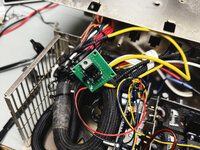 I put it together using a small test PCB and it did the trick. The rails are coming up right around the same time and the pop is not minimal as expected. I was hoping this lack of power rail synchronization was causing my random crashes on power up but unfortunately, it didn't help. But at least the loud pop was gone! Second, the crashes. The system on occasion would crash on power up right after the Welcome to Macintosh screen appears. The system was booting but then I would random errors like invalid instruction and others. Sometimes everything is fine. Sometimes it crashes. I ruled out the usual suspects: swapped memory, swapped the disk. I cleaned the ram slots. Nothing. I tried replacing the internal SCSI ribbon cable. Nope. I checked the termination, all good. I figured it had to be something with the SCSI system and it was intermittent. I then tried the external SCSI port. Works! I could not reproduce a crash even after 20+ attempts. Usually I get a crash 1 out of 3 boots. The Q950 has two SCSI chips, one for the internal SCSI chain and one for the external SCSI chain. It also has two SCSI internal ports... one is the main internal port and the other is next to the external connector and is part of the external SCSI chain. So the internal was having issues, the external was fine. I pulled the logic board out and took two steps:
| |
| Posted by: jmacz on 2026-05-02 09:48:04 Spoke too soon. Still running into problems with SCSI. Crash happened again and this time, it seems to have corrupted the disk image on my Zulu as the image no longer works even on other machines. External controller seems ok? But the internal chain seems to have an issue. Gonna have to try and borrow a stock PSU again to see if it's PSU related at all, otherwise will need to look at the SCSI system. | |
Posted by: volvo242gt on 2026-05-02 13:30:58Spoke too soon. Still running into problems with SCSI. Crash happened again and this time, it seems to have corrupted the disk image on my Zulu as the image no longer works even on other machines. External controller seems ok? But the internal chain seems to have an issue. Gonna have to try and borrow a stock PSU again to see if it's PSU related at all, otherwise will need to look at the SCSI system.@Mk.558 had the same issue with a BlueSCSI he was testing with my Q650... | |
| Posted by: jmacz on 2026-05-07 12:18:46 Not Mac related... but finally cobbled together a fully working Sun Ultra 1 workstation with proper monitor, keyboard, mouse. 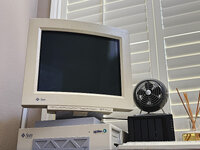 Joins my NeXTStation Color in my non-Mac collection. | |
Posted by: macinbot on 2026-05-07 22:12:23Not Mac related... but finally cobbled together a fully working Sun Ultra 1 workstation with proper monitor, keyboard, mouse. Very nice! I have a big warm spot in my computing heart for Sun Micro machines. I did an internship at the UC Berkeley Earthquake Engineering and Research Center, and their simulation lab was full of Sun machines. I used to sit in their lab on my lunch break just to see them in action. | |
Posted by: jmacz on 2026-05-07 22:25:39Very nice! I have a big warm spot in my computing heart for Sun Micro machines. I did an internship at the UC Berkeley Earthquake Engineering and Research Center, and their simulation lab was full of Sun machines. I used to sit in their lab on my lunch break just to see them in action. 👍 very cool! I spent a lot of time at Cal surrounded by Sun machines. | |
| Posted by: jmacz on 2026-05-08 13:09:37 I have been trying to reduce my collection and sold a few of them recently. But having issues reducing further. For the following 11 machines, if you could only keep 5 of them, which would you let go?
| |
| Posted by: obsolete on 2026-05-08 13:17:36 You've got ten 68k machines and one PowerPC. Is there anything PowerPC-specific that you like to do with the 8500 that you can't do with the rest of them? If so, it should probably stay, if not, it should probably go. I have opinions on the others but let's start with that 🙂 | |
| < 25 > |