68kMLA Classic Interface
This is a version of the 68kMLA forums for viewing on your favorite old mac. Visitors on modern platforms may prefer the main site.
| Click here to select a new forum. | |
| TashTwenty: Single-Chip DCD (Hard Disk 20) Interface | |
| Posted by: hideehoo on 2024-03-17 17:31:24 Built up my new design, but no dice yet. Getting the 0000001 blink code (no SD card detected?) on startup. @tashtari, should Pin 10 on the PIC always be outputting a SPI clock signal, or does it stop once the SPI SD init fails and CS (pin 7) start outputting that blink code? I not seeing anything on the SCK (pin 10) or MOSI (pin 8) lines at startup, but could be either be my dodgy Chinese sourced 1704, or the 4050 holding the line low. 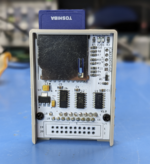 | |
Posted by: Tashtari on 2024-03-17 17:53:03should Pin 10 on the PIC always be outputting a SPI clock signal, or does it stop once the SPI SD init fails and CS (pin 7) start outputting that blink code?No, once you're in the blink code routine, there's nothing that should cause the SPI peripheral to output any signal... that's very strange. I not seeing anything on the SCK (pin 10) or MOSI (pin 8) lines at startupThis is also very strange. At the very least, you should see 80 clock pulses on the SCK line on startup. my dodgy Chinese sourced 1704*suspiciousness intensifies* | |
| Posted by: Tashtari on 2024-03-18 04:16:49 Can you be more specific about what you're seeing on the pins? It sounds like SCK is quiet on startup but then starts pulsing after SD init has failed - is that correct? What is the frequency of the pulses? Also, what did you use to program the PIC? Was it a PICkit3 or another programmer from Microchip, or did you use a third party programmer of some kind? | |
Posted by: hideehoo on 2024-03-18 08:26:56Can you be more specific about what you're seeing on the pins? It sounds like SCK is quiet on startup but then starts pulsing after SD init has failed - is that correct? What is the frequency of the pulses? SCK always stays low, no activity at all. I see MOSI and CS pulse a bit at startup like they are trying to talk to the SD card, and then CS starts outputting that flash code after a few seconds. Programming with MPELAB X IPE v6.0 and a Chinese PICkit3. Using 20220621-1704.HEX from the latest release on Github. What is the expected behavior of read LED when not connected to the Mac but powered up? Currently it is always on, but I swear after one flashing attempt I saw it briefly flash at startup, then go off, and then start flashing slowly. I did not have a SD card inserted at this point and unfortunately didn't do enough testing before I flashed it again and am now back to the solid LED. | |
Posted by: Tashtari on 2024-03-18 08:40:17What is the expected behavior of read LED when not connected to the Mac but powered up?It should still go through the usual init routine, meaning it'll try to initialize the card and will jump into the blink code routine if it fails. If it succeeds in initializing the card, I'm not sure what it'll do because it might read the unconnected Phase/CA* pins as anything. I'm assuming the LED you're referring to is lit when the !CS pin is low... is the !CS pin constantly low, or does it go high for brief periods along the way? | |
Posted by: hideehoo on 2024-03-18 19:10:14It should still go through the usual init routine, meaning it'll try to initialize the card and will jump into the blink code routine if it fails. If it succeeds in initializing the card, I'm not sure what it'll do because it might read the unconnected Phase/CA* pins as anything. I'm assuming the LED you're referring to is lit when the !CS pin is low... is the !CS pin constantly low, or does it go high for brief periods along the way? But !CS you mean the !ENABLE line from the Mac? 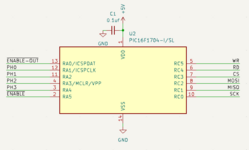 It's floating in this case and essentially low, so I would expect the Read LED to be lit since the RD line is also floating and low. 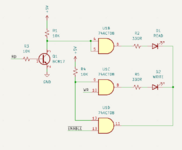 I was just curious is you have an code to try to actively drive this lines that may have cause this blinking, or maybe I was just imagining things late at night 🙂 I probably just have a bad 1704. Have a SOIC to DIP adapter in the mail and will do more breadboard testing on another example from this batch before I solder it in. | |
| Posted by: dochilli on 2024-03-19 01:06:06 You could try to program the 1704 with a pickit3 with this software: http://kair.us/projects/pickitminus/ It worked for me. | |
Posted by: Tashtari on 2024-03-19 03:45:35But !CS you mean the !ENABLE line from the Mac?No, I mean the chip select line to the memory card - my mistake, I thought that's where you had the LED connected. If you can, in future spins of the board, I'd recommend that you have a single LED connected to the !CS pin, that way users can see the blink code without using an oscilliscope. The read/write LEDs are somewhat inaccurate anyway because the Mac always has to do a "write" in order to read from the DCD, and likewise the DCD puts out a response that looks like a "read" for each sector when the Mac is writing to it. Anyway, as you say, in the error handler (that blinks the !CS line), the RD line is tristated, so I don't know what the 74ACT08 will read it as... | |
| Posted by: hideehoo on 2024-03-22 16:16:29 Success! Was simply a bad PIC16F1704. Programmed a new one, did a little testing before swapping it in, and all better now. 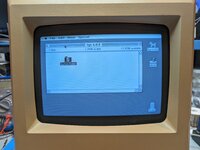 | |
Posted by: Tashtari on 2024-03-22 17:07:56Success! Was simply a bad PIC16F1704. Programmed a new one, did a little testing before swapping it in, and all better now.Cool, that's a relief. =) | |
| Posted by: Iesca on 2024-03-22 17:34:31 Have there been any developments at all in transferring items to the tashtari or the sd card via a modern Mac or PC? I recall that the original method revolved around using the Terminal to format and transfer a pre-made image. | |
| Posted by: NJRoadfan on 2024-03-22 20:27:24 Can it be mounted with CiderPress II? https://github.com/fadden/CiderPress2 | |
| Posted by: hideehoo on 2024-03-22 21:07:29 Now I need to buy a FloppyEmu to see if the passthrough port works. 🙂 Or flash a floppy only firmware on the Fujinet. 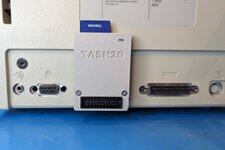 | |
Posted by: Tashtari on 2024-03-23 02:49:44Now I need to buy a FloppyEmu to see if the passthrough port works. 🙂 Or flash a floppy only firmware on the Fujinet.Looking good! You could also attach an actual-for-real floppy drive (an internal one, anyway), couldn't you? Have there been any developments at all in transferring items to the tashtari or the sd card via a modern Mac or PC?The postal service transfers items to the Tashtari just fine... =D Seriously, though, last I heard, @Corgi was working on a tool along those lines, but that was in 2022 and they haven't been heard from since. CiderPress is an interesting prospect, though. If it doesn't have support for the images used by TashTwenty already, it seems like it'd be relatively easy to add it - if you ignore the custom icon support, TashTwenty's images are just standard MBR images with HFS partitions (type 0xAF). | |
| Posted by: laisan86 on 2024-04-12 03:12:57 I downloaded the image, thanks! For the Tash20 I bought has been pre-installed the os 6.0.8, and my Macintosh 512K can't support it. But, i really wonder: how I can replace the image on my SD card of tash20 now. Is there any one can help? | |
Posted by: Tashtari on 2024-04-12 03:25:03how I can replace the image on my SD card of tash20 now.TashTwenty recognizes cards with standard MBR (DOS) partition tables on them with HFS (type 0xAF) primary partitions. If you have a raw .dsk image that you want to convert into an image you can write to a card for use with TashTwenty, I made up a small Python script here that will do the job. Working with cards is currently easiest on Linux where you can just use fdisk to manipulate the partition table and then dd to/from the partitions... do you have a Linux machine (a Raspberry Pi works fine) available? I wish there was a simple GUI utility I could direct you to, but none exists that I'm aware of and I have very little experience in the area so I'm poorly positioned to write one myself... | |
Posted by: laisan86 on 2024-04-12 05:20:32TashTwenty recognizes cards with standard MBR (DOS) partition tables on them with HFS (type 0xAF) primary partitions. If you have a raw .dsk image that you want to convert into an image you can write to a card for use with TashTwenty, I made up a small Python script here that will do the job. Working with cards is currently easiest on Linux where you can just use fdisk to manipulate the partition table and then dd to/from the partitions... do you have a Linux machine (a Raspberry Pi works fine) available? I wish there was a simple GUI utility I could direct you to, but none exists that I'm aware of and I have very little experience in the area so I'm poorly positioned to write one myself...Oh, good! I try to get it. And, I have a MacBook Pro M1 which is also a Linux like machine. Is MacBook Pro able to do the job? | |
Posted by: Tashtari on 2024-04-12 05:22:34Oh, good! I try to get it. And, I have a MacBook Pro M1 which is also a Linux like machine. Is MacBook Pro able to do the job?You should be able to use the Python script, at least, and use dd to write an image to your card. I don't know very much about (modern) Mac OS, but perhaps others can chime in... | |
Posted by: laisan86 on 2024-04-12 05:35:53You should be able to use the Python script, at least, and use dd to write an image to your card. I don't know very much about (modern) Mac OS, but perhaps others can chime in...So, I plan to do: 1. Format the SD card 2. Extract the image from the zipped file on above 3. Run the python script Thus, I can have a SD card for my Macintosh 512K. Right? | |
| Posted by: robin-fo on 2024-04-12 05:37:17 IIRC the script worked without issues on my modern Mac | |
| < 23 > |