68kMLA Classic Interface
This is a version of the 68kMLA forums for viewing on your favorite old mac. Visitors on modern platforms may prefer the main site.
| Click here to select a new forum. | |
| TashTwenty: Single-Chip DCD (Hard Disk 20) Interface | |
Posted by: Tashtari on 2023-04-18 17:48:51Could this probably work with a IIgs??If you can get Python running on a IIgs... =) But seriously - no, TashTwenty won't work on a IIgs as they don't support DCD (the protocol used by the Hard Disk 20). They do support SmartPort, which is a notionally similar protocol, but it's totally incompatible with DCD. | |
| Posted by: WillJac on 2023-04-27 13:42:36 I made an image and then used the python script to create the other image to DD onto the SD card. When I did the python script I told it not to use any icons by using the '-'. All went well and I done the DD if=... of=.... on my Mac and made sure the PID is set to HFS after as I am running this on the 1825 pic chip with the 1825 hex on the chip. But when I boot and all, I get this on the screen and I am not sure why the font is SOO big.. Anyone have ideas? Thanks in advance for the help. | |
Posted by: Tashtari on 2023-04-27 13:50:42I made an image and then used the python script to create the other image to DD onto the SD card. When I did the python script I told it not to use any icons by using the '-'. All went well and I done the DD if=... of=.... on my Mac and made sure the PID is set to HFS after as I am running this on the 1825 pic chip with the 1825 hex on the chip. But when I boot and all, I get this on the screen and I am not sure why the font is SOO big.. Anyone have ideas?Does your System Folder have Geneva 9 in it? Alternatively, that looks like System 7, can you change the font in the Views control panel? | |
Posted by: WillJac on 2023-04-27 14:51:46Does your System Folder have Geneva 9 in it? Alternatively, that looks like System 7, can you change the font in the Views control panel?Well this is what I am seeing. I changed the font size in view to 10 and some items improved but still strange as you can see. Not sure if Geneva 9 is there. | |
| Posted by: Tashtari on 2023-04-27 15:50:23 I don't see Geneva 9 in the list, that could be the root of your problem. In any case, from what you've described, I doubt this is a TashTwenty issue... | |
| Posted by: WillJac on 2023-04-27 15:53:38 I don’t think is something with Tash20 either. I will try work some on it and update. | |
| Posted by: Mark Newlon on 2023-04-30 11:07:45 The Tash Twenty Mega looks fantastic! Are these available now? | |
Posted by: WillJac on 2023-04-30 17:15:44Boards arrived right as I was heading out of town, so I finally was able to get one assembled today. Still need to get the MCUs programmed and do some testing... but it's otherwise complete! I'll have GitHub links posted here when testing is complete. The SD card slot is a bit of a tight fit when inserting/removing the card; the Rodime is kinda in the way and makes it a little cumbersome to swap SD cards; if you're fine just swapping out the microSD card, it's no worry.Warmech, any update on this project as I would love to get some of these boards and build them. | |
| Posted by: Mark Newlon on 2023-04-30 17:18:49 Me too! I have THREE HD20's that I cannot mount. This would be an awesome solution. | |
| Posted by: Joopmac on 2023-07-09 02:34:03 Hello all🙂 Would this work on a unupgraded week 27 128k? Read somewhere that the 64k rom does not work with hd20... | |
Posted by: cheesestraws on 2023-07-09 04:02:44Read somewhere that the 64k rom does not work with hd20... It doesn't. And even if you load it in software, which you can do, it uses sufficient memory that it's hard to do anything practical with the rest of the machine. An HD20 or HD20-alike is really only practical in a 512k+ RAM machine. | |
Posted by: WillJac on 2023-08-11 06:51:27This has inspired me. I've been trying to find a tiny project to re-hone my C# skills. Used to be a professional C# dev but haven't touched it in over 10 years. No promises this will ever be done, but I've drafted a UI in Visual Studio; what do you think?Hello, was this project ever finished? | |
| Posted by: pyranger on 2023-08-11 16:48:18 hello, I purchased a tashtwenty budget from Caymac and it works fine with the sd card that was shipped with it on my 512ke. However, all of my attempts to create my own sd card using makeimg.py have been failures - none have been recognized by my mac even when booted from 6.0.8 floppy. I have tried 2GB, 100MB and 20MB partitions and still no success. Have also tried 2 different SD cards. Not sure what I am doing wrong. Any suggestions would be welcome. Thank you. | |
Posted by: Tashtari on 2023-08-11 18:27:46hello, I purchased a tashtwenty budget from Caymac and it works fine with the sd card that was shipped with it on my 512ke. However, all of my attempts to create my own sd card using makeimg.py have been failures - none have been recognized by my mac even when booted from 6.0.8 floppy. I have tried 2GB, 100MB and 20MB partitions and still no success. Have also tried 2 different SD cards. Not sure what I am doing wrong. Any suggestions would be welcome. Thank you.What command line are you using with makeimg.py, and what are you using to write it to the card? | |
| Posted by: pyranger on 2023-08-12 04:29:51 thanks for the response. FYI: Caymac also graciously helping me out. I sent him my .dsk image and resultant .img file and he's going to take a look. Answering your question: 1. python makeimg.py 608_hd20.img 608_020M.dsk - 2. for writing to the card, I have tried: a. raspberry pi disk imager b. sudo dd if=608_020M.dsk of=/dev/sda | |
Posted by: Tashtari on 2023-08-12 07:06:42thanks for the response. FYI: Caymac also graciously helping me out. I sent him my .dsk image and resultant .img file and he's going to take a look. Answering your question:I notice your dd command is writing the 608_020M.dsk file to the card rather than the 608_hd20.img file generated by the script, is that intentional? | |
| Posted by: pyranger on 2023-08-12 07:17:28 1. sorry. I may have made this mistake at some previous point, but presently am using: sudo dd if=608_020M.img of=/dev/sda 2. comparing my sectors (sdb below) to caymac's sd card (sda below), his starting sector is 256 whereas mine is 1. perhaps this is the problem? 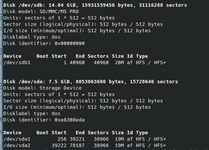 | |
| Posted by: Tashtari on 2023-08-12 07:54:18 Starting sector shouldn't matter to TashTwenty, I don't see anything there that looks suspicious. Just to eliminate the other cards as a potential source of trouble, can you write 608_020M.img to Caymac's SD card (back it up first, obviously) and see if that works? Alternatively, if you don't want to do that, it might be worth seeing if the firmware is blinking out a trouble code using the instructions here - the trouble code is supposed to be visible using the drive activity LED if it's connected to !CS but I'm not sure if Caymac have connected theirs this way. | |
| Posted by: pyranger on 2023-08-12 08:58:28 1. i added a 256 sector offset to the makeimg.py code which successfully created offset in the partition when written to the sd card. Made no difference, as you predicted. 2. not seeing lights blink even with no card, so these leds may not be connected in a way to communicate trouble codes. i may have to do some white wiring. 3. i have tried 2 cards (8GB and 16GB) without success. i will leave the Caymac card alone as my sole functioning reference. thanks for suggestions. I'll see what Caymac comes back with. | |
| Posted by: Mark Newlon on 2023-08-12 13:12:05 Is there any update on the Tash unit for the HD20? I'de love to have FOUR of those! | |
| < 21 > |