68kMLA Classic Interface
This is a version of the 68kMLA forums for viewing on your favorite old mac. Visitors on modern platforms may prefer the main site.
| Click here to select a new forum. | |
| Needed: Lapis ColorServer PDS/30 software | |
| Posted by: trag on 2014-12-04 17:05:26 Here's a much better set. Eight chips for less than $10. Still may not be the right chips, but if the part numbers don't match, don't assume they won't work. Post the part number you do need. Then we can maybe find a datasheet and see if they're the same part from different manufacturers. http://www.ebay.com/itm/8-TC524258BZ-80-DUAL-PORT-VIDEO-RAM-256Kx4-512x4-150-30ns-5V-ZIP-28-DRAM-VRAM/271632014082?_trksid=p2060778.c100276.m3476&_trkparms=aid%3D222007%26algo%3DSIC.MBE%26ao%3D1%26asc%3D20140725133649%26meid%3D9654b2767c8041d983a7e9413fedc0d9%26pid%3D100276%26prg%3D20140725133649%26rk%3D2%26rkt%3D4%26sd%3D121291981557 | |
| Posted by: olePigeon on 2014-12-04 17:54:00 My part is Mitsubishi. It has: M5M442256AL 1512E04-10 | |
| Posted by: olePigeon on 2014-12-04 17:57:20 Mfr Package Description 0.400 INCH, PLASTIC, ZIP-28 Status DISCONTINUED Technology CMOS Package Shape RECTANGULAR Package Style IN-LINE Terminal Form THROUGH-HOLE Terminal Pitch 1.27 mm Terminal Position ZIG-ZAG Number of Functions 1 Number of Terminals 28 Package Body Material PLASTIC/EPOXY Temperature Grade COMMERCIAL Memory Width 4 Organization 256K X 4 Memory Density 1.05E6 deg Operating Mode ASYNCHRONOUS Number of Words 262144 words Number of Words Code 256K Operating Temperature-Max 70 Cel Operating Temperature-Min 0.0 Cel Supply Voltage-Max (Vsup) 5.5 V Supply Voltage-Min (Vsup) 4.5 V Supply Voltage-Nom (Vsup) 5 V Access Mode FAST PAGE Memory IC Type VIDEO DRAM Number of Ports 2 Access Time-Max (tRAC) 100 ns | |
| Posted by: olePigeon on 2014-12-04 17:57:41 Gah. Code tag doesn't work. >🙁 | |
| Posted by: olePigeon on 2014-12-04 18:01:00 Well, they're identical, except that the eBay version is 80ns while the RAM on the card is 100ns. Think that might cause a problem? Or can the 80ns RAM just run slower? | |
| Posted by: olePigeon on 2014-12-04 18:05:18 $8, I'll give it a try. Even comes with 8 RAM chips so I can populate the whole board. | |
| Posted by: trag on 2014-12-05 00:24:18 Let us know how it works out, please. | |
| Posted by: CC_333 on 2014-12-05 11:52:22 80ns is faster than 100ns, but it seems that it should work, just at the slower speed. It could also be that the original chips will run at 100ns, while the new ones will operate at 80ns, and the speed of one won't affect the speed of the other. I think that mostly applies to clock frequency, not response time (or whatever it is). c | |
Posted by: ScutBoy on 2014-12-05 12:24:11I've done some googling to try and come up with specs on the Ehman Full page display, but so far have not found any info. It appears (along with the Ehman Portrait Display) on a list of "Fixed Frequency Monitors" but the links on that list to specs is 404.I did find some info on the Apple Full Page Display. 640x870 Resolution 8 bit grayscale 75Hz refresh rate ADB hub Special display cable 80 DPI "Special display cable" refers to the fact that the monitor has a 13W3 connector. I have no idea how this matches up to the Ehman or Radius monitors. | |
| Posted by: olePigeon on 2014-12-05 19:01:32 Well, BMOW has an Apple Full Page Display that's 8-bit grayscale, 640x870. I'm going to give it a whirl, hopefully sometime this weekend. | |
| Posted by: ScutBoy on 2014-12-07 18:42:48 Found this data sheet on the Radius FPD - at least an early vintage one. Seems they came in different refresh rates during their lifetime... View attachment 4902 | |
| Posted by: olePigeon on 2014-12-08 18:18:32 I added the extra memory to the Lapis SE/30 card. It didn't do anything. The card still identifies as a PDS/30 17 and not a PDS/30 21, it also didn't offer any additional resolution or color depth. So I guess I'd need to change the ROM as well, but I doubt I'd ever find one. As for the other Lapis card in the SE, I got the same picture on the Apple Portrait as I did on the LCD. So it could be a sync issue. Maybe the vertical and horizontal are switched? I don't know. | |
| Posted by: trag on 2014-12-10 13:41:40 Bummer. But not terribly surprising. Is there a ROM on the card? Or is it totally dependent on the driver loading the FPGA image. I guess there must be a declaration ROM at least. Might be interesting to read that out, if there is one. It's possible that the declaration ROM just declares what model card it is and then the driver loads the FPGA code for that model. Possibly, change one byte in the declaration ROM and it might know to change the FPGA code to support the larger VRAM. It'd probably make more sense to look for the test and branch instruction in the driver, than to spend a lot of time guessing at the contents of the declaration ROM. | |
| Posted by: olePigeon on 2014-12-10 20:46:23 Yep. Actually, the ROM looks to be just your standard everyday EPROM. | |
| Posted by: BadGoldEagle on 2015-03-16 04:21:06 Hi all I've just bought the same card on ebay last week but I'm struggling to make it work on my SE/30. The Driver Museum is back, so I got the "drivers pack" from them, which is exactly the same archive that you have. I understand that I need the ColorServer PDS 17 Control panel, which I've got. But do I need anything else? What I don't get is that I'm told it's a control panel, but my SE/30 had another video card when I got it, another Lapis (the DPD one) and I seem to remember the driver was installed under extensions not control panels. I tried both and it's still not working: the monitor control panel doesn't see anything even with an external display connected (I tried a LCD with a DA-15 to VGA converter which I know works from my "Radius IIsi hack for SE/30" and a standard 14" Macintosh Color Display) I'm sure the solution is that I'm a n00b that doesn't know how to install stuff properly. But I'm not even sure that the card itself works... So I've downloaded a software called "slots", I'm going to upload a couple of pics What do you think? | |
Posted by: BadGoldEagle on 2015-03-16 04:28:06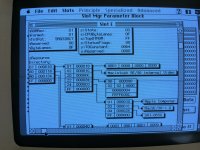 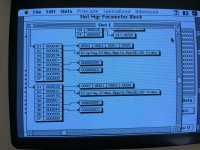 | |
| Posted by: olePigeon on 2015-03-16 08:27:13 The Mac Driver Museum version is corrupted. I couldn't get it to work. Try these: https://dl.dropboxusercontent.com/u/5334905/%7F%7FLapisVideoDrivers.sit | |
| Posted by: BadGoldEagle on 2015-03-16 09:14:33 I have tried your link. Still nothing ;( the monitor control panel is left unchanged. Could the card be damaged? I can't understand properly what the report from "slots" is telling me. There are no signs of a Lapis card in there... | |
| Posted by: BadGoldEagle on 2015-03-17 01:37:32 I don't want to spoil your thread, so I'll create another one for my problem. :beige: | |
| < 2 |