68kMLA Classic Interface
This is a version of the 68kMLA forums for viewing on your favorite old mac. Visitors on modern platforms may prefer the main site.
| Click here to select a new forum. | |
| System 7 not booting on SE/30 | |
| Posted by: Themk on 2017-04-15 18:51:15 Can any give me any hints of where I should start checking? Which ones fail the most often? Techknight? | |
| Posted by: techknight on 2017-04-16 09:58:27 you need to check all the pins on the SCC, and see if they buzz out at their respective counterpoints. You can check address/data lines from the chip against the ROM socket, as 99% of the databus appears at the ROM SIMM socket. Follow the schematic and cross off the shit you check with a highlighter. Once you locate bad traces, its probably only 1 or two, you can follow the schematic because the Data and Address lines at the SCC also appear at the SCSI, the SWIM, and the ASC so you can solder a patch wire to any adjacent IC pin that is on the same net. | |
| Posted by: Themk on 2017-04-16 12:04:04 Thanks techknight, this is exactly what I was looking for! I will get started soon. My plan is to first check the data bus between 53C80 and SCC, then SCC to ROMSIMM, and then work my way from there, following this schematic page. | |
| Posted by: Themk on 2017-04-19 15:46:14 Just checked SCC to 53C80 on the data bus (D0-D7), everything checked out okay, now I have to check more pins on the SCC 😀 | |
| Posted by: techknight on 2017-04-19 15:57:17 you need to check every single pin. address bus, data bus, the read/write lines, enable line, etc... If everything rings out, the chip itself could be bad, I have only ever seen 1 go bad. That would be a last ditch effort. Otherwise, i would check the bourns filters to make sure none are shorted to ground. | |
| Posted by: Themk on 2017-04-19 16:04:40 In the unlikely event that the chip really is bad, would this be a suitable replacement: http://www.ebay.com/itm/371898294968 I realize that eBay is maybe not the best place to buy one, but is that what I would be looking for? | |
| Posted by: Themk on 2017-04-22 16:14:17 I found a broken trace! Now Im soldering a patch wire, will update when done. | |
| Posted by: Themk on 2017-04-22 16:51:17 YES, THAT WAS THE BROKEN TRACE!!!! YES, IT WORKS! Here is my patch wire: 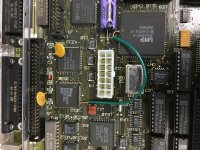 You can see how I patched from pin 41 (which is RD VERY VERY important) to pin 62 on the UI8 (The large GLU chip) And here is the "About this Macintosh" window: (NOTE: 32-bit addressing was not enabled as this was booted from floppy, and there is no space for MODE32 on floppy) 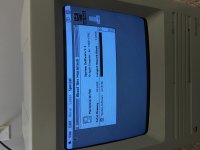 Wow, just wow, I'm so glad this is fixed! My sound works, my SCSI works, my everything works now! I did the recapping my self, which I felt went pretty well, and hopefully people think I did a good job of running my patch wire too! (If I didn't do a good job, you can let me know) | |
| Posted by: techknight on 2017-04-22 17:00:02 Yep. Figured. Glad its working. P.S. I have seen this more than a few times 😉 Mainly the portable though. | |
| Posted by: Themk on 2017-04-22 17:12:25 What's funny is you could visually see how the trace was rotted out (it was actually broken right at the SCC). Had I been more careful in my searching, I probably could have found the bad pin with my naked eye, but methodically checking everything with my multimeter and the schematics is a good thing to do anyway 🙂 Not every broken trace is visible P.S. Right now I am using HyperTerm on my PC, and ZTerm on my mac to ZModem a large stuffit archive of System 7.1.1. Rather than consume the disks, I figured I could simply serial it over 🙂 P.P.S. If you are using a newer version of windows, and want a good way to ZModem stuff, HyperTerm no longer comes with windows, BUT if you still have your old Windows XP CD (or Windows 2000, or an ISO 😉 ), you can copy HyperTerm off of that. Works fine for me on Windows 10 x86-64, with a FTDI USB to serial adaptor. | |
| Posted by: avadondragon on 2017-04-22 17:51:23 Nice job! I always enjoy seeing people's success with this stuff. Plus if you hang around long enough you get to see may of the things that could go wrong on your own hardware. Would have never guessed a system could boot sys6 but not sys7 because of a bad trace! | |
| Posted by: Johnnya101 on 2017-04-22 18:24:54 Great job!!!!! Can't believe it was just one trace! | |
Posted by: Themk on 2017-04-22 18:49:20Nice job! I always enjoy seeing people's success with this stuff. Plus if you hang around long enough you get to see may of the things that could go wrong on your own hardware. Would have never guessed a system could boot sys6 but not sys7 because of a bad trace!Haha, yes you do get to see what can happen. Thankfully I tried to use serial, which meant that techknight was able to tell me that my SCC was preventing Sys7 from booting! Great job!!!!! Can't believe it was just one trace!Same here! This board is one of the earliest SE/30 boards, being produced in January 1989, it is socketed. The original caps were still installed, and, amazingly, the machine still booted without totally simasimacing! Looking (and using) at the schematics have given me new respect for the complexity of the SE/30 design, it's amazing that only one trace was broken! There are a lot of them! Right now (you can see in the photo above) I have this SE/30 board housed in my SE SuperDrive (I hear the SuperDrive labeling is rare-ish or something), and everything is working perfectly. System 7.1.1 is currently being installed, after which I want to try to get extended display working with my SE/30's Video card! | |
Posted by: techknight on 2017-04-22 19:19:24Great job!!!!! Can't believe it was just one trace!I can, haha. I see it alot. BTW, as far as HyperTerminal, I never use it anymore. Ever since I downloaded and got used to Putty, I dont use anything else! | |
| Posted by: Themk on 2017-04-22 20:54:58 I love PuTTY, it is very useful! I will never look back at other terminal programs. PuTTY doesn't have built in ZModem. All I use HyperTerm for these days is ZModem to my old macs. That is it! I use PuTTY daily for SSHing into a few of the servers I manage, so nice! | |
| < 2 |