68kMLA Classic Interface
This is a version of the 68kMLA forums for viewing on your favorite old mac. Visitors on modern platforms may prefer the main site.
| Click here to select a new forum. | |
| My screen is blue (Radius Pivot SE/30) | |
| Posted by: Trash80toHP_Mini on 2017-03-30 10:51:46 I'm thinking you'll be getting a lot more than 16 levels of grays. 😉 /monthly_03_2017/post-4256-0-29410800-1488970854.png">View attachment 11955 | |
Posted by: beddy on 2017-03-30 12:40:35I'm thinking you'll be getting a lot more than 16 levels of grays. 😉I can't get more of 16 color 🙂 always blue color 🙁 I am on finder 7.5.5, I have no driver no software. I tried to load some soft from radius but extensions scratch my mac se 🙁 | |
| Posted by: Trash80toHP_Mini on 2017-03-30 13:27:40 We've got to identify which software needs to be installed to get the additional levels of color/grayscale on my COLORPIVOT SE/30 and your GS PIVOT SE/30. Switch your settings to Grayscale instead of Color and the BlueScale output looks a lot nicer. 😉 Your card has the expanded VRAM we were talking about in another thread, note the empty ZIP sockets in that pic of 90210's board. | |
Posted by: beddy on 2017-03-30 13:41:04We've got to identify which software needs to be installed to get the additional levels of color/grayscale on my COLORPIVOT SE/30 and your GS PIVOT SE/30.I noticed about VRAM and i tried to remove and i lost color (16 to 4). I replugged now. I tried to use grey scale mode but my screen still blue. i tried to find drivers for Radius for old mac on internet , but all links I found it's dead. | |
| Posted by: Themk on 2017-03-30 15:19:23 You have a greyscale card. To fix your blue screen of confusion problem, you have to perform my hack, which fixes the blue screen of confusion problem | |
| Posted by: Trash80toHP_Mini on 2017-03-30 18:49:54 LOL! I'd typed this earlier and forgotten to hit post. Doesn't sound to me like you have any need for drivers at all with your card, it's a hardware problem. You've got to find some way to adapt your card's Cable to the VGA interface which ties the Red & Green lines to the Blue(only) output of your Monochrome Card per Themke's suggestion and your MonoBlues will go away. It's too bad the VRAM bump only takes you from 2bit to 4bit grayscale. Make sure you're set to Grayscale and not Color in the Monitors Control Panel, you'll see the difference. | |
Posted by: beddy on 2017-03-30 23:42:50LOL! I'd typed this earlier and forgotten to hit post.Ok I understand ! No driver for this card ! it's monochrome card. Monitors settings is GrayScale in 16 levels now. But my screen still blue. I gonna use this solution perform my hack, which fixes the blue screen of confusion problem have a nice day Tks for your help | |
| Posted by: BadGoldEagle on 2017-03-31 00:05:53 Trash, are you 1000% sure your card is color? I can't see a damn difference between yours and mine and the ones on google images. | |
Posted by: beddy on 2017-03-31 02:08:59Trash, are you 1000% sure your card is color? I can't see a damn difference between yours and mine and the ones on google images.I'm sure about nothings 🙂 some screenshots about my hardware Ed 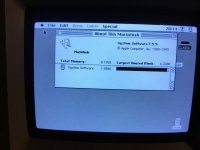 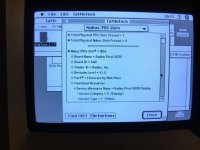 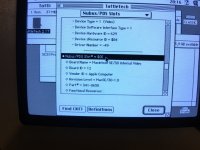 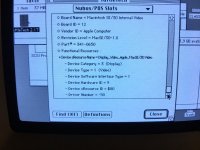 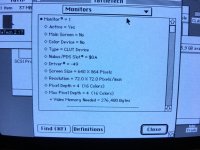 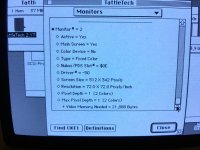  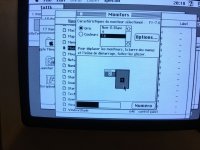 | |
Posted by: Trash80toHP_Mini on 2017-03-31 07:23:46Trash, are you 1000% sure your card is color? I can't see a damn difference between yours and mine and the ones on google images.Pretty dang sure: 1/ it says COLORPIVOT on the ROM sticker 2/ gives me the choice of colors or grayscale in the Monitors Control Panel 3/ I can see a distinct difference between the "blocks of 256 blues" in the control panel's sample bar when it's set to color 4/ I can see a very smooth gradation when it's set to 256 Grays "BlueScale" 5/ my card looks NOTHING like the cards in these pics I'll take a pic, but I thought we'd already had one up of the Color Pivot card for the SE/30? edit: too many related threads, gimme a placemarker link to the pic of yours here. | |
| Posted by: Themk on 2017-03-31 09:09:35 A photo would be nice, as well as an entry into NuBus Mafia. (If you want to) All of these related threads seem to be bringing up the same points, over and over again. | |
| Posted by: BadGoldEagle on 2017-03-31 09:36:53 Mine does not say Color Pivot on the ROM sticker... BUT it lets me choose between 256 grays (blues) or 256 colors (blues) SO confusing. Mine looks like beddy's card. I think that's definitely the monochrome card. Edit: found picture of Color SE/30 Pivot: /monthly_09_2016/post-1378-0-78721700-1474146828.jpg">View attachment 10068 | |
| Posted by: Themk on 2017-03-31 09:48:39 Yup that's it. Not sure you can toggle between greys and colours in your monitors control panel-- starting to think the toggle doesn't matter. | |
Posted by: Trash80toHP_Mini on 2017-03-31 09:52:13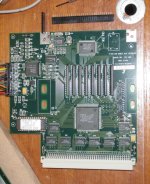 Here's a quick one of my card and also showing the female header connector type that'll be used for fabricating cables. I think shorter versions are used for mounting Arduino shields and the like. | |
Posted by: Trash80toHP_Mini on 2017-03-31 09:56:37All of these related threads seem to be bringing up the same points, over and over again.Yep, there's a "rarely ending" series of interrelated posts about most anything if you dig back far and wide enough into the archives. Some make for happy endings. quick test: if you toggle between colors and grays, does the sample bar underneath change at all? | |
Posted by: Themk on 2017-03-31 12:13:26quick test: if you toggle between colors and grays, does the sample bar underneath change at all?I know this is not quite what you are looking for, but if I select "millions" in the greys section on my 24-bit colour VidCard, the bar will still be colour, while the UI will go to greyscale. On the lower options, changing between colour and greys will change the bar at the bottom to one that has many shades of grey. | |
Posted by: beddy on 2017-03-31 13:06:39Yep, there's a "rarely ending" series of interrelated posts about most anything if you dig back far and wide enough into the archives. Some make for happy endings.Yes in color mode i have not grade of colors juste a palette (of what i don't know, everything are blue 🙂 ) | |
| Posted by: Trash80toHP_Mini on 2017-04-01 10:03:01 Most curious, when I toggle my COLORPIVOT 030 card between grays and colors it goes from shaded blues to a checkerboard of blues. Your Grayscale version is apparently behaving the same way as mine if I'm reading you correctly? Can anyone else with the Grayscale Pivot 030 confirm this behavior? I need to find out which driver kicks my card from its Blue Screen of Confusion into color mode. My first guess is that while the two cards look entirely different to the eye, they could be sharing much the same hardware and firmware if not identical components. That would explain the odd behavior exhibited by both cards and the need to run a driver to flip the COLORPIVOT from its default Blue line only output to full-on RGB output. If that's the case, it might be possible to piggyback the additional four VRAM sticks implemented on my COLORPIVOT onto the Grayscale Pivot's VRAM to achieve the fully smooth 256 level "gray" banding I'm seeing. Given that component level similarity, I'd almost bet the 256 level option will pop right up just as you can make the 16 level option appear and disappear by changing you configuration between two sticks and four. Given the two ZIP sockets, could this VRAM piggybacking hack be as simple as designing a six stick card to plug into those two sockets and adding patch wires for the additional four bits of addressing? | |
| Posted by: Trash80toHP_Mini on 2017-04-01 10:29:59 Almost time for work, but gotta get this posted: It looks like the hack MIGHT be even easier than described! Could someone buzz the connections between the VRAM ZIP sockets and the 14pin DIP socket next to the soldered VRAM? I'll bet a lot of them are in common. edit: maybe not doesn't seem near enough lines . . . they might be the additional lines needed to be added to the ZIP sockets or all four IC positions for an eight stick daughtercard? The two boards are year or less apart, looks like the GP030 might have been an almost fully functional "early release" form subset of the planned CP030. Check the specs on the standard(?) socketed (BIG) IC and the Bt IC. If the latter is the same on the two cards we've got a shot. Looks like the several standard GAL ICs were condensed into the ASIC above the VRAM on my card and that Radius switched to their own ASIC to replace the standard part socketed onto the Grayscale Pivot 030. TTFN 😛h34r: | |
| Posted by: Trash80toHP_Mini on 2017-04-01 15:50:48 Bt478KPJ50 135 9012 D vs. Bt478KPJ50 387 9237 F | |
| < 2 > |