68kMLA Classic Interface
This is a version of the 68kMLA forums for viewing on your favorite old mac. Visitors on modern platforms may prefer the main site.
| Click here to select a new forum. | |
| upgrading the ibook clamshell's L2 cache to 1MB | |
| Posted by: alectrona6400 on 2026-06-14 12:01:16 welp, got the new chips in and well... it still isn't passing the mac os 9 built in memory test for cache. starting to think its either address lines or firmware related. dunno if the firmware on here has ever been updated, as a matter of fact. i know for certain these chips are good. | |
| Posted by: alectrona6400 on 2026-06-14 15:22:31 well, tested the computer some more and it does work, but disables the L2 cache for whatever reason. maybe lack of address lines or something. gauge pro also doesn't properly see my bus overclock, and assumes the CPU is running at 266MHz with the 66MHz bus even though i had set the bus to run at 100MHz... 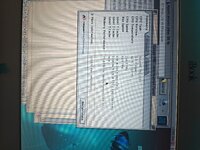 | |
| Posted by: defor on 2026-06-14 16:32:37 Totally not directly related, but BITD, about a year and a half after I got my DA/733/1M Superdrive model, I started getting the same error you're seeing completely out of the blue in os9, but not in osx... I ASSUME there's some kind of integrity check but i doubt there's any diagnostics for this. Definitely interested if you can pull this off tough! | |
Posted by: alectrona6400 on 2026-06-14 19:20:52Totally not directly related, but BITD, about a year and a half after I got my DA/733/1M Superdrive model, I started getting the same error you're seeing completely out of the blue in os9, but not in osx... I ASSUME there's some kind of integrity check but i doubt there's any diagnostics for this.OS X definitely does the checks, and you can check in system profiler if something is amiss or has failed. | |
| Posted by: defor on 2026-06-14 19:24:21 Oh definitely- I just meant that on that specific machine, i didn't even know it'd failed because OSX doesnt do the popup, and classic wasnt notifying. Anyhow.. definitely gonna be following your attempts if you plan to keep trying! | |
| Posted by: alectrona6400 on 2026-06-16 16:16:45 so i managed to get the RAM upgrade to 128MB working, for a total of 640MB on the system. sadly i am still stuck on the cache failing to pass the power on test, which makes the whole machine feel rather slow (powerbook 5300 much?). | |
| Posted by: alectrona6400 on 2026-06-16 19:53:36 turns out there is in fact an address line that likely is not connected, A16 on the 128Kx36 chips is on pin 50 although that is a no-connect on the old 64Kx36 chips... probably why the cache isn't working | |
Posted by: Daniël on 2026-06-17 00:31:50turns out there is in fact an address line that likely is not connected, A16 on the 128Kx36 chips is on pin 50 although that is a no-connect on the old 64Kx36 chips... probably why the cache isn't working Yes, they most likely didn't route all the address lines for the cache. I know @herd has run their own address lines from under the CPU on a Pismo card before, so it's not impossible to mod the board to add them here: | |
| Posted by: LightBulbFun on 2026-06-17 05:44:08 if your upgrading the L2 cache to 1MB total (and not 2MB total) the issue here sounds like Bad soldering or Bad chips, I am quite sure the Clamshell has all the address lines for at least 1MB, and I know @max1zzz has done it it before (but sadly we did not know about the config-block issue at the time) if it is done successfully then the clamshell should boot up without any L2 cache errors and report 512KB of L2 cache until you suitably edit the config-block of the BootROM to enable the full 1MB 2MB of L2 cache is where the address line issues start 🙂 (but as Dan mentioned you might be able to bodge on the extra missing address line) | |
| Posted by: alectrona6400 on 2026-06-17 07:51:16 the confusing part is I did manage to install these correctly, yet it still doesn't pass 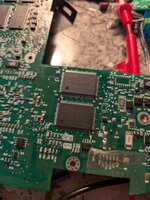 | |
| Posted by: alectrona6400 on 2026-06-17 11:31:42 i was in fact SUCCESSFUL! now i just need to figure out what i need to modify in the bootrom for both the 1MB of L2 cache and 128MB of onboard memory. 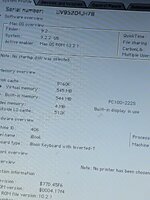 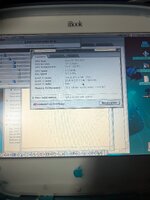 | |
| Posted by: LightBulbFun on 2026-06-17 12:29:13 you will have to edit the config block thusly [Success] PowerPC Mac Soldered RAM UpgradeFor years now, myself and many others have made attempts to upgrade soldered RAM on PowerPC-based Macs, without any success. As I've found from my vast experience doing such upgrades on Intel machines, just swapping the chips is not all that needs to be done; the system's BootROM also has to be...
 forums.macrumors.com
there is GUI tool config block editor, that leaked recently, for editing this sort of stuff, but I have not personally messed with it much other then finding it in the CD and poking at it a bit 
Apple EVT CD MacOS "Bandit 18 (1.2f4)" : Free Download, Borrow, and Streaming : Internet ArchiveThis CD was found in an Apple iBook G3 EVT laptop. The disk is labeled Bandit 18 (1.2f4). It appears to contain an installer for MacOS 9.2 along with several...
archive.org
but I think you should be able to use it to edit the config block for the PowerBook2,1 Apple 4.1.7 firmrware update, so it updates that to the 128MB/1MB configuration of your machine or as Colin does you can dump the BootROM and update things according to the config block document | |
Posted by: croissantking on 2026-06-17 13:30:00i was in fact SUCCESSFUL! now i just need to figure out what i need to modify in the bootrom for both the 1MB of L2 cache and 128MB of onboard memory. So how did you go from not successful to successful? What was the issue? | |
Posted by: alectrona6400 on 2026-06-17 13:57:12So how did you go from not successful to successful? What was the issue?solder joints apparently. i guess not all of them stuck down. | |
Posted by: alectrona6400 on 2026-06-17 14:03:48you will have to edit the config block thuslyi am going to look into that perhaps, also i wonder if i could change the startup chime to the one from the TAM? | |
| Posted by: alectrona6400 on 2026-06-17 14:36:26 tried using the GUI tool but to no avail, the program doesn't recognize my bootrom hardware which is weird. what linux live CD should i use to get the flashrom program? | |
Posted by: davidg5678 on 2026-06-17 14:58:49i was in fact SUCCESSFUL! now i just need to figure out what i need to modify in the bootrom for both the 1MB of L2 cache and 128MB of onboard memory.Awesome work so far! I'm eager to try the same modifications to my own iBook. As far as the GUI flashrom program goes, did you make sure to follow this step from Dosdude? Be aware that to do this, you must ensure the machine is booted into firmware programming mode (hold power button at boot until power LED starts flashing), otherwise the EEPROM will not be exposed to the OS. Otherwise, I'm guessing that as long as you pick a Linux distribution that is era-appropriate for the iBook Clamshell, it probably won't matter too much --I'd hunt for an early PowerPC copy of Ubuntu probably. And you're also going to need to find a PowerPC binary of flashrom. Let me know if this makes sense? I can try to tinker with flashrom on my iBook too if you get stuck. | |
| Posted by: alectrona6400 on 2026-06-17 15:02:48 i couldn't get the LED to flash on mine. i think it works a little differently? idk | |
| Posted by: alectrona6400 on 2026-06-17 20:00:13 okay so i figured it out, theres been an error on the soldered ram writeup. in order to get access to the ROM you need to actually hold command and power at the same time until you hear a beeping sound, then it'll let you program it. also i need help on what to set the L2 size value to. i set it from 19 to 38 thinking that it would make all of it work but apparently not. if anyone has a machine with 1MB of L2 cache and can get the bandit CD working, pls send me the L2 size value in config block editor, located in "basic tools" on the CD. | |
| Posted by: herd on 2026-06-17 20:16:07 Do you have a dump of the firmware? You can look for the config block and it may correspond with the .pdf description. If so, that document should explain the needed modifications. "19" and "38" do not sound familiar. User joevt has previously been very generous with explaining this sort of firmware thing, and looking at old posts on this subject may help. Good luck and keep us posted! | |
| < 2 > |