68kMLA Classic Interface
This is a version of the 68kMLA forums for viewing on your favorite old mac. Visitors on modern platforms may prefer the main site.
| Click here to select a new forum. | |
| Portable & SCSI2SD Questions | |
| Posted by: stickyc on 2019-12-13 18:44:33 For the battery, I Dremeled (badly) the original battery box open and replaced the 3 cells with one of the recommended Panasonic lead-acid cells (https://www.amazon.com/gp/product/B005FNTY7C/). 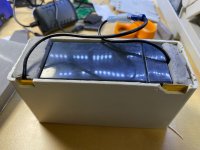 It worked fine until it sat for a couple of weeks (unplugged) while I waited for the SCSI2SD stuff to show up then wouldn't power up at all. So, I took the whole battery assembly apart, measured 6v on the battery terminals, re-packed it still no love. Then I used the tried-and-true tongue test on the 9v and it seemed a bit weak so I swapped that out - Shazam! Now it boots up fine. The LED on the SCS2SD card blinks and the Mac shows a sad face, which is to be expected - no OS installed. Now the bummer part; The pristine set of System 7 disks I picked up wont launch the OS because the poor thing doesn't have enough RAM. Looks like I'll have to find System 6 disks and/or a RAM card. Are there SD card images floating around with the base OS installed already? 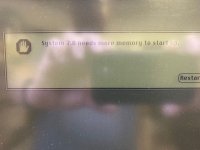 | |
| Posted by: techknight on 2019-12-17 10:17:06 Im worried. Changing the 9V batter should not have changed anything with the system turning on or off. All that battery is for, is when you slide the battery cover off, it switches into the circuit to keep the memory maintained. Until you slide the battery cover back on. the 9V battery servs no other purpose. So if changing the 9V battery made a difference, that tells me your battery latch switch is either bad, or the tab is broke off your battery cover. The portable wont last long in this manner. | |
| Posted by: stickyc on 2019-12-17 13:49:01 Entirely possible - or it could have just been wiggling the connectors. It still has the original caps, so I'm sure it's not long for this world without being stripped and prepped anyway. | |
| Posted by: stickyc on 2020-01-22 09:01:45 So, it turns out I didn't realize there was an interlock on the battery cover. That was the root cause of not booting: not being consistent with replacing the battery cover (duhhhhh). Alas, when I did finally get that sorted, it started throwing errors on boot (shame, it was booting fine before I tore into it). I'm going to re-cap it before going further. While doing so, I'll take the time to wash the plastics in retr0bright. Thanks for the help! | |
| < 2 |