68kMLA Classic Interface
This is a version of the 68kMLA forums for viewing on your favorite old mac. Visitors on modern platforms may prefer the main site.
| Click here to select a new forum. | |
| Question about the Macintosh Portable | |
Posted by: 3lectr1cPPC on 2026-03-29 20:01:45where's the putdown? please highlight it."i'll be real man. you're getting way ahead of yourself." - maybe not a putdown, but it's discouraging for no good reason. You learn how to do things by researching and asking others. OP saw a cool old laptop they wanted to get running, did some research on it, found out what they'll need to fix, then came here to ask others with experience for advice. There's no black magic in a Portable that only technology wizards can fix. It's a little trickier than something like a Mac LC but it's the same general process. The biggest risk where inexperience might cause damage is if they messed up the soldering. As long as they practice before working on the Portable (which they had already indicated before your comment), then the repair itself will likely go fine. The only real risk they're taking is that the LCD will be shot or that something else on the motherboard other than caps has died, but that's a risk you take with any laptop. Anyways, point being, there's really no reason to try to discourage the guy from giving it a shot, especially given the fact that they're doing the research. My first ever SMD recapping project was a PowerBook 145's LCD, which is frankly more fragile than a portable logic board. I made it even more difficult on myself because I accidentally bought extremely tiny ceramic capacitors without realizing how small they'd be. I still pulled it off. It's not that difficult. | |
Posted by: finkmac on 2026-03-30 05:33:23"i'll be real man. you're getting way ahead of yourself." - maybe not a putdown, but it's discouraging for no good reason.there was no discouragement. merely sobering advice 🙂 no reason to go overboard buying accessories when it hasn't been repaired yet. either way it looks like you're getting offended on behalf of someone who.. is not 🤔 | |
| Posted by: Froggy814 on 2026-03-30 07:48:07 @finkmac I understand you don't want me to get ahead of myself and I have only boughten the barest accessories to start off, which is caps and a battery eliminator. Right now I am waiting for them to ship in so I am going to clean everything really good and then buy the other stuff when needed. I just hope I don't have to repair traces because one of the i/o plugs for the trackball or keyboard looks like the traces are all gone. (The traces are black instead of gold.) Thanks! -Froggy | |
| Posted by: 3lectr1cPPC on 2026-03-30 11:12:24 Could you send a photo of the full top side of the logic board? | |
| Posted by: Froggy814 on 2026-03-30 11:29:52 Yes sir! 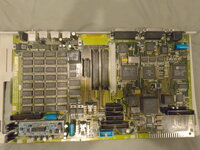 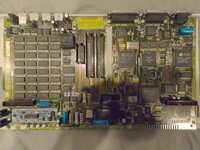 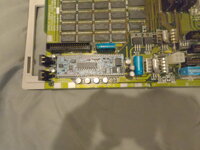 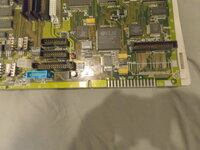 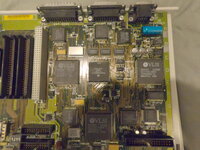 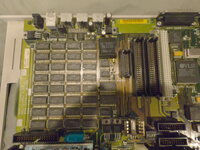 | |
| Posted by: Froggy814 on 2026-03-30 11:30:41 There you go, If you need any of the bottom of the motherboard just ask | |
| Posted by: 3lectr1cPPC on 2026-03-30 11:37:01 I don't see anything immediately alarming but it's really hard to tell because of how blurry they are. | |
| Posted by: Froggy814 on 2026-03-30 11:52:55 Sorry, that's our best camera. It's a gopro hero 6. The only thing I saw that was alarming was the caps and their leakage and some resistors that are literally disentigrating next to the i/o ports on the back. Thanks! -Froggy P.S. What are the best apps and games for the macintosh portable if I get it running? | |
| Posted by: Froggy814 on 2026-03-31 07:18:57 Best seen on picture 4. Why is there a dip switch on the logic board? Is it for the ram? because the ram expansion I got from it has switches to. Is it the 8 pin thing on page 5 of the schematic manual? Thanks -Froggy | |
| Posted by: Froggy814 on 2026-04-05 14:13:35 Can anyone tell me if the macintosh portable ever had a dedicated rom card? | |
Posted by: joevt on 2026-04-05 14:25:57Can anyone tell me if the macintosh portable ever had a dedicated rom card?The Macintosh Portable schematics have a slot named ROM and labeled J10. It's 16 bits wide and has 23 address bits (excludes address bit 0 because it's 16 bits wide) similar to RAM slot J11. This is for the M5120 (non-backlit). I don't have schematics for M5126 (backlit) version. https://www.macdat.net/repair/apple_schematics.html https://68kmla.org/bb/threads/macintosh-portable-m5126-ram-logic-schematics.48839/ This page has a ROM card? "661-0648 - Card, ROM, Backlit Upgrade" https://macintoshportable.info/Components/ Is that an upgrade for non-backlit to make it backlit? Your pictures show the ROM and RAM slots J10 and J11. | |
| Posted by: Froggy814 on 2026-04-05 15:15:49 So the only rom card made was the backlight upgrade? Correct? Thanks -Froggy | |
Posted by: joevt on 2026-04-05 16:56:01So the only rom card made was the backlight upgrade? Correct?Asking me to prove a negative? | |
| Posted by: Froggy814 on 2026-04-05 17:03:25 No, I was just wondering if there were any rom modules. But it just looks like theres the backlight module that plugs into the rom slot. Is there a rom module? -Froggy | |
| Posted by: joevt on 2026-04-05 17:05:25 Since you have a ROM slot, it is possible for a ROM module to exist. I don't have a list of everything Apple made so I can't say if Apple did or didn't make a ROM module. | |
| Posted by: Froggy814 on 2026-04-05 17:07:51 Okay, Thanks! -Froggy | |
Posted by: SuperSVGA on 2026-04-06 00:21:46So the only rom card made was the backlight upgrade?Apple made a ROM card, but I haven't ever seen it used outside of the prototypes. | |
| Posted by: Froggy814 on 2026-04-06 07:53:22 Thanks! -Froggy | |
| Posted by: Froggy814 on 2026-04-07 17:23:12 Does anyone know what caps are needed for the screen and the mp-f75w-02g floppy drive so I can order them all without double shipping? Thanks! -Froggy | |
| Posted by: 3lectr1cPPC on 2026-04-08 14:45:45 No caps in the LCD unless it's a backlit model. Don't know about the floppy drive. | |
| < 2 > |