68kMLA Classic Interface
This is a version of the 68kMLA forums for viewing on your favorite old mac. Visitors on modern platforms may prefer the main site.
| Click here to select a new forum. | |
| 5260/120 issue | |
Posted by: Phipli on 2026-02-06 13:04:57Also noteworthy is that the system boots fines without the PRAM battery, which is NOT what you read onlineYeah, my similar machines boot without a battery, but it is worth noting that we have found before that some machines will and others won't if the same type. Or at least, @joshc and I both claim to have similar machines that do the opposite 😄 | |
| Posted by: pinto_guy on 2026-02-06 13:45:12 Well, I'm a bit embarrassed to say that in the end, it was one of the two 8MB RAM modules (or both): I plugged in the 32MB one that came with the replacement 6300CD board, and it worked like a charm. I lightly sanded the contacts of the 8MB ones, reseated them, and it did not help. So I went ahead and bought a 32MB module, and I guess I'll put the 6300CD board for sale again on eBay, unless someone wants it on this BB. Also, for documentation sake, here are the events during the boot process: - After pressing the ON key on the keyboard, chime is heard in less than one second - We can then hear the HDD do its self-test for 1-2 seconds - Only after 9-10s can we hear the CRT degauss event (thump) followed by the HDD boot actuation - Shortly afterwards (~2s) we see the CRT come on with the OS boot screen I hope this helps future Mac tinkerers | |
Posted by: mikes-macs on 2026-02-06 14:11:46What puzzled me most about the 5260 was that the display resolution seemed to be limited to 640x480. Was that really true?800 x 600 | |
Posted by: Phipli on 2026-02-06 14:17:06Well, I'm a bit embarrassed to say that in the end, it was one of the two 8MB RAM modules (or both): I plugged in the 32MB one that came with the replacement 6300CD board, and it worked like a charm. I lightly sanded the contacts of the 8MB ones, reseated them, and it did not help. So I went ahead and bought a 32MB module, and I guess I'll put the 6300CD board for sale again on eBay, unless someone wants it on this BB.This is interesting - I'm wondering... I'm wondering if this family of machines don't do a proper memory test. My 6200 starts way too quickly for having tested 64MB of RAM. Although the times you mentioned do seem reasonable for a memory test (the test happens between the chime and the screen turning on - the more RAM you have the longer it takes for the screen). Something weird anyhow. | |
| Posted by: pinto_guy on 2026-02-06 14:33:44 What's also weird is that the ROM does not tell you anything. In the compact Macs, when the RAM is faulty, a death chime is heard, with a sad Mac showing an error code. Here, you're in complete darkness, so to speak, and left guessing what's really happening. | |
Posted by: Phipli on 2026-02-06 14:40:07What's also weird is that the ROM does not tell you anything. In the compact Macs, when the RAM is faulty, a death chime is heard, with a sad Mac showing an error code. Here, you're in complete darkness, so to speak, and left guessing what's really happening.Yeah, later macs don't do that. They do give debug stuff out of the modem port though. Not human readable. | |
Posted by: croissantking on 2026-02-06 15:27:17What's also weird is that the ROM does not tell you anything. In the compact Macs, when the RAM is faulty, a death chime is heard, with a sad Mac showing an error code. Here, you're in complete darkness, so to speak, and left guessing what's really happening.Can you shed any light on the resolutions available? Are you limited to 640x480? | |
Posted by: Nixontheknight on 2026-02-06 15:30:15Can you shed any light on the resolutions available? Are you limited to 640x480?every 5xxx/6xxx board can go up to 800x600 on the VGA mode and up to 832x624 in a different mode | |
Posted by: croissantking on 2026-02-06 15:31:12every 5xxx/6xxx board can go up to 800x600 on the VGA mode and up to 832x624 in a different modeIt’s been highlighted that the 5260 is limited to 640x480 - a limitation of the analog board not the logic board. | |
Posted by: Snial on 2026-02-06 15:58:50It’s been highlighted that the 5260 is limited to 640x480 - a limitation of the analog board not the logic board.From: 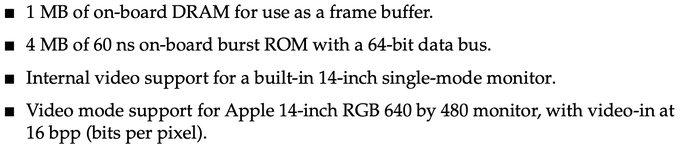 Super cheap Performa 14" monitor, like my Performa 400 I guess. | |
| Posted by: pinto_guy on 2026-02-07 07:13:16 I checked all over the control panel, but could not find out the screen resolution of my system. I'd be happy to do it if you tell me how to do this. | |
Posted by: croissantking on 2026-02-07 07:22:14I checked all over the control panel, but could not find out the screen resolution of my system. I'd be happy to do it if you tell me how to do this. Open up the Monitors control panel and hit Options: 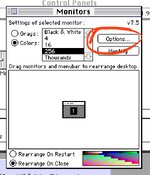 You should get a dialog box like this. 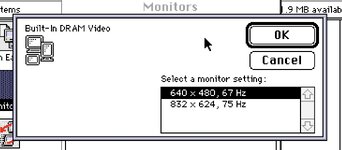 | |
| Posted by: pinto_guy on 2026-02-07 08:22:41 Ha, Monitors somehow was not enabled in my control panel. So the verdict is in: 640x480 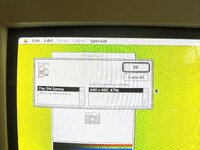 | |
Posted by: croissantking on 2026-02-07 08:29:24Ha, Monitors somehow was not enabled in my control panel. So the verdict is in: 640x480It’s so weird that just that this one obscure model of the 5x00 AIOs was quietly specced as fixed frequency, when the rest of the series were multisync. Can we surmise that they were using up old monitor parts stock? To be honest, I run my Multisync 15AV display at 640x480 most of the time, since it’s pin sharp - but loses too much definition at 800x600 and above. Most 68k software expects 640x480 anyway. | |
| Posted by: mikes-macs on 2026-02-07 10:07:36 Mac OS 8.6 on my Power Macintosh 5260's using the "Monitors and Sound" Control Panel the option for 800x600 is allowed. | |
| Posted by: Forrest on 2026-02-08 22:29:16 Try holding the Option key down when you select the Monitors control panel, to see additional video resolutions. If that doesn’t work, I wonder if you have the correct Monitors control panel that matches your operating system version. | |
| < 2 |