68kMLA Classic Interface
This is a version of the 68kMLA forums for viewing on your favorite old mac. Visitors on modern platforms may prefer the main site.
| Click here to select a new forum. | |
| Powerbook G4 12" - Boot OS9? | |
Posted by: smrieck511 on 2025-06-16 08:43:37I remember this as a problem with the unsupported bluetooth module, I removed it. See step 53:Thanks, I would very much appreciate a photo of that. | |
| Posted by: joevt on 2025-06-16 13:17:56 "USB Prober" from the USB DDK 1.5.9f1 can show info about connected USB devices. | |
Posted by: smrieck511 on 2025-06-16 13:44:46"USB Prober" from the USB DDK 1.5.9f1 can show info about connected USB devices.Thanks! Found it on macintoshgarden. | |
Posted by: opualuan on 2025-06-16 21:14:08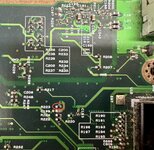 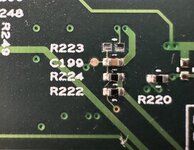 This is the easiest way to rework I found: remove R223. Easily reversible if needed. This is located underneath the hard drive bracket, I think it can be removed without taking out the motherboard. Tested good today. This way the computer thinks there is always a headphone plugged in. No startup chime, but from then on sound works from internal speakers including volume control. If you plug in external speakers/headphone, sound comes from both internal and external. | |
| Posted by: macdude888 on 2026-05-18 16:35:09 Instructions here for OpenFirmware method and MacOS9Lives liveCD method. Mac ClassicTips and tricks to help keep your Mac OS 9/Early Mac OS computers usable today. Software downloads, guides, hacks and news.
| |
Posted by: smrieck511 on 2026-05-18 18:02:45Instructions here for OpenFirmware method and MacOS9Lives liveCD method.thanks very much. Yeah I did get this working a while back. It's a great little OS9 machine for sure... now I need to find out if it's possible to replace the backlight. | |
| < 2 |