68kMLA Classic Interface
This is a version of the 68kMLA forums for viewing on your favorite old mac. Visitors on modern platforms may prefer the main site.
| Click here to select a new forum. | |
| Experience and suggestions: setting up BlueSCSI with my Mac SE. | |
Posted by: LaPorta on 2024-07-17 02:41:54Well there is ZuluSCSI, that lets you move files via USB…I appreciate the differentiation. I have sat out the Blue/Zulu thing for just this reason. | |
| Posted by: killvore on 2024-07-25 06:59:50 For my use case, Sheepshaver works great: 1. Sheepshaver can mount both .dsk and .hda files, so I have all my 68k-era images automatically mount when I open Sheepshaver. 2. Sheepshaver allows you to mount a folder ("Unix Root" in the settings) from your modern OS environment as a volume in Sheepshaver. I use my Downloads folder since that's usually where things I want to move across end up. This means I can go to eg. Macintoshgarden, download a file, open Sheepshaver and just copy it into one of the .hda images I use (which looks like a regular hard drive in Sheepshaver). I then copy that .hda image onto the SD card that goes in the BlueSCSI! Works great for me. It should be possible to mount your RAID as the Unix Root, and if not copy it to your local machine and mount the folder there instead. I've added some screenshots, I'm using a Quadra 700 icon for the .hda images but they function as separate hard disks in Sheepshaver (and on the BlueSCSI). 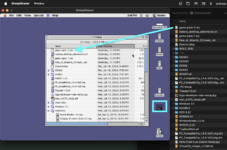 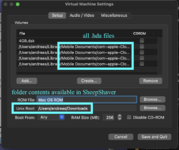 | |
Posted by: LaPorta on 2024-07-25 09:21:41For my use case, Sheepshaver works great:Absolutely. Everything you say makes sense and does work. The only issue is that it involves an emulator, which is exactly what I was trying to avoid. | |
| Posted by: killvore on 2024-07-25 09:37:50 Oof I missed that very significant part 😅 I got wrapped around the "how to write to hda from a modern OS"-part | |
| Posted by: Arbee on 2024-07-25 09:53:59 Disk Jockey works great for converting vMac/Basilisk/SheepShaver images to true-to-hardware BlueSCSI/ZuluSCSI/MAME/DingusPPC images (and vice-versa). Not my program, just a very happy user. | |
| Posted by: zefrenchtoon on 2024-07-25 23:47:19 You can also prepare your image using https://infinitemac.org/ then export it to hda. 🙂 Be careful that the exported hda will be in HFS+ if you're using any OS that manage it. Usually, I use a special version of mini vMac that can manage hda to modify them. This version was made by the BlueSCSI creator: 
68k - Mini vMac booting SCSI Device imagesEdit: Prebuilt binaries are available for mac/win/lin here: https://github.com/erichelgeson/minivmac/releases/ It is also in the emulator https://infinitemac.org/ as well now! --- Mini vMac is a great emulator - has been around forever and works very slick. App + ROM + HFS Disk and you're good...
 tinkerdifferent.com
| |
| < 2 |
