68kMLA Classic Interface
This is a version of the 68kMLA forums for viewing on your favorite old mac. Visitors on modern platforms may prefer the main site.
| Click here to select a new forum. | |
| PowerBook 180 - some keyboard keys don't function | |
| Posted by: luRaichu on 2024-03-13 10:18:48 This is my 2nd attempt at replacing the ribbon. No boot chime with this cable, just random lines on-screen but the brightness control works. Also the HD won't spin up with this interconnect board AND the LCD plugged in so perhaps there's a short. (same behavior as with the first attempt) Aaaaaand now looking at the photos I probably cut the ribbon cable too short. Should I give it one last go with longer, fresh ribbon? | |
| Posted by: croissantking on 2024-03-13 11:14:52 Ah, damn. I’m surprised as the work seems neat. I would check continuity on all wires, checking for shorts to neighbouring wires; but bearing in mind that some are grouped together (I annotated a photo on my repair thread showing which ones). | |
| Posted by: croissantking on 2024-03-13 11:28:51 Welcome to the world of hell that are these machines. LOL | |
| Posted by: luRaichu on 2024-03-13 12:36:34 I find these are all tied together. Is it normal? 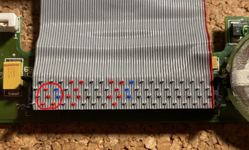 | |
Posted by: croissantking on 2024-03-13 12:40:39I find these are all tied together. Is it normal?View attachment 71082No - the blue ones should be separate from the red. | |
Posted by: luRaichu on 2024-03-13 14:16:12No - the blue ones should be separate from the red.what should I do to fix this | |
| Posted by: halkyardo on 2024-03-13 14:28:51 My suspicion would be that the cable was slightly misaligned at one end or the other, and one of the contact 'blades' has nicked into an adjacent wire as well as the one that it's supposed to contact. I'd try another attempt at rebuilding it, using a fresh piece of ribbon cable. With connectors like those, you've really got to make sure that the cable is both sitting centered in the connector, and that it's perfectly straight, before punching it down. It's very easy to get it wrong, especially with the fine-pitch cables like those. | |
Posted by: croissantking on 2024-03-14 12:01:36I find these are all tied together. Is it normal?I’ve double checked this on an interconnect board with an original cable. See the photo below, showing the same group you asked about from the other side of the board. The red group as you can see is clearly tied to a ground plane, so you’ve shorted a couple of pins (the blue pair) to ground that shouldn’t be. Are all other lines toning out good? | |
Posted by: luRaichu on 2024-03-18 11:12:13Are all other lines toning out good?Yeah, I think everything's good except for those pins being blobbed together as far as I've checked. Although, the difficulty of getting the new ribbon cable in and functioning correctly leaves me unmotivated. Maybe I'll try again today... | |
Posted by: croissantking on 2024-03-18 13:51:31Yeah, I think everything's good except for those pins being blobbed together as far as I've checked. Although, the difficulty of getting the new ribbon cable in and functioning correctly leaves me unmotivated. Maybe I'll try again today...You could maybe split off and replace a thin section of the ribbon, as the short is close to the edge of the connector. | |
Posted by: croissantking on 2024-03-18 13:53:44Aaaaaand now looking at the photos I probably cut the ribbon cable too short. Should I give it one last go with longer, fresh ribbon?Oh yes I would say this could be an issue too. Uhh maybe just start again. | |
| Posted by: luRaichu on 2024-03-19 18:36:40 I redid it and... now everything works again. You've gotta leave a fair margin of ribbon cable sticking out from the back end of the connectors. | |
| Posted by: croissantking on 2024-03-19 19:41:15 Good to hear. | |
| Posted by: demik on 2024-03-23 08:35:38 Good job ! I still need to find some motivation to do mine. I will grab the cable you used | |
| < 2 |