68kMLA Classic Interface
This is a version of the 68kMLA forums for viewing on your favorite old mac. Visitors on modern platforms may prefer the main site.
| Click here to select a new forum. | |
| Mac OS 8.6 for (some) Unsupported G3s and G4s | |
| Posted by: Phipli on 2024-02-23 03:29:22 Yay 🙂 just me accidentally running an old copy. The current image does work 🙂 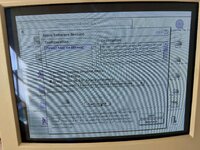 | |
Posted by: zefrenchtoon on 2024-02-23 05:51:22as per the OP make sure your machines firmware is fully up to date, it was only in later BootROM's did apple add the MacRISC2 descriptor which is what the modified ROM looks for instead of "PowerMac3,1" etcSorry if the question seem stupid but how can I check in OF that the MacRISC2 descriptor is present or not ? | |
Posted by: Phipli on 2024-02-23 06:10:54Sorry if the question seem stupid but how can I check in OF that the MacRISC2 descriptor is present or not ?Just type... dev /
.propertiesI think. I'll go and check. Edit - yeah. This is mine : 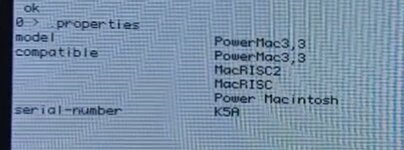 | |
Posted by: zefrenchtoon on 2024-02-23 08:18:04Just type...Thank you !!! | |
| Posted by: GRudolf94 on 2024-02-23 08:54:18 Bawww. I tried. This is after spoofing machine and CPU properties, attempting boot from USB - seems it simply didn't like the file. | |
Posted by: Phipli on 2024-02-23 08:57:30Bawww. I tried. This is after spoofing machine and CPU properties, attempting boot from USB - seems it simply didn't like the file.Hum. I wonder if checksum checking an environmental property? | |
| Posted by: GRudolf94 on 2024-02-23 09:06:19 At first I thought it might actually be a checksum issue, but racking my brains here, I think DO-QUIESCE is supposed to be the last thing OF does after it finds a valid boot image and hands control over to it. I don't remember anymore, my favorite programming language is solder anyway. | |
| Posted by: trag on 2024-02-23 11:42:45 The G4 Mac Minis came with a 7447a processor and an ATI Radeon 9200 graphics chip. Is this adaptation of 8.6 likely to work on the G4 Mini? | |
Posted by: LightBulbFun on 2024-02-23 17:36:51Bawww. I tried. This is after spoofing machine and CPU properties, attempting boot from USB - seems it simply didn't like the file.did you do a .properties check after spoofing the CPU PVR to make sure the changes had indeed gone through? the checksum error is normal, but I note your trying that on an AlBook, so I think its hanging up on the GPU side of things, most later apple portables and AIO's dont have the GPU's NDRV in ROM, instead Mac OS X fetches it from disk instead, and the MacOS 8.6 ROM does not seem to like the lack of an NDRV at least thats my leading theory with it, based on the messing about I have done 🙂 my full ROM X850 XT flashed FireGL X3 will still boot MacOS 8.6's ROM for example, but something like an GeForce FX 5200 or GeForce 6200 wont still need to try my reduced ROM ATI 9800 Pro and see if that fails as I think it will it could also be there is other hardware in these newer machines that the 8.6 ROM does not like and is stalling on, for example like with Booting OS 9.2.2 on the Xserve G4, the MacOS ROM would get hung up on the special ATA controller those machines have IIRC | |
| Posted by: LightBulbFun on 2024-02-23 17:42:35 BTW @Phipli I was just reading the page you made for it, and I notice your instructions for spoofing the CPU PVR are not quite correct, please refer to this post I made on MR on how to do it correctly 🙂 
Mac OS 8.6 findings and ramblingsto fake a CPUs PVR to boot a Classic New World ROM Mac OS that does not include native support for you CPU in question you do something like this dev /cpus/PowerPC,G4 000c0206 encode-int " cpu-version" property .properties obviously replace "PowerPC,G4" with whatever the OpenFirmware name of...
 forums.macrumors.com
also worth noting this is temporary change its cleared every reboot, but its not too hard to roll it into an NVRAMRC script. Which is what most of the 3rd party firmware patchers for 7447/7448 do to enable OS 9.2.2 booting on those CPU's in their case they spoof the CPU to be a 7455, if you already have such an NVRAMRC script installed just replace the 7455 PVR value with the 7400 value to enable 8.6 booting on your 7447-7448 CPU upgrade card thats how I booted 8.6 on a 2Ghz 7448 🙂 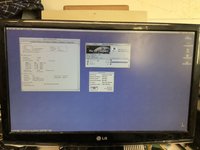 this was combined with a fast CF card, never before had I seen the extensions load so quickly during boot 🙂 | |
Posted by: GRudolf94 on 2024-02-23 18:39:22did you do a .properties check after spoofing the CPU PVR to make sure the changes had indeed gone through?Yup - not my first time around the block 😛 both PVR and compatible took the edits to nvramrc the checksum error is normal, but I note your trying that on an AlBook, so I think its hanging up on the GPU side of things, most later apple portables and AIO's dont have the GPU's NDRV in ROM, instead Mac OS X fetches it from disk instead, and the MacOS 8.6 ROM does not seem to like the lack of an NDRVQuite possibly. I've been wondering if editing BOOT-SCRIPT to remove the DO-QUIESCE would lead to more useful debugging info. Never really tinkered that far. | |
Posted by: Phipli on 2024-02-24 10:28:02BTW @Phipli I was just reading the page you made for it, and I notice your instructions for spoofing the CPU PVR are not quite correct, please refer to this post I made on MR on how to do it correctly 🙂Thanks for the heads up. I've tweaked it to match your version. | |
Posted by: zefrenchtoon on 2024-02-25 12:01:04The G4 Mac Minis came with a 7447a processor and an ATI Radeon 9200 graphics chip. Is this adaptation of 8.6 likely to work on the G4 Mini?That's why I've asked about the command to check MacRISC2 flag. 😉 I've checked my mini and it says MacRISC3 so I think it will not work (but I may be wrong because I've read the original @LightBulbFun post while being distracted by my wife and my son). I'm in to test something on my mini if necessary | |
| Posted by: Snial on 2024-02-25 14:25:23 Is there an equivalent topic Mac OS 7.5.5 for unsupported machines (eg PM4400, PB1400). I was curios, since the PB1400 doesn't run 7.5.5, but a PB5300 does and yet they're basically the same underlying architecture aren't they? | |
Posted by: Phipli on 2024-02-25 14:33:04Is there an equivalent topic Mac OS 7.5.5 for unsupported machines (eg PM4400, PB1400). I was curios, since the PB1400 doesn't run 7.5.5, but a PB5300 does and yet they're basically the same underlying architecture aren't they?But can't 7.5.3 be run on those? Which is basically functionally equivalent? | |
Posted by: CC_333 on 2024-02-25 14:35:51Is there an equivalent topic Mac OS 7.5.5 for unsupported machines (eg PM4400, PB1400). I was curios, since the PB1400 doesn't run 7.5.5, but a PB5300 does and yet they're basically the same underlying architecture aren't they?I know almost nothing on this subject, but perhaps the ROMs are different? Apple, then as much as now, was very keen on building in artificial blocks that prevent otherwise compatible SSW versions from installing and/or booting on certain machines, often for no apparent reason (beyond marketing, maybe?), and which are often quite trivial to bypass with the right know-how. Mac OS 8.6 not booting on certain otherwise compatible machines (and on a few more partially compatible ones) because of a slightly different, less inclusive machine check in 8.6's Mac OS ROM is a prime example. c | |
Posted by: Snial on 2024-02-25 14:42:42But can't 7.5.3 be run on those? Which is basically functionally equivalent?Well, that's part of the curiosity: what was really different about 7.5.5? I might try comparing 7.5.3 and 7.5.5 on Infinite Mac. I guess there was a bit of bug-fixing, and maybe it's bug-fixing that didn't fix bugs when run on the PB1400, but worked ok on the 5300. E.g. IDE-based CD-ROM (though I guess PPC Performas were using IDE CD-ROMs by then (I know they used IDE internal HDs, but can't remember if the CD ROMs were IDE too)). Then there might be a few new extensions or control panels, which could be just dropped into 7.5.3. I know almost nothing on this subject, but perhaps the ROMs are different?Maybe it is a basic ROM incompatibility. | |
| Posted by: Phipli on 2024-02-25 14:44:36 While apple did block OS installs for no reason at times, and it was rarely possible to install an OS older than the one a computer came with, there seems to have specifically been something that prevented compatibility with 7.5.5. Apple had no motivation to exclude them, so it looks like there was a reason. Both work with 7.5.3 which is hardly different at all. Updating system components (Open Transport etc) would likely make up for most differences between 7.5.3 and 7.5.5, plus 7.6.1 is an excellent OS that works on both machines. Well, that's part of the curiosity: what was really different about 7.5.5?If I had to outright guess, I'd say they had a conflict when integrating the system enablers, which was the primary difference between 7.5.3 and 7.5.5. Other than some bug fixes, integration of system enablers was the big change. | |
Posted by: CC_333 on 2024-02-25 14:44:53Maybe it is a basic ROM incompatibility.Maybe so. c | |
Posted by: CC_333 on 2024-02-25 14:55:18If I had to outright guess, I'd say they had a conflict when integrating the system enablers, which was the primary difference between 7.5.3 and 7.5.5. Other than some bug fixes, integration of system enablers was the big change.Given that System 7.5.5 was being released at just about the time that the Copland project was imploding (according to Wikipedia, Copland was cancelled in late August 1996, and 7.5.5 was released just about a month later), it's entirely plausible that the team in charge of 7.5.5 simply had no idea of what they were doing because of how chaotic and confusing things were. Things got sorted out by early 1997, and 7.6.x was a much better, if somewhat bloated, release, especially for PowerMacs and PPC PowerBooks. c | |
| < 2 > |