68kMLA Classic Interface
This is a version of the 68kMLA forums for viewing on your favorite old mac. Visitors on modern platforms may prefer the main site.
| Click here to select a new forum. | |
| Can sombody tell me how my logic board looks? (Color classic) | |
| Posted by: Powerbook27364 on 2024-02-10 12:48:49 They are actually very easy to find! Macdat.net has the logic board references and I'm sure I can find the analog board references somewhere | |
| Posted by: 3lectr1cPPC on 2024-02-10 12:49:01 Analog board CAN be dangerous for sure - most important thing there is to know what parts can shock you, and how to either avoid or discharge them. You’ve got to worry about the CRT, fly back transformer, the capacitors on the high voltage section of the analog board, and a couple other things. Always leave it unplugged for a few hours or more before messing with the analog side unless you REALLY know what you’re doing, and never work on it while power is plugged in. | |
| Posted by: StockRodz on 2024-02-10 12:50:15 UPDATE. I just put in the board I cleaned last night and it booted up | |
Posted by: 3lectr1cPPC on 2024-02-10 12:50:52They are actually very easy to find! Macdat.net has the logic board references and I'm sure I can find the analog board references somewhere 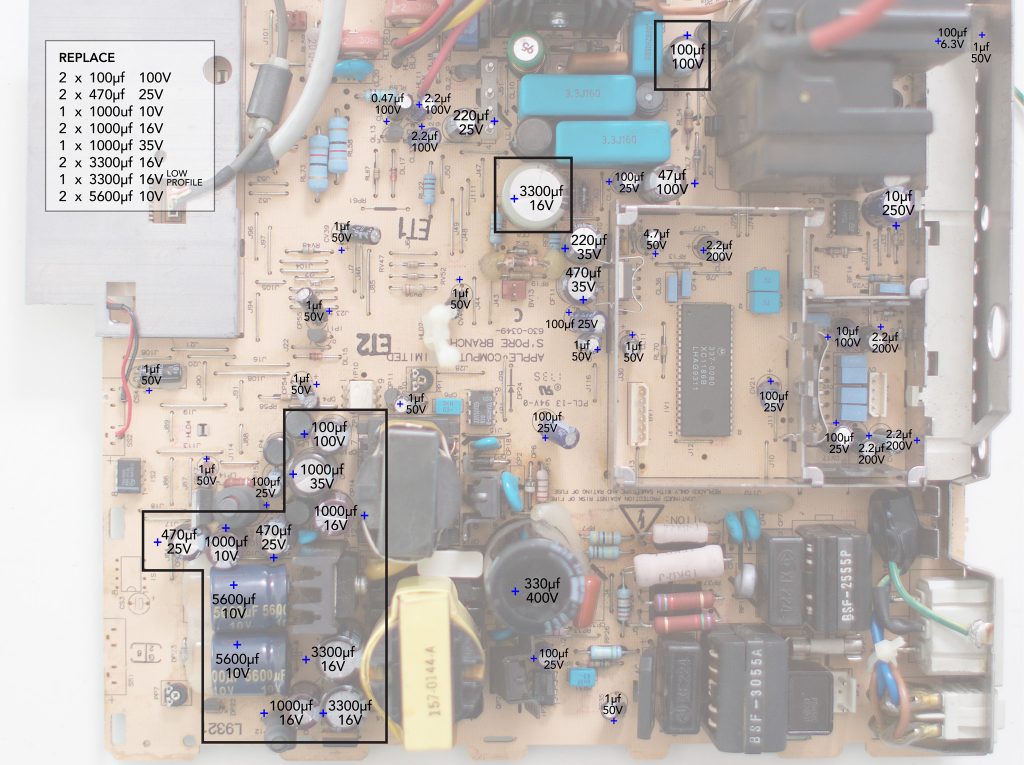
Macintosh Colo(u)r Classic Analog Board - Recap-a-MacWhile people are busily recapping their vintage Mac logic boards, they sometimes forget that some analog boards are also prone to capacitor leakage....
 recapamac.com.au
I’m out of the house right now but I’ll post a photo of the logic board with cap reference in a bit when I’m home at my computer - I have one now, it’s just not public on the site yet (I run macdat) | |
| Posted by: StockRodz on 2024-02-10 12:51:17 Thank you so much | |
Posted by: 3lectr1cPPC on 2024-02-10 12:52:18UPDATE. I just put in the board I cleaned last night and it booted upNice! Cleaning a board can also be a temporary fix - it gets rid of electrolyte that may be causing shorts. It might work like that for a bit, but the caps do need to be replaced regardless. The problem WILL eventually come back. You can use that board right now to test the analog board and CRT hardware in both chassis though. | |
| Posted by: Powerbook27364 on 2024-02-10 12:52:38 Your machine looks quite nice. Glad it works. You definitely need to recap the motherboard still though. Looks like at least for now the analog board works, but in future that needs to be recapped as well. For the logic board, tantalum capacitors are the most reliable, but the analog board needs electrolytics in most cases because tantalums are either super expensive or not possible to get with the right values | |
Posted by: 3lectr1cPPC on 2024-02-10 12:53:04Thank you so muchGlad to help. | |
| Posted by: StockRodz on 2024-02-10 12:53:24 Yeah I definitely would feel better knowing there's new caps inside. I'm for sure taking it to be worked on. | |
| Posted by: 3lectr1cPPC on 2024-02-10 12:56:02 Sounds like a plan. You might also want to look into a solid state replacement for the original hard drive, which can be unreliable as well. There are multiple options out there. Here’s a list I have on my site with details on each: https://macdat.net/macintosh/upgrades/scsi_ssds.html Also, when you take them to your guy - let him know that there are also two caps on the microphone board, up hidden away in the chassis. These are the same type as on the logic board and will 100% need to be replaced. See here: https://macdat.net/cap_reference/apple/compact/color_classic.html | |
| Posted by: Powerbook27364 on 2024-02-10 12:57:33 Now that i think about it, I dont know if mine had the mic board caps replaced... I will have to check that during the summer | |
| Posted by: 3lectr1cPPC on 2024-02-10 12:59:50 Very easy to mix. I had zero idea about them until @joshc found them in his. I’m not even sure anyone mentioned them previous to this. Replacing them won’t be required for the computer to work but the microphone probably won’t without them replaced. Plus, having power running through a board covered in electrolyte will lead to fast corrosion. | |
| Posted by: StockRodz on 2024-02-10 13:00:07 Got it. I will be sure to mention that. And I will also post back here with a picture of the repaired board. | |
| Posted by: 3lectr1cPPC on 2024-02-10 13:01:07 Sounds like a plan. I hope everything goes well! | |
| Posted by: StockRodz on 2024-02-10 13:02:54 Thank you for everyone who replied. I really appreciate the help. I learned alot in the last hour haha. Ty | |
Posted by: JC8080 on 2024-02-10 13:24:53Alright. I don't think I'm going to attempt it. That sounds like alot and I don't have much time on my hands. Is there any issues when trying to find caps for a old board like this? I imagine their hard to find?Console5 lists the capacitors on the website (console5.com), he sells pre-packaged kits for about the same price if you were to order them yourself from Mouser or DigiKey. I bought my CC caps from him. As @Powerbook27364 said above, make sure you have the right equipment, all the things he listed are 100% required. Then search for Branchus Creations on YouTube and watch his videos, I know he has at least one of working specifically on CC boards. All of his Mac recap videos are relevant though. Definitely get some practice boards before you work on your CC. You need to find something from around the same era with the same type of caps, just so you have a feel for what it will actually be like. And when you work on the analog board, be careful not to use more heat that necessary, at least on my CC analog board the pads liked to come off if I used a bit too much heat. Edit: removed extra word | |
| Posted by: StockRodz on 2024-02-10 13:55:11 Any have a clue why the sound from the on board speaker is making only static noise? From the cc that is working. I heard the boot chime the 1st time it boot up. Out of nowhere it's just static sound now. Even wen I boot. If I were to clean the logic board again. Where is the sound chip located? If so | |
| Posted by: Powerbook27364 on 2024-02-10 13:58:47 That may be related to caps, but it also may be related to grounding. the metal shield in the chassis needs to be properly contacting the grounding pieces on the logic board. The photo attached shows the grounding pieces on the motherboard. On the bottom of the board where these stick out, they should all be properly touching the metal shield. | |
| Posted by: 3lectr1cPPC on 2024-02-10 13:59:58 If the grounding issue isn't it then it's caps. Some of those caps are in the sound circuit. | |
Posted by: StockRodz on 2024-02-10 14:02:19That may be related to caps, but it also may be related to grounding. the metal shield in the chassis needs to be properly contacting the grounding pieces on the logic board. The photo attached shows the grounding pieces on the motherboard. On the bottom of the board where these stick out, they should all be properly touching the metal shield. If the grounding issue isn't it then it's caps. Some of those caps are in the sound circuit.I did notice there was a loop from my other board that fell off inside where they all ground. I removed it and made sure all loops are touching the metal shield but I still get static. Is there a sound chip of some sort on the logic board? | |
| < 2 > |