68kMLA Classic Interface
This is a version of the 68kMLA forums for viewing on your favorite old mac. Visitors on modern platforms may prefer the main site.
| Click here to select a new forum. | |
| Netatalk 2.3.0 available | |
Posted by: slipperygrey on 2024-01-21 19:24:10As always, thanks for your work!Thanks for keeping the NetBSD package up to date! I've also been pondering what an appropriate name for a stand alone v2 project should be. Chris K. called it "netatalk-classic". Your idea of "netatalk-ddp" isn't bad either, for those who know what DDP stands for. BTW a minor thing, but the "master sites" URL on https://pkgsrc.se/net/netatalk22 is incorrect; it should be: https://github.com/Netatalk/netatalk/releases/tag/netatalk-2-3-0 | |
Posted by: hauke on 2024-01-22 08:10:29Thanks for keeping the NetBSD package up to date! I've also been pondering what an appropriate name for a stand alone v2 project should be. Chris K. called it "netatalk-classic". Your idea of "netatalk-ddp" isn't bad either, for those who know what DDP stands for.The correct name would be "netatalk-appletalk", but that is a bit hilarious. BTW a minor thing, but the "master sites" URL on https://pkgsrc.se/net/netatalk22 is incorrect; it should be: https://github.com/Netatalk/netatalk/releases/tag/netatalk-2-3-0For which value of "incorrect"? The Makefile's MASTER_SITES variable expands to "https://github.com/Netatalk/Netatalk/releases/download/netatalk-2-3-0/", which works when you append netatalk-2.3.0.tar.xz - I just tried. Previous versions were accessible under the same path, I just updated the version information. But github's download links are a mess, I've seen all kinds of patterns. There is no systematics. | |
| Posted by: slipperygrey on 2024-01-22 14:12:01 I get it now, it’s a URL fragment that isn’t valid by itself. I, too, blame GitHub for having a needlessly complex URL scheme. FWIW I set up a webhook that automatically syncs all new GitHub releases with SourceForge. Their file server has other drawbacks but at least it is predictable: https://sourceforge.net/projects/netatalk/files/ | |
| Posted by: slipperygrey on 2024-02-03 21:28:23 Netatalk v2.3.1 is available now. This is a bugfix and compatibility release. Notably, this improves the buggy RMTP broadcast behavior that we attempted to fix with the atalkd "quirks" (-q) mode in 2.3.0. Now atalkd should automatically detect if it needs to run in quirks mode, which should improve compatibility with AppleTalk networks that has multiple routers. Additionally, the CUPS code in papd has seen major refactoring and modernization of CUPS API calls. This should improve compatibility with printers, while making it future proof in anticipation of CUPS 3.0. Huge thanks to @NJRoadfan for his hard work on both of the above! See the release notes for more details and download links. https://netatalk.io/2.3/ReleaseNotes2.3.1 You may also notice the new netatalk.io domain. Thanks SourceForge for two decades of hosting. 🙂 | |
Posted by: cheesestraws on 2024-02-04 16:44:13The correct name would be "netatalk-appletalk", but that is a bit hilarious. in b4 netatalkatalkatalkatalkatalkatalk | |
| Posted by: slipperygrey on 2024-02-06 00:30:07 More Netatalk news! Building upon a POC by community member @eharmon I was able to put together a more or less fully functioning Docker setup for netatalk2. And now I'm looking for volunteers to try it out, and hopefully hear back if it works for you or not. To get started, check out this git branch: https://github.com/Netatalk/netatalk/tree/rdmark-docker-v2 Instructions are in the root README.md I have to say, for me and a handful of other people, it works remarkably well... | |
| Posted by: ironborn65 on 2024-02-07 03:56:07 this is good, thanks. I don't see the image being pushed to a registry, e.g. docker hub. I'd need this to install it in my Synology. Yes I could build it locally and upload it ... 😉 there are several other Netatalk images, some very recents, one from the official Netatalk maintainer would be a good thing | |
| Posted by: slipperygrey on 2024-02-07 13:38:41 Once the docker setup is finalized and stable I’ll look into pushing to registries. Thanks for the suggestion! | |
| Posted by: slipperygrey on 2024-02-10 02:06:30 @ironborn65 by popular demand, here it is now on Docker Hub: https://hub.docker.com/r/netatalk/netatalk2 Please read through the instructions carefully. There are a number of conditions and caveats for getting everything fully working in the container. Give it a whirl and let me know how it goes. | |
| Posted by: ironborn65 on 2024-02-11 09:45:29 thanks @slipperygrey foreword: I'm moving out of my comfort zone I disabled the AFP in my Synology NAS 218+ I downloaded both images, netatalk21 and netatalk31 I configured the mandatory variables AFP_USER, AFP_PASS, ATALKD_INTERFACE the latter matching the IP of the NAS. My test machine is a UTM VM with OS9.2.1 running in a MacOS. It can access the internet. It's the VM I use to share folders with the retro non virtualised Macs. I started the container. I can not see the netatalk server also if adding the server manually in OS9.2.1. The same with netatalk21. Of course 31 and 21 don't run concurrently. The logs are attached hereby. Even if the Avahi is not supported in the Synology NAS, at least it should work if configured manually. Can u, or someone else, advice? | |
| Posted by: slipperygrey on 2024-02-11 17:48:11 @ironborn65 Yes, you should be able to connect to the AFP server by IP even if Avahi or AppleTalk aren't working. For the netatalk container running on your NAS, are you using host networking, or are you exposing port 548? Maybe you have to manually open port 548 on the NAS when the built-in AFP server is disabled? BTW, you can use your contemporary macOS system as a test bed as well. In the Finder, do CMD+K to bring up "Connect to Server" then type "afp://" and the address to the NAS. This page might be helpful: https://netatalk.io/docs/Connect-to-AFP-Server-from-Mac-clients | |
| Posted by: ironborn65 on 2024-02-12 01:30:09 from the MacBook M1 the afp:// works, I can authenticate, good, NAS wise it's all set instead from Basilisk II + System 7.5.3 + O.T 1.1.2 + Apple Talk 60.1.2 active + Apple Client Present I have a "This file server does not use a recognizable log on sequence." From this VM I can access the NAS by IP or domain name, so the network configuration should be ok | |
| Posted by: slipperygrey on 2024-02-12 02:07:24 @ironborn65 What version of the Apple Share Client are you running on the 7.5.3 system? That error means that the connection to the AFP server is successful, but that there is no compatible authentication method. In fact, I was under the impression that the RandNum UAM would work out of the box with practically any version, but if this is not the case we have to revisit the decision not to include the ClrTxt UAM. | |
| Posted by: ironborn65 on 2024-02-12 03:07:46 when working with the modern MacOS: I must map my shared NAS folder to /mnt/afpshare, otherwise it does not work. In fact I can find the files in the container, in root@netatalk-netatalk31:/mnt/afpshare# and the MacOS correctly sees it when "Connect to Server...". If I try to map a different folder to /mnt/logs (for example), the folder is correctly reflected in the container, but in the MacOS the volumes I see are only "File Sharing" and "Time Machine", my "logs" is not shown. Is this an expected behaviour? After adding the file from the MacOS, the container log shows up some errors, the report log is attached. I hope this helps. | |
Posted by: ironborn65 on 2024-02-12 03:19:02@ironborn65 What version of the Apple Share Client are you running on the 7.5.3 system? That error means that the connection to the AFP server is successful, but that there is no compatible authentication method.TattleTech reports: ◊ AppleShare Client is Present = Yes + AppleShare Client is Running = Yes + AppleShare Client Version = [Unknown] Any other way I can check the version? | |
Posted by: ironborn65 on 2024-02-12 03:20:09when working with the modern MacOS: | |
Posted by: slipperygrey on 2024-02-12 05:49:16TattleTech reports:Find the AppleShare or AppleShare Client extension and do "Get Info" on it.  | |
| Posted by: ironborn65 on 2024-02-12 05:54:21 thanks but I was reporting the behaviour "from Basilisk II + System 7.5.3 +" anyhow it was helpful: 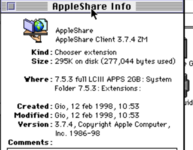 | |
Posted by: slipperygrey on 2024-02-12 05:56:31when working with the modern MacOS:Yes this is the expected behavior. In order to share another directory in the container, you have to modify the /usr/etc/netatalk/AppleVolumes.default file (netatalk2) or /usr/etc/afp.conf file (netatalk3). Earlier today I pushed an update to the netatalk images that introduces a "MANUAL_CONFIG" option that you can enable to stop the entry script from rewriting the config files every startup. That way you can do whatever you want to the configuration and have it be persistent (I think.) | |
| Posted by: slipperygrey on 2024-02-12 06:03:10 @ironborn65 Actually, were you in fact running the netatalk3 image when you got the "This file server does not use a recognizable log on sequence." error? The netatalk3 image is using the DHX UAM for authentication which requires at least AppleShare Client 3.8.4. The netatalk2 image is using the more backwards-compatible RandNum UAM. | |
| < 2 > |