68kMLA Classic Interface
This is a version of the 68kMLA forums for viewing on your favorite old mac. Visitors on modern platforms may prefer the main site.
| Click here to select a new forum. | |
| Sad/Death Chime on IIci | |
| Posted by: Phipli on 2024-01-04 12:59:58 What is the battery area like? | |
Posted by: jmacz on 2024-01-04 22:00:25What is the battery area like? Based on the picture on the first post, that area looks pretty prestine. @pinto_guy I was looking at the picture again. Can you check the circled pin on the CPU? It looks like it's bent and touching the pin next to it. Or possibly even broken. 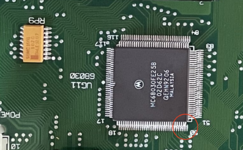 If that doesn't solve your issue, can you take a picture of the underside of the board and post that? | |
Posted by: bigmessowires on 2024-01-05 08:14:39Can you check the circled pin on the CPU? It looks like it's bent and touching the pin next to it. Or possibly even broken.Good catch!! It looks like pin 50 of the 68030 is broken or shorted to pin 49. From a glance at the datasheet, pin 49 is +5V and pin 50 is NC, so I'm not sure it would make a difference though. | |
Posted by: cheesestraws on 2024-01-05 08:16:36Can you check the circled pin on the CPU? It looks like it's bent and touching the pin next to it. Or possibly even broken. You've got good eyes! That definitely looks bent. | |
| Posted by: Phipli on 2024-01-05 08:36:48 I think that is just wonky silkscreen. It is too close to the corner of the chip to be a pin, compared to around the corner. Edit - changed my mind. Looking at the top side the pin looks closer to the corner. It is just perspective playing tricks on me. | |
Posted by: pinto_guy on 2024-01-05 08:47:06The area around C10 and friends is a bit cruddy, not sure if enough to stop the machine working, but D5, Q3, UD13 and UE13, and the vias around them could all use some retouching with fresh flux. For the two HC132 I'd actually pull them to ensure you have no corrosion issues under the ICs.Thanks. Will look into this. My understanding was that the area around C10 controlled the soft power on/off. Does it also control the boot-up sequence ? Also, does anyone know whether the chime of death always happens when no RAM is present | |
Posted by: pinto_guy on 2024-01-05 08:55:14Based on the picture on the first post, that area looks pretty prestine.Wow, great eyes. I was really hoping that WAS the problem, but upon closer look, the two pins were not touching. And after straightening them, the problem is still there. Below is the pic of the underside 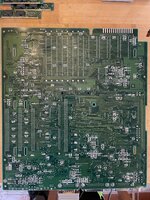 | |
Posted by: pinto_guy on 2024-01-05 08:59:53What is the battery area like?The battery had not exploded, and the area is super clean (below) 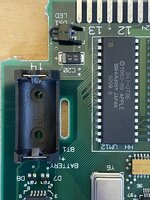 | |
| Posted by: jmacz on 2024-01-05 09:22:02 The bottom side doesn't appear as clean as the top side was. Can you also check these traces for continuity? This might just be the lighting or lint sitting on top, but just confirming. 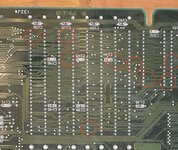 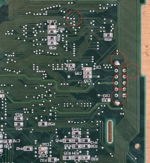 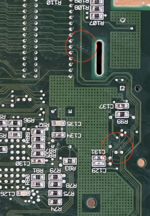 | |
Posted by: bigmessowires on 2024-01-05 09:23:57Thanks. Will look into this. My understanding was that the area around C10 controlled the soft power on/off. Does it also control the boot-up sequence ?The sound chip creates the reset signal for the rest of the system. If you're getting a chime of death, that's probably fine. I think you're right that a system with no RAM will always get a chime of death, but I haven't tried it recently. Do you have another Mac that you could use to test the RAM, or swap the RAM with? Maybe both sets have a bad SIMM or a SIMM with dirty contacts. Or one of your SIMM sockets has a dirty or bent pin. | |
Posted by: jmacz on 2024-01-05 09:31:09Thanks. Will look into this. My understanding was that the area around C10 controlled the soft power on/off. Does it also control the boot-up sequence ? I just tested on my IIci. With no RAM present, I get the normal chime first followed immediately by the death chime, so I hear both chimes back to back. | |
Posted by: pinto_guy on 2024-01-05 12:28:12I just tested on my IIci.Oh great, thanks. Chimes of death (COD) are different for different products. If you see here, the COD for the IIcx sounds like a regular chime, followed by the death chime. I would assume it's the same for the IIci. Is this what you hear ? | |
Posted by: pinto_guy on 2024-01-05 12:34:27The bottom side doesn't appear as clean as the top side was. Can you also check these traces for continuity? This might just be the lighting or lint sitting on top, but just confirming.Thanks. Yeah mostly lint and dust. Looks like the PCB varnish on the underside suffered from chicken pox though (see high res photo). I also notice that a couple of vias are empty of tin solder (see pic below). I wouldn't expect that it could be a problem since the sides of the through hole should be coated. Any comment ? Pic 1: underside after dust-off 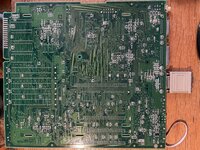 Pic 2: PCB varnish "chicken pox" 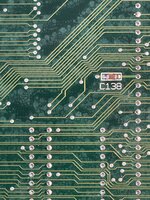 Pic 3: Through holes with no tim  | |
Posted by: jmacz on 2024-01-05 12:51:56Oh great, thanks. Chimes of death (COD) are different for different products. If you see here, the COD for the IIcx sounds like a regular chime, followed by the death chime. I would assume it's the same for the IIci. Is this what you hear ? No, it was clearly a regular chime followed by the death chime which has that extra note in front like in the link you provided. So one note good chime, brief pause, followed by 5 note death chime (1 of which sounds like another chime followed by the usual 4 note death chime). I have attached an audio clip I just recorded. | |
Posted by: jmacz on 2024-01-05 12:54:02Thanks. Yeah mostly lint and dust. Looks like the PCB varnish on the underside suffered from chicken pox though (see high res photo). Ok, yeah, not sure what it could be then. My guess is still something with the memory, either something with the slots or traces to the slots, or something with the memory. | |
Posted by: pinto_guy on 2024-01-05 13:31:46No, it was clearly a regular chime followed by the death chime which has that extra note in front like in the link you provided.Ah, thanks. So yeah, what I hear is only the chime of death, which I also hear when there is no RAM. This seems to exonerate the RAM from being the cause of my problem. That's progress. Thanks again @jmacz | |
Posted by: jmacz on 2024-01-05 14:22:50Ah, thanks. So yeah, what I hear is only the chime of death, which I also hear when there is no RAM. This seems to exonerate the RAM from being the cause of my problem. That's progress. Thanks again @jmacz For completeness, I ran a couple more tests on my working IIci. Memory Case 1: no RAM - good chime followed immediately by death chime (the test I ran earlier and the sound clip I provided). Memory Case 2: one stick missing - good chime followed immediately by death chime. Memory Case 3: one known bad stick of RAM - good chime... pause while it's testing theRAM and then death chime as soon as it hits the bad RAM. To clarify, I think you're saying that it exonerates the RAM because you're thinking it's hitting an issue even before the memory check as there's no good chime? There was a startup sequence posted somewhere on this forum which lists the sequence of checks done. That might help see what comes before the memory tests. | |
Posted by: Phipli on 2024-01-05 14:33:47There was a startup sequence posted somewhere on this forum which lists the sequence of checks done. That might help see what comes before the memory tests.We've discussed it a few times, there are sort of two sources, a very detailed description of the original macs (128->Plus era) and a slightly less detailed discussion of the early Mac IIs. The IIci won't be identical because it has a newer ROM, but so did the IIfx we were discussing (the IIfx and IIci ROMs are very similar other than differences resulting from hardware). From this linked reply, but make sure you read onwards because there are further links about the boot process for the Mac IIs. My IIfx progressUnequivocally. This one actually got a US theatrical release. :) It's just a lot of fun.
 68kmla.org
| |
| Posted by: jmacz on 2024-01-05 14:50:54 Take a look at this doc. It's a troubleshooting guide from Apple specifically for the IIci. It has flowcharts for debugging startup issues including the chimes. It also describes the boot sequence but it's much more high level than the 128K/Plus one that @Phipli provided. | |
| Posted by: jmacz on 2024-01-05 14:56:36 I only took a quick glance, but if the startup sequence in that doc and for the IIci is anything like the Plus/II, and the hypothesis is that the RAM is good and it's failing before the RAM test, then you might need to focus on whether the ROM has a problem somewhere or perhaps the VIA (UD11) and SWIM (UA11) chips. Those sit near the startup circuit and the capacitors which always seem to do a lot of damage on the IIci boards. | |
| < 2 > |